10 Best Z-edge Gaming Monitors Of 2026
Z-edge Gaming Monitors — Reviews, Recommendations & Updated Buying Guide November 2026


Z-EDGE 24-inch Curved Gaming Monitor
Why We Love It


Z-EDGE 32inch Curved Gaming Monitor
Why We Love It

Z-EDGE 24inch IPS Gaming Monitor
Why We Love It
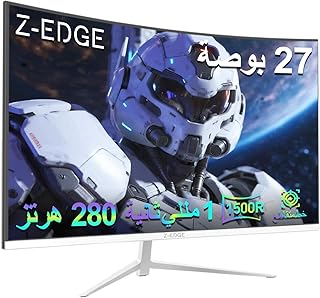
Z-EDGE 27-inch Curved Gaming Monitor
Why We Love It

Z-Edge 24.5 inch 300Hz 280Hz 240Hz Gaming Monitor
Why We Love It

Z-Edge 24.5" Gaming Monitor
Why We Love It

Z-Edge Gaming Monitor Curved 32'' 240Hz
Why We Love It

Z-Edge 34" Curved Ultrawide Gaming Monitor
Why We Love It

Z-Edge 27-inch Gaming Monitor 1920x1080 IPS 240Hz Gaming
Why We Love It

Z-Edge 34" UWQHD 165Hz 1ms Curved IPS Gaming Monitor
Why We Love It
Quick Pick
10 Best Z-edge Gaming Monitors Of 2026
Quick Pick
Z-EDGE 24-inch Curved Gaming Monitor,200Hz,Frameless/FreeSync/HDR,FHD UG24 | MPRT 1ms/16.7 Million Colors/300cd/m²Brightness/LED/VESA/DP1.4 & HDMI2.1 Ports
Z-EDGE 32inch Curved Gaming Monitor, 240Hz,LED, VA/FreeSync/HDR, FHD UG32P | MPRT 1ms/3000:1 Contrast Ratio/16.7 Million Colors/280cd/m²Brightness//VESA/HDMI 2.0 x 2 / DP 1.4 x 2
Z-EDGE 24inch IPS Gaming Monitor, FHD 1080P, Max 240Hz,LED,UG24PJ,Black | FreeSync/Frameless/1ms/Brightness 350cd/m²/VESA Compatible/HDMI & DisplayPort/for Game,Office
Z-EDGE 27-inch Curved Gaming Monitor - 16:9 Full HD 1920x1080, 280Hz Refresh Rate, 1ms Response Time, Frameless LED Display, AMD FreeSync - DisplayPort & HDMI Ports UG27P White | 8 Bit/HDR/FreeSync/HDR/VESA Compatible/PS5/HDMI & DisplayPort /for Game,Office
Z-Edge 24.5 inch 300Hz 280Hz 240Hz Gaming Monitor, UG25S FHD 1080p, Ultra Fast MPRT 1ms, IPS Monitor Gaming, PC Computer Monitor, 16.7M Colors, DP x2, HDMI x2
Z-Edge 24.5" Gaming Monitor,Max 240Hz,FHD,1ms,VA LED,Freesync,5000:1,UG25F | 1ms/350cd/m²Brightness /16.7 Million Colors/HDR/16:9/VESA/HDMI x2 & DP x 1
Z-Edge Gaming Monitor Curved 32'' 240Hz, 1ms, 1080P, FreeSync, Screen Game LED 16:9, 1500R VA, Adjustable Tilt, 2*HDMI 2.0 & 2* DP 1.4, RGB Breathlight(HDMI Cable Included)
Z-Edge 34" Curved Ultrawide Gaming Monitor, Max 240Hz,WQHD,VA LED, AG34P
Z-Edge 27-inch Gaming Monitor 1920x1080 IPS 240Hz Gaming Monitor 1ms Frameless LED, UG27PJ AMD Freesync Premium Display Port HDMI | 1ms/16.7 Million Colors/Contrast Ratio 1200:1/Frameless /VESA/PS5/LED/HDMI x2 & DP x 2
Z-Edge 34" UWQHD 165Hz 1ms Curved IPS Gaming Monitor, FreeSync, 1500R Curvature, UWQHD 3440 * 1440, 96% DCI-P3, 1.07 Colors, 300 cd/㎡, 21:9, Powerful Connections, 2000:1, UG34I-Black
Buying Guide: Z-edge Gaming Monitors
📋 Table of Contents
1What refresh rate is actually necessary for gaming?
For competitive gaming, 144Hz or higher is ideal to reduce motion blur and input lag. Casual gamers can get by with 120Hz, while 60Hz is only suitable for non-action-heavy titles and may feel sluggish in fast-paced games.
2Is a higher resolution always better for a gaming monitor?
Not necessarily — 1080p is fine for 144Hz monitors and budget setups, while 1440p balances detail and performance. 4K offers stunning visuals but requires a powerful GPU to maintain high frame rates, especially in modern AAA games.
3What panel type should I choose for the best gaming experience?
IPS panels offer excellent color and wide viewing angles, ideal for media and casual gaming. TN panels have the fastest response times and are best for competitive FPS games. VA panels provide deep blacks and high contrast but can suffer from slower motion handling.
4What response time is important for different game genres?
For fast-paced games like FPS or MOBA, look for 1ms GtG response time to avoid ghosting. 5ms is acceptable for slower-paced or story-driven games, but avoid anything above 10ms if you play action-heavy titles regularly.
5Are adaptive sync technologies like G-Sync or FreeSync worth it?
Yes — adaptive sync eliminates screen tearing and stutter by syncing the monitor’s refresh rate with your GPU’s frame rate. Look for at least 120Hz with a 144Hz max sync range for the smoothest experience in variable frame rate games.
How we choose
Our editors are people who genuinely love testing and writing about products. We compare each product's real-world usability and strengths, then distill what matters most into our own "Why We Love It" points — so you get an honest, at-a-glance sense of what counts before you buy.