10 Best Yoga Tablet Of 2026
Yoga Tablet — Reviews, Recommendations & Updated Buying Guide November 2026


Lenovo Yoga Tab | 11.1" 3.2K 144Hz Display
Why We Love It


Lenovo Yoga Tab Tablet
Why We Love It

Lenovo Tab | 10.1" WUXGA (1920x1200) 60Hz Display
Why We Love It

Lenovo Yoga Tab Plus
Why We Love It

Android Tablet 11″ – Philips T7310
Why We Love It

Lenovo Idea Tab 11" (UAE Version)
Why We Love It

HONOR Pad 10 Tablet 8+256 GB
Why We Love It
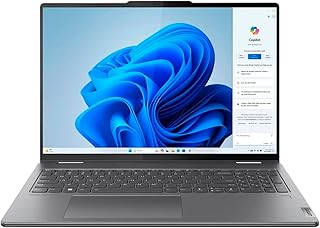
Lenovo Yoga 7i 2 IN 1 (83DL0002US) 16" 2K Touch Core Ultra 7
Why We Love It

OPPO Pad Air, WiFi 5
Why We Love It

Lenovo Idea Tab (UAE Version) + Pen & Case
Why We Love It
Quick Pick
10 Best Yoga Tablet Of 2026
Quick Pick
Lenovo Yoga Tab | 11.1" 3.2K 144Hz Display, Snapdragon 8 Gen 3, 12GB RAM, 256GB SSD, Front 13.0MP / Rear 13.0MP + 2.0MP Cameras, 8860mAh Battery, Android 15 - Seashell [ZAG60251AE] + Tab Pen Pro + KB
Lenovo Yoga Tab Tablet | 11.1 Inch 3.2K LTPS Display | 16:10 | Qualcomm Snapdragon 8 Gen 3 | 12GB RAM | 256GB Memory | Qualcomm Adreno 750 Graphics | Android 15 | Seashell | Includes Tab Pen Pro
Lenovo Tab | 10.1" WUXGA (1920x1200) 60Hz Display, MediaTek Helio G85, 4GB RAM, 64GB Storage, Front 5.0MP / Rear 8.0MP Cameras, 5100mAh Battery, Android 15 - Luna Grey [ZAEH0212AE]
Lenovo Yoga Tab Plus, AI Tablet, 12.7" 144Hz 3K, Snapdragon 8 Gen 3 Processor, 16GB RAM, 256GB Memory, WiFi 6, Android 14 Tablet, Tab Pen Pro and Keyboard Included - Seashell
Android Tablet 11″ – Philips T7310, 8GB RAM + 128GB ROM, 1TB Expandable, Octa-Core T616, 7200mAh Battery, HD Eye Protection Display, WiFi 6, Dual Cameras, Android 16, Gemini AI, GPS, WiFi 6, BT 5.2
Lenovo Idea Tab 11" (UAE Version) | Android Tablet with Folio Case & Pen | Brilliant 2.5K 90Hz Display | MediaTek Dimensity 6300 | 8GB RAM | 128GB Storage, Luna Grey [ZAFR1002AE]
HONOR Pad 10 Tablet 8+256 GB, 12.1 inches, 120 Hz, 2.5K display, Snapdragon 7 Gen 3, 10100 mAh battery, supports 35 W Supercharge, six speakers, Android 15, Wi-Fi tablet, grey
Lenovo Yoga 7i 2 IN 1 (83DL0002US) 16" 2K Touch Core Ultra 7 16GB 1TB SSD W11 Grey
OPPO Pad Air, WiFi 5, 6.94mm Ultra Slim & Light Body, 2K Eye Care Display, Qualcomm Snapdragon 680 8 Core 6nm Processor, Smart Multitasking, 64GB 4GBRAM Grey, Standard
Lenovo Idea Tab (UAE Version) + Pen & Case | 11" 2.5K (2560x1600) IPS 90Hz Display, MediaTek Dimensity 6300, 8GB RAM, 256GB UFS 2.2, Wi-Fi 5, Android 15, Luna Grey [ZAFR0962AE]
Buying Guide: Yoga Tablet
📋 Table of Contents
1What screen size is best for my needs?
For reading and light use, 7-8 inches is compact and portable; 10 inches or more is better for media, multitasking, or productivity. Larger screens offer more real estate but can be heavier and harder to carry in one hand.
2How much storage do I actually need?
64GB is sufficient for basic use with cloud backup, but 128GB or more is better if you download many apps, movies, or games. Consider expandable storage if you plan to store large files locally over time.
3What battery life should I look for?
A tablet with 8-10 hours of continuous use is standard for most tasks. Look for at least 12 hours if you need it for full workdays or long travel without access to a charger.
4Is a stylus worth the extra cost?
A stylus is essential for drawing, note-taking, or precise input, but not needed for casual browsing or media. Many tablets support optional styluses, so check if the model you're considering has good pressure sensitivity and low latency.
5What operating system is best for me?
Choose a tablet with an OS you're already familiar with — one offers a vast app ecosystem and seamless device integration, while the other is known for simplicity and media consumption. Consider future app support and software updates before deciding.
How we choose
Our editors are people who genuinely love testing and writing about products. We compare each product's real-world usability and strengths, then distill what matters most into our own "Why We Love It" points — so you get an honest, at-a-glance sense of what counts before you buy.