10 Best Xp Pen Graphic Tablets Of 2026
Xp Pen Graphic Tablets — Reviews, Recommendations & Updated Buying Guide November 2026


XP-Pen Deco 01 V3 Drawing Tablet
Why We Love It


XPPen 6 * 4 inch Drawing Tablet with 16384 Pressure Levels
Why We Love It

XP-Pen G430S OSU Tablet Ultrathin Graphic Tablet 4 x 3 inch
Why We Love It

XP-Pen®G640 6 x 4 inch Graphic Drawing Tablet for OSU!
Why We Love It

XP-Pen Artist12 11.6 Inch FHD Drawing Monitor Pen Display
Why We Love It

XP-PEN G960S 9 x 6 Inch Graphics Tablet with Stylus 8192
Why We Love It

XP-PEN Deco mini7 7" Portable Graphic Drawing Tablet with
Why We Love It

XP-Pen Artist15.6 Pro v2 Drawing Tablet Pen Display Graphics
Why We Love It
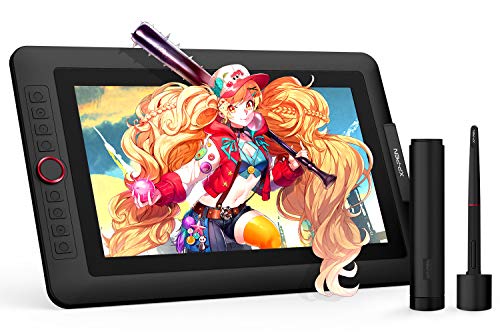
XP-PEN Artist13.3 Pro 13.3 Inch IPS Drawing Monitor Pen
Why We Love It

XP-Pen Star03 V2 12 Inch Graphic Tablet with Passive Stylus
Why We Love It
Quick Pick
10 Best Xp Pen Graphic Tablets Of 2026
Quick Pick
XP-Pen Deco 01 V3 Drawing Tablet, 10x6.25 Inch, 16384 Levels Pressure | Graphic Tablet, Battery-Free Stylus with Tilt Function, 8 Shortcut Keys, Compatible with PC, Chromebook, Android, MAC
XPPen 6 * 4 inch Drawing Tablet with 16384 Pressure Levels IT640 Digital Graphic Art Tablet Battery-Free Stylus 60° Tilt Support OSU Drawing Pad for Beginner Compatible with Android Windows macOS
XP-Pen G430S OSU Tablet Ultrathin Graphic Tablet 4 x 3 inch Digital Tablet Drawing Pen Tablet for OSU!8192 Levels 266RPS (Rev A)
XP-Pen®G640 6 x 4 inch Graphic Drawing Tablet for OSU! Digital Tablet Gameplay with Our Battery-Free Stylus Design
XP-Pen Artist12 11.6 Inch FHD Drawing Monitor Pen Display Graphic Monitor with PN06 Battery-Free Multi-Function Pen Holder and Glove 8192 Pressure Sensitivity
XP-PEN G960S 9 x 6 Inch Graphics Tablet with Stylus 8192 Level Tilt 60 Degree Compatible with Windows/Mac/Android
XP-PEN Deco mini7 7" Portable Graphic Drawing Tablet with Passive Stylus Supports Windows, Mac and Android
XP-Pen Artist15.6 Pro v2 Drawing Tablet Pen Display Graphics Monitor with Screen, 16384 Levels Pen Pressure Full-Laminated Technology, 8 Shortcut Keys Work for PC Mac Linux Android
XP-PEN Artist13.3 Pro 13.3 Inch IPS Drawing Monitor Pen Display Full-Laminated Graphics Drawing Monitor with Tilt Function and 8 Shortcut Keys (8192 Levels Pen Pressure, 123% sRGB)
XP-Pen Star03 V2 12 Inch Graphic Tablet with Passive Stylus 8192 Levels and 8 Shortcuts Digital Drawing Tablet
Buying Guide: Xp Pen Graphic Tablets
📋 Table of Contents
1What's the difference between XP-Pen pen displays and pen tablets?
Pen tablets (like Deco series) are just the drawing surface that connects to your monitor—you draw on the tablet while looking at your screen. Pen displays (like Artist series) have a built-in screen, so you draw directly on what you're creating, which feels more natural but costs more.
2What size tablet should I get for digital art?
If you're starting out or have limited desk space, a small to medium tablet (6x4 inches) is fine and easier to control. Professional artists often prefer larger sizes (10x6 inches or bigger) for better precision and less hand strain during long sessions.
3Does pressure sensitivity matter, and how much do I need?
Yes, pressure sensitivity is crucial for natural brushstrokes and line weight variation in digital art. Most XP-Pen tablets offer 8192 or higher pressure levels, which is sufficient for professional work—anything above 4096 levels will feel smooth and responsive.
4What software compatibility should I check before buying?
XP-Pen tablets work with all major software (Photoshop, Clip Studio Paint, Procreate on iPad, etc.), but check if your specific app requires certain driver versions or USB specifications. Their drivers are regularly updated and available for Windows, Mac, and some offer iPad compatibility.
5When is it worth upgrading to a more expensive XP-Pen model?
Upgrade if you need a pen display instead of a tablet, want a larger active area for detailed work, or need higher refresh rates for smoother drawing. Budget models work fine for beginners, but professionals doing commission work benefit from the better build quality and features in premium models.
How we choose
Our editors are people who genuinely love testing and writing about products. We compare each product's real-world usability and strengths, then distill what matters most into our own "Why We Love It" points — so you get an honest, at-a-glance sense of what counts before you buy.