10 Best Xlr Audio Interfaces For Recording Of 2026
Xlr Audio Interfaces For Recording — Reviews, Recommendations & Updated Buying Guide November 2026

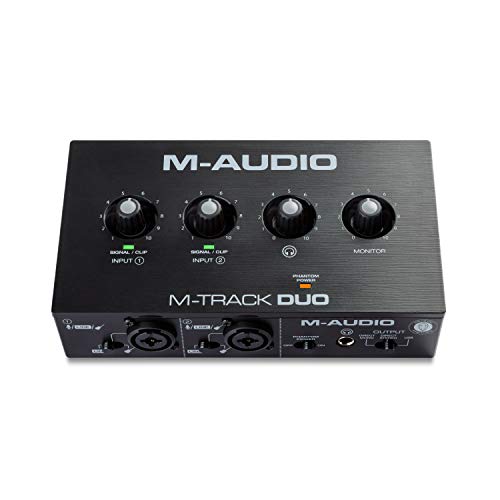
M-AUDIO M-Track Duo USB Audio Interface
Why We Love It


Focusrite Scarlett Solo 4th Gen USB-C Audio Interface
Why We Love It

NALACAL Gaming Audio Mixer
Why We Love It

Kadence KOTG-4 4 Channel Audio Mixer with OTG Recording
Why We Love It

FIFINE AmpliGame AM8TW Gaming XLR/USB Microphone Kit
Why We Love It

M-AUDIO M-Track Duo HD USB-C Audio Interface
Why We Love It

FIFINE Studio XLR Dynamic Microphone
Why We Love It

FIFINE L9 9.8ft XLR Microphone Audio Cable for Podcast
Why We Love It

FIFINE PC Audio Mixer for Recording Music
Why We Love It

Zoom AMS-22 USB Audio Interface for Recording & Streaming
Why We Love It
Quick Pick
10 Best Xlr Audio Interfaces For Recording Of 2026
Quick Pick
M-AUDIO M-Track Duo USB Audio Interface
Focusrite Scarlett Solo 4th Gen USB-C Audio Interface
NALACAL Gaming Audio Mixer, Streaming RGB PC Mixer with XLR Microphone Interface, Individual Control Volume Fader/Mute Button/48V Phantom Power for Podcast/Recording/Vocal/Game Voice, PC, Guitar, F11
Kadence KOTG-4 4 Channel Audio Mixer with OTG Recording | Podcast, Streaming & Live Sound Mixer | 192kHz/24-Bit USB Audio Interface | USB/BT Playback | 99 DSP Effects with Faders | Black
FIFINE AmpliGame AM8TW Gaming XLR/USB Microphone Kit Streaming Dynamic Mic | Computer Mic with Controllable RGB, Headphones Jack, Gain Knob, Arm Stand, for Vocal Podcast Recording Voiceover, White
M-AUDIO M-Track Duo HD USB-C Audio Interface
FIFINE Studio XLR Dynamic Microphone, USB PC Podcast Microphone for Streaming Recording, XLR/USB Vocal Mic with Tap-to-Mute, Gain Knob, Headphones Monitoring-Amplitank K688 White
FIFINE L9 9.8ft XLR Microphone Audio Cable for Podcast Recording
FIFINE PC Audio Mixer for Recording Music, USB Interface for Streaming and Podcasting with XLR, Monitor, 48V Phantom Power, Gain Knob, for Instrument Guitar/Video Content Creation/Vocal-Ampli 1
Zoom AMS-22 USB Audio Interface for Recording & Streaming, 1 In / 2 Out
Buying Guide: Xlr Audio Interfaces For Recording
📋 Table of Contents
1How many XLR inputs do I actually need for my setup?
Most home studios need 2-4 XLR inputs for mics and instruments, but if you plan to record a full band or multiple vocalists, look for 8 or more. More inputs save time and reduce the need for multiple devices.
2What preamp quality should I prioritize in an XLR audio interface?
Look for interfaces with at least 20dB of clean gain and low noise (under 13nV/√Hz) for clear recordings. Higher-end models often use discrete or transformer-based preamps for a warmer, more professional sound.
3Is USB-C or Thunderbolt better for my XLR interface?
USB-C is widely compatible and fast enough for most home setups, while Thunderbolt offers lower latency and higher bandwidth for large sessions. Choose based on your computer’s ports and project complexity.
4What sample rate and bit depth should I look for in a recording interface?
A minimum of 24-bit depth and 44.1kHz/48kHz sample rates is standard for most music and voice recordings. For high-resolution audio, 96kHz or 192kHz and 24-bit or higher ensures future-proof quality and detailed sound.
5Are phantom power and MIDI support worth including in my XLR interface?
Phantom power (48V) is essential for condenser mics, so ensure it’s available if you use them. MIDI support is handy if you plan to connect a keyboard or controller, but not necessary for basic vocal or instrument recording.
How we choose
Our editors are people who genuinely love testing and writing about products. We compare each product's real-world usability and strengths, then distill what matters most into our own "Why We Love It" points — so you get an honest, at-a-glance sense of what counts before you buy.