10 Best Xlr Audio Interfaces For Podcasting Of 2026
Xlr Audio Interfaces For Podcasting — Reviews, Recommendations & Updated Buying Guide November 2026

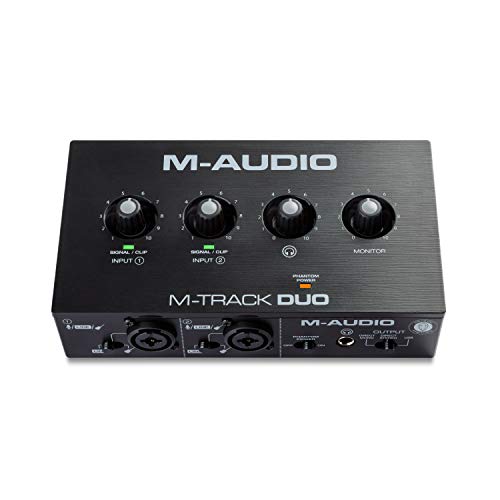
M-AUDIO M-Track Duo USB Audio Interface
Why We Love It


M-AUDIO M-Track Duo HD USB-C Audio Interface
Why We Love It

RØDE PodMic Versatile Dynamic Broadcast Microphone with XLR
Why We Love It

Elgato Wave XLR MK.2
Why We Love It

MAONO PD300X Podcast Microphone- XLR/USB Mic with Noise
Why We Love It

Kadence KOTG-4 4 Channel Audio Mixer with OTG Recording
Why We Love It

Azonee Audio Mixer for PC/Phone
Why We Love It

Hercules Stream 200 XLR Audio Controller with Sound Card
Why We Love It

Tc-Helicon Go XLr Broadcast Production Studio Mixer
Why We Love It

Tascam US-2x2HR 2 Mic 2IN/2OUT High Resolution Versatile USB
Why We Love It
Quick Pick
10 Best Xlr Audio Interfaces For Podcasting Of 2026
Quick Pick
M-AUDIO M-Track Duo USB Audio Interface
M-AUDIO M-Track Duo HD USB-C Audio Interface
RØDE PodMic Versatile Dynamic Broadcast Microphone with XLR and USB Connectivity for Podcasting, Streaming, Gaming, Music and Content Creation
Elgato Wave XLR MK.2 – USB Audio Interface and DSP Mixer for XLR Microphones, 80dB Gain, Onboard Effects, LED Feedback, Touch Mute, Works with Stream Deck, PC & Mac
MAONO PD300X Podcast Microphone- XLR/USB Mic with Noise Canceling, 192kHz/24Bit Hi-Fi Audio, Mute Button, Link Software. For Podcasting, Streaming, Studio Recording
Kadence KOTG-4 4 Channel Audio Mixer with OTG Recording | Podcast, Streaming & Live Sound Mixer | 192kHz/24-Bit USB Audio Interface | USB/BT Playback | 99 DSP Effects with Faders | Black
Azonee Audio Mixer for PC/Phone – Live Sound Card with Voice Changer Noise Reduction, Compatible with 3.5mm/6.35mm Microphones, Adjustable Reverb Custom Sound Effects for Streaming, Gaming Podcasting
Hercules Stream 200 XLR Audio Controller with Sound Card
Tc-Helicon Go XLr Broadcast Production Studio Mixer
Tascam US-2x2HR 2 Mic 2IN/2OUT High Resolution Versatile USB Audio Interface for Recording, Streaming, Podcasting, Songwriting
Buying Guide: Xlr Audio Interfaces For Podcasting
📋 Table of Contents
1How many XLR inputs do I actually need for podcasting?
For solo podcasting, one XLR input is sufficient. If you plan to record multiple guests or use a second mic for ambient sound, look for at least two XLR inputs to avoid the need for a mixer or additional gear.
2What sample rate and bit depth should I prioritize for clear audio?
Aim for a minimum of 44.1kHz sample rate and 24-bit depth for professional-grade podcasting. These settings ensure high fidelity and flexibility during post-production, especially if you plan to edit or enhance the audio later.
3Is phantom power necessary for my microphone?
Yes, if you're using a condenser mic — it requires 48V phantom power to operate. Dynamic mics don’t need it, so check your mic type before purchasing. Some interfaces offer switchable phantom power for flexibility.
4Should I prioritize USB or Thunderbolt connectivity?
USB is widely compatible and sufficient for most podcasters, especially with low-latency drivers. Thunderbolt offers faster data transfer and is better for high-channel-count or complex setups, but it’s overkill for basic podcasting and limits portability.
5What preamp quality should I look for in an XLR interface?
Look for interfaces with clean, low-noise preamps and a flat frequency response to preserve your voice’s natural tone. Higher-end models often include gain control and pad switches, which help avoid distortion and optimize signal levels for different mics.
How we choose
Our editors are people who genuinely love testing and writing about products. We compare each product's real-world usability and strengths, then distill what matters most into our own "Why We Love It" points — so you get an honest, at-a-glance sense of what counts before you buy.