10 Best Xlr Audio Interfaces For Guitar Of 2026
Xlr Audio Interfaces For Guitar — Reviews, Recommendations & Updated Buying Guide November 2026


Focusrite Scarlett Solo 4th Gen USB-C Audio Interface
Why We Love It


NALACAL Gaming Audio Mixer
Why We Love It
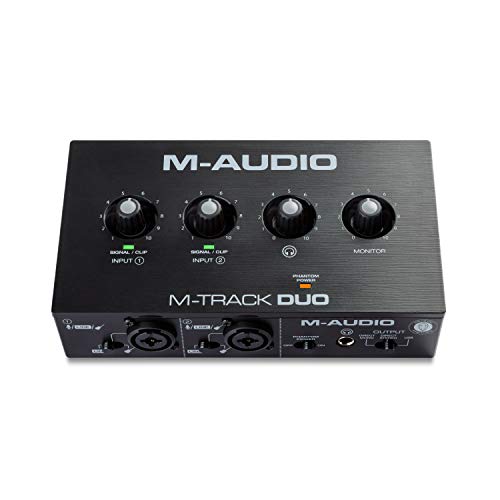
M-AUDIO M-Track Duo USB Audio Interface
Why We Love It

Behringer UMC202HD Audiophile 2x2
Why We Love It

Focusrite Scarlett Solo 4th Gen USB Interface with Software
Why We Love It

Focusrite Scarlett Solo Studio 4th Gen USB-C Audio Interface
Why We Love It

M-AUDIO M-Track Duo HD USB-C Audio Interface
Why We Love It

MAONO Audio Interface with DJ Mixer and Sound Card
Why We Love It

Tascam US-2x2HR 2 Mic 2IN/2OUT High Resolution Versatile USB
Why We Love It

BOMGE USB Audio Interface(24 bit/192 kHz) with XLR
Why We Love It
Quick Pick
10 Best Xlr Audio Interfaces For Guitar Of 2026
Quick Pick
Focusrite Scarlett Solo 4th Gen USB-C Audio Interface
NALACAL Gaming Audio Mixer, Streaming RGB PC Mixer with XLR Microphone Interface, Individual Control Volume Fader/Mute Button/48V Phantom Power for Podcast/Recording/Vocal/Game Voice, PC, Guitar, F11
M-AUDIO M-Track Duo USB Audio Interface
Behringer UMC202HD Audiophile 2x2, 24-Bit/192 kHz USB Audio Interface with Midas Mic Preamplifiers | For Recording Microphones and Instruments
Focusrite Scarlett Solo 4th Gen USB Interface with Software Suite, Bundle with H&A 10' XLR Microphone Cable
Focusrite Scarlett Solo Studio 4th Gen USB-C Audio Interface Bundle
M-AUDIO M-Track Duo HD USB-C Audio Interface
MAONO Audio Interface with DJ Mixer and Sound Card, Portable ALL-IN-ONE Podcast Production Studio with 3.5mm Microphone for Guitar, Live Youtube Streaming, PC, Recording Studio and Gaming(AU-AM200-S1)
Tascam US-2x2HR 2 Mic 2IN/2OUT High Resolution Versatile USB Audio Interface for Recording, Streaming, Podcasting, Songwriting
BOMGE USB Audio Interface(24 bit/192 kHz) with XLR,phantom power,Direct Monitoring,Loopback for PC Recording,Streaming,Guitarist,Vocalist and Podcasting
Buying Guide: Xlr Audio Interfaces For Guitar
📋 Table of Contents
1What preamp quality should I prioritize for guitar recording?
Look for interfaces with at least 40dB of clean gain and a high signal-to-noise ratio (100dB or more) to capture your guitar's tone without hiss. Discrete preamps often deliver warmer, more detailed sound than basic op-amp designs, especially for electric and acoustic guitars.
2Does the number of XLR inputs matter for my setup?
If you plan to record multiple instruments or microphones at once, choose an interface with at least two XLR inputs. For solo guitarists, one XLR input is usually enough, but having a second can be useful for room mics or vocal overdubs later on.
3What sample rate and bit depth should I look for?
A minimum of 24-bit depth and 44.1kHz or 48kHz sample rate is standard for most recordings. Higher rates like 96kHz can capture more detail, but require more storage and processing power. For guitar, 48kHz is often sufficient and balances quality with file size.
4Is phantom power necessary for my guitar interface?
Phantom power (48V) is only needed if you're using a condenser microphone or a dynamic mic that requires it. For most direct guitar inputs, phantom power is not required, but it's a useful feature to have if you plan to expand your setup with mics in the future.
5What connectivity options are most useful for a guitar interface?
USB-C is the most common and future-proof connection for modern interfaces, ensuring fast data transfer and compatibility with most devices. Look for a model that also includes MIDI I/O if you plan to use external synths or controllers alongside your guitar.
How we choose
Our editors are people who genuinely love testing and writing about products. We compare each product's real-world usability and strengths, then distill what matters most into our own "Why We Love It" points — so you get an honest, at-a-glance sense of what counts before you buy.