10 Best Xbox Series X Cooling Stands Of 2026
Xbox Series X Cooling Stands — Reviews, Recommendations & Updated Buying Guide November 2026


MAKINGTEC Vertical Cooling Stand Compatible with Xbox Series
Why We Love It


Cooling Fan for Xbox Series X
Why We Love It

KlsyChry Vertical Stand for Xbox Series X Console with
Why We Love It

Cooling Fan for X-box Series X
Why We Love It

RGB Vertical Stand for Xbox Series X Console & Controller
Why We Love It

Xbox Series X Cooling Fan Stand
Why We Love It
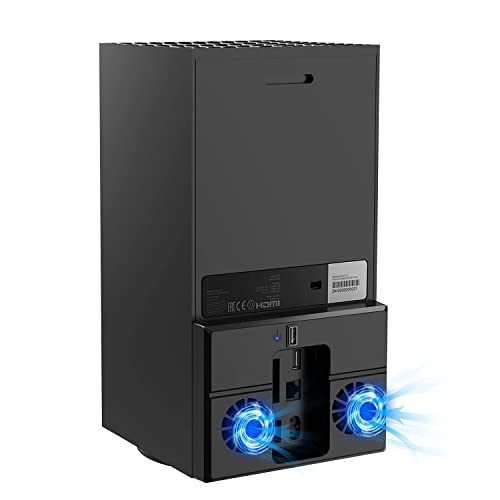
Cooling Fan Compatible with Xbox Series X Console
Why We Love It

Tolesum Upgraded Fan Stand for Xbox Series X
Why We Love It

Mviioe Cooling Fan for Xbox Series X Cooling Stand with LED
Why We Love It

Xbox Series X Cooling Fan
Why We Love It
Quick Pick
10 Best Xbox Series X Cooling Stands Of 2026
Quick Pick
MAKINGTEC Vertical Cooling Stand Compatible with Xbox Series X, Charging Station Dock with 1400mAh Rechargeable Battery Pack and Dual Controller Charger Ports (NOT Compatible with Xbox One X/S), Black
Cooling Fan for Xbox Series X, Auto Mode Cooling System for Xbox Series X Accessories, Built-in Auto Adjustable Fan Speeds' Cooling System, Cooler for Console with Headset Holder, USB Port, Low Noise
KlsyChry Vertical Stand for Xbox Series X Console with Built-in Cooling Vents and Non-slip Feets (Black)
Cooling Fan for X-box Series X, Cooling Fan with Adjustable Auto Fan Speed, RGB Light, Controller Stand, 2 USB Ports for Charging & Data Transmission, Low Noise Cooling System
RGB Vertical Stand for Xbox Series X Console & Controller, Cooling Fan Stand & Dual Charging Dock with Dust Cover Filter Kits, LED Light Stand with Rubber Dust Filter Plugs, RGB Light Modes
Xbox Series X Cooling Fan Stand, Dual Controller Wireless Charging Dock with Rear Dual Suction Fans, Adjustable Speeds, Metal Vented Base, 15 Colorful Light Modes, Vertical Design
Cooling Fan Compatible with Xbox Series X Console, Dual Cooling Fan Back Fan Compatible with Xbox Series X, with 2 Cooling Fan and 1 USB Port
Tolesum Upgraded Fan Stand for Xbox Series X, Cooler Stand with RGB LED, 4 Large & Turbo Fans, USB 3.0 & 2.0 Ports & 3 Speed Levels, Adjustable Cooling System for Xbox Series X, Black
Mviioe Cooling Fan for Xbox Series X Cooling Stand with LED Indicator, Extra Big Turbo Fan, USB 2.0 Ports For Gaming Console (Only Compatible with Xbox Series x)
Xbox Series X Cooling Fan, Vertical Cooling Stand with RGB LED Light and Dual 5300RPM Fans, USB Powered Cooling System Accessories with External USB Port for Xbox Series X Console
Buying Guide: Xbox Series X Cooling Stands
📋 Table of Contents
1How much airflow do I need for effective cooling?
Look for at least 100 CFM (cubic feet per minute) of airflow to ensure proper ventilation for the Xbox Series X. Higher airflow helps prevent overheating during long gaming sessions, especially if the console is in a closed cabinet or a warm room.
2Are raised or flat cooling stands better for the Xbox Series X?
Raised stands are generally better as they allow airflow underneath the console, reducing heat buildup. Flat stands may trap heat if placed on a surface that restricts ventilation, so check for open-bottom or slotted designs for optimal cooling.
3What materials are best for durability and heat dissipation?
Aluminum or steel stands offer better heat dissipation and durability compared to plastic. These materials also help in stabilizing the console and reducing vibrations from fans or external sources, ensuring a quieter and cooler setup.
4Should I look for a stand with built-in cable management?
Yes, a stand with cable clips or channels keeps your setup tidy and prevents cables from blocking airflow. Neat cable management also makes it easier to access ports and maintain the console without disrupting the cooling system.
5Can a cooling stand replace the console's internal cooling system?
No, a cooling stand supports the console's internal cooling but does not replace it. It helps by improving airflow and reducing ambient heat, but you should still ensure the console's vents are unobstructed and the internal fans are functioning properly.
How we choose
Our editors are people who genuinely love testing and writing about products. We compare each product's real-world usability and strengths, then distill what matters most into our own "Why We Love It" points — so you get an honest, at-a-glance sense of what counts before you buy.