10 Best Xbox Controllers With Turbo Of 2026
Xbox Controllers With Turbo — Reviews, Recommendations & Updated Buying Guide November 2026


GameSir Nova Lite Wireless Controller for PC
Why We Love It


Wired Controller for Xbox 360
Why We Love It

Wired Controller for 360
Why We Love It

EasySMX X05 2.4g Wireless Controller for
Why We Love It

Mobile Cloud Gaming Controller for iPhone 16/15/14
Why We Love It

Begally Switch Controller Wireless for Switch/Lite/OLED
Why We Love It
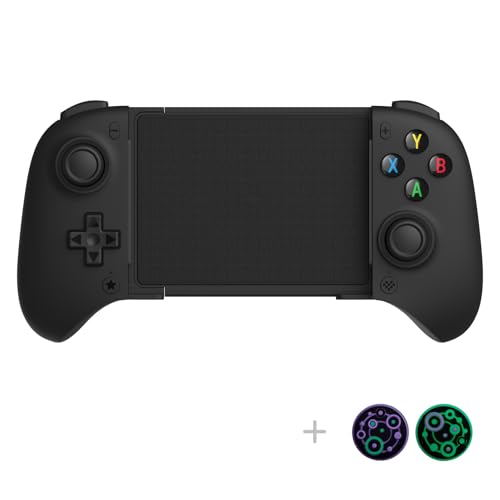
8Bitdo Ultimate Mobile Gaming Bluetooth Controller for
Why We Love It

8Bitdo Ultimate 2C Wired Controller for Windows PC and
Why We Love It

SQDeal 2 Pack USB Joystick Gamepad Gaming Pad Wired
Why We Love It

NALACAL Mobile Gamepad Controller for Android and iPhone
Why We Love It
Quick Pick
10 Best Xbox Controllers With Turbo Of 2026
Quick Pick
GameSir Nova Lite Wireless Controller for PC, Hall Effect Sticks & Trigger | Bluetooth Controller Gamepad with Hall Effect Trigger,Turbo,Rumble Vibration, Android, Switch & Steam Deck
Wired Controller for Xbox 360, YAEYE Game Controller for 360 with Dual-Vibration Turbo Compatible with Xbox 360/360 Slim and PC Windows 7,8,10,11
Wired Controller for 360, PC Game Controller for 360 with Dual-Vibration Turbo Compatible with 360/360 Slim and PC Windows 7,8,10,11
EasySMX X05 2.4g Wireless Controller for PC/iPhone/Android/Switch & Steam Deck- Bluetooth Controller Gamepad with Hall Effect Joysticks and Trigger,Turbo,Rumble Vibration and RGB Lighting,Ideal for Mainstream Football Games and Other Types of Games on the Market.
Mobile Cloud Gaming Controller for iPhone 16/15/14, iPad, Android, PC, Switch, PS3/PS4, Gamepad Joystick with Turbo, Hall Effect Trigger, 6-Axis Gyro Sensor, Streaming for PS4/Xbox/PC - Black
Begally Switch Controller Wireless for Switch/Lite/OLED Wireless Gamepad for PC/iOS/Android with RGB/Programmable/Motion Control/Vibration/Turbo/Wakeup
8Bitdo Ultimate Mobile Gaming Bluetooth Controller for Android Devices with Hall Effect Joysticks and Hall Triggers, Back Buttons, Mapping and Turbo Function (Black)
8Bitdo Ultimate 2C Wired Controller for Windows PC and Android, with 1000Hz Polling Rate, Hall Effect Joysticks and Hall Triggers, and Remappable L4/R4 Bumpers (Purple)
SQDeal 2 Pack USB Joystick Gamepad Gaming Pad Wired Controller with Double Vibration Feedback Motors for PC Computer Laptop Window (Black)
NALACAL Mobile Gamepad Controller for Android and iPhone 16/15 Series, USB-C with APP Key Mapping, 3.5MM Headset Port, Turbo & Macro Keys, Hall Joysticks, Cloud Gaming, Compatible with PS5/PS4/Xbox/PC
Buying Guide: Xbox Controllers With Turbo
📋 Table of Contents
1What is a turbo function and how does it work?
A turbo function allows you to set a rapid-fire rate for buttons, useful in fast-paced games. It works by repeating button presses at a set interval, typically adjustable in 10-200ms increments, to give you a competitive edge in action or fighting games.
2Can I adjust the turbo speed to suit different games?
Yes — look for controllers with multiple turbo modes or customizable intervals. Some allow you to set different speeds for different buttons, which is especially helpful in games requiring quick reflexes or varied inputs.
3Are turbo controllers compatible with all Xbox consoles and games?
Most turbo controllers are designed for Xbox and work with all Xbox consoles, but always check for official Xbox certification. Some games may disable turbo features to maintain fair play, especially in online multiplayer modes.
4What are the best ways to activate the turbo function?
Turbo can be activated via a physical button, a combination of buttons, or through software. A dedicated button is the most convenient, while software options let you assign turbo to specific profiles or games for more flexibility.
5Is a rechargeable battery important for turbo controllers?
Yes — turbo functions can drain batteries faster due to increased button activity. A controller with a long-lasting rechargeable battery (8-12 hours of gameplay) and quick charging is ideal for extended gaming sessions without interruptions.
How we choose
Our editors are people who genuinely love testing and writing about products. We compare each product's real-world usability and strengths, then distill what matters most into our own "Why We Love It" points — so you get an honest, at-a-glance sense of what counts before you buy.