10 Best Xbox Charging Stands Of 2026
Xbox Charging Stands — Reviews, Recommendations & Updated Buying Guide November 2026


8BitDo Xbox Charging Dock for Xbox Series X|S and Xbox One
Why We Love It


Razer Universal Quick Charging Stand for Xbox Series X|S
Why We Love It
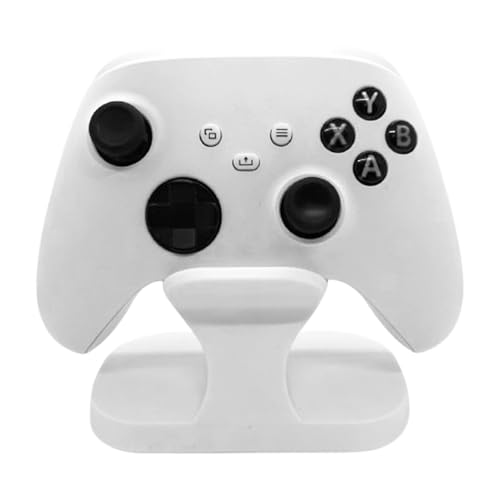
Universal Game Controller Holder and Charging Stand for Xbox
Why We Love It

MAKINGTEC Vertical Cooling Stand Compatible with Xbox Series
Why We Love It

Razer Universal Quick Charging Stand for Xbox Series X|S:
Why We Love It

Turtle Beach Fuel Dual Controller Charging Station & Headset
Why We Love It

Gaming Headphone Stand with Wireless Charging
Why We Love It

RGB Vertical Stand for Xbox Series X Console & Controller
Why We Love It

OIVO PS5 Charging Station
Why We Love It

Venom USB Charging Station with Rechargeable Battery
Why We Love It
Quick Pick
10 Best Xbox Charging Stands Of 2026
Quick Pick
8BitDo Xbox Charging Dock for Xbox Series X|S and Xbox One Wireless Controllers - Officially Licensed, Magnetic Secure Charging, USB Type C
Razer Universal Quick Charging Stand for Xbox Series X|S - Magnetic Secure Charging, Perfectly Matches Xbox Wireless Controllers, USB Powered - Pulse Red (Controller Sold Separately)
Universal Game Controller Holder and Charging Stand for Xbox Series X/S, Xbox One, PS5, PS4, Nintendo Switch, PC, Steelseries, Steam Controllers – Adjustable Desktop Dock, Anti-Slip(White)
MAKINGTEC Vertical Cooling Stand Compatible with Xbox Series X, Charging Station Dock with 1400mAh Rechargeable Battery Pack and Dual Controller Charger Ports (NOT Compatible with Xbox One X/S), Black
Razer Universal Quick Charging Stand for Xbox Series X|S: Magnetic Secure Charging - Perfectly Matches Xbox Wireless Controllers - USB Powered - Shock Blue (Controller Sold Separately)
Turtle Beach Fuel Dual Controller Charging Station & Headset Stand for Xbox
Gaming Headphone Stand with Wireless Charging, 3 in 1 Desktop Headset Holder and Storage Rack for iPhone Series, PS5 Xbox and PC Gaming Desk Accessories, White Sleek Design
RGB Vertical Stand for Xbox Series X Console & Controller, Cooling Fan Stand & Dual Charging Dock with Dust Cover Filter Kits, LED Light Stand with Rubber Dust Filter Plugs, RGB Light Modes
OIVO PS5 Charging Station - 2H Fast Controller Charger for PlayStation 5 DualSense, Upgrade Charging Dock With 2 Types of Cable for Dual Controllers
Venom USB Charging Station with Rechargeable Battery - Black (Xbox Series X & S/Xbox One)
Buying Guide: Xbox Charging Stands
📋 Table of Contents
1How many devices can a charging stand hold at once?
Most Xbox charging stands support 2-4 controllers, but some models can hold up to 6. If you have multiple players or frequently host gaming sessions, look for a stand with more slots to avoid clutter and charging delays.
2Is a vertical or horizontal design better for my space?
Vertical stands save desk space and keep controllers upright for easy access, while horizontal designs are better for low-profile setups or when you want to charge multiple controllers side by side. Choose based on your available surface and gaming habits.
3What type of charging ports should I look for?
Most Xbox charging stands use USB-A ports, but newer models may include USB-C for faster charging. Ensure the stand has enough ports to match your controllers and any additional devices you want to charge simultaneously, like a headset or phone.
4Does the stand support Xbox Series X|S controllers?
Yes, but double-check the stand’s compatibility. Some older stands may not fit the slimmer design of the Series X|S controllers. Look for a model explicitly labeled as compatible with both Xbox One and Series X|S controllers to avoid fit issues.
5Are LED indicators useful, or just a gimmick?
LED indicators show when the stand is charging and when devices are fully charged, which is helpful for tracking progress. While not essential, they add convenience, especially if you charge controllers overnight or for long periods without supervision.
How we choose
Our editors are people who genuinely love testing and writing about products. We compare each product's real-world usability and strengths, then distill what matters most into our own "Why We Love It" points — so you get an honest, at-a-glance sense of what counts before you buy.