10 Best Wqhd 240hz Of 2026
Wqhd 240hz — Reviews, Recommendations & Updated Buying Guide November 2026


Z-Edge 34 Inch Ultrawide Curved 3440x1440 WQHD 240HZ
Why We Love It


Alienware 27 Gaming Monitor - AW2726DM
Why We Love It

Alienware 34 Gaming Monitor - AW3425DW
Why We Love It

MSI PRO MP273Q E14 27" Eye Care Ergonomic Business Computer
Why We Love It
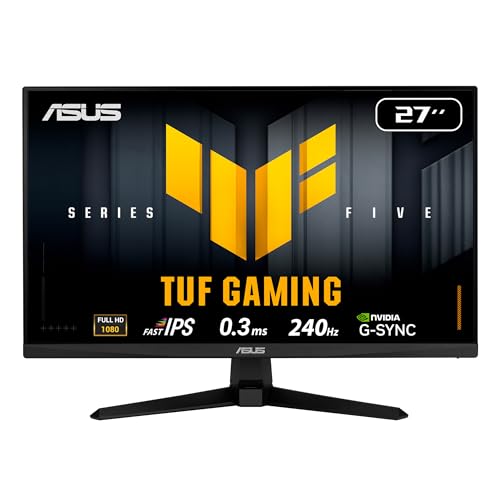
ASUS TUF Gaming Series 5 - VG279QM5A Gaming Monitor
Why We Love It

Z-Edge 27 Inch IPS Gaming Monitor 2K
Why We Love It

MSI MAG 275QF 27 Inch WQHD Gaming Monitor
Why We Love It

AUSU TUF Gaming Series 5
Why We Love It

MSI MAG 274QF X24 27 Inch WQHD Gaming Monitor
Why We Love It

MSI MAG 274QF X24 27' WQHD (2560 x 1440) IPS Gaming Monitor
Why We Love It
Quick Pick
10 Best Wqhd 240hz Of 2026
Quick Pick
Z-Edge 34 Inch Ultrawide Curved 3440x1440 WQHD 240HZ, Gaming Monitor, 1ms, 21:9 Curved Screen, 4000:1, Freesync, HDMI2.1 & DP1.4, 178 Viewing Angles
Alienware 27 Gaming Monitor - AW2726DM, QHD (2560x1440), 240Hz, QD OLED, 0.03ms, AMD FreeSync Premium, VESA AdaptiveSync, 99% DCI-P3, HDR10, DisplayPort, 2 HDMI, 3 Year Warranty | 0.03ms, AMD FreeSync Premium, VESA AdaptiveSync, 99% DCI-P3, HDR10, DisplayPort, 2 HDMI, 3yr Warranty
Alienware 34 Gaming Monitor - AW3425DW, WQHD (3440x1440), 21:9 1800R Curved, 240Hz, QD OLED, 0.03ms, NVIDIA G-SYNC Compatible, AMD FreeSync Premium Pro, HDR True Black 400, USB-C, 3 Year Warranty | 0.03ms, NVIDIA G-SYNC Compatible, AMD FreeSync Premium Pro, 21:9 1800R Curved, HDR True Black 400, USB-C
MSI PRO MP273Q E14 27" Eye Care Ergonomic Business Computer Monitor, WQHD 2560x1440, IPS, Frameless, 144Hz, 1ms, Tilt Compatible, 2xHDMI&DP Port, Built-in Speakers, VESA, Black, 3 Year Warranty
ASUS TUF Gaming Series 5 - VG279QM5A Gaming Monitor – 27-inch Full HD Fast-IPS Panel, 240Hz, 0.3ms, G-SYNC® Compatible, AMD FreeSync™ Premium, ELMB SYNC, 99% sRGB, DisplayWidget Center, Gaming AI
Z-Edge 27 Inch IPS Gaming Monitor 2K, 260Hz (DP1.4×2), 240Hz, QHD Computer Monitor 2560x1440, 1ms MPRT, 144Hz (HDMI2.0×2), FreeSync, VESA 100 * 100mm, Tilt Adjustable (DP Cable Included)
MSI MAG 275QF 27 Inch WQHD Gaming Monitor - 2560 x 1440 Rapid IPS Panel, 180 Hz / 0.5ms (GtG, Min.), 101% sRGB Colour Gamut, Frameless Design, HDR Ready - DisplayPort 1.4, HDMI 2.0b (WQHD @ 144Hz)
AUSU TUF Gaming Series 5 - VG34WQML5A Gaming Monitor ― 34-inch WQHD Fast-VA Panel, 250Hz(OC), 0.5ms, AMD FreeSync™ Premium, DisplayHDR™ 400, 95% DCI-P3, DisplayWidget Center, Gaming AI, HDMI 2.1
MSI MAG 274QF X24 27 Inch WQHD Gaming Monitor - Rapid IPS 2560 x 1440, 240 Hz, 0.5 ms, HDR Ready, AMD FreeSync Premium, AI Vision, HDMI 2.0b, DPort 1.4, Edge-Free, Tilting, VESA Comaptable, Black | Rapid IPS panel 2560x1440, 240 Hz, 0.5ms, compatible with VESA, HDMI, DisplayPort, FreeSync Premium
MSI MAG 274QF X24 27' WQHD (2560 x 1440) IPS Gaming Monitor, 240Hz, 0.5ms GTG, HDR Ready, Eye Care, Tilt & Height Adjustable, AI Vision & HDMI CEC Profile Sync, HDMI 2.1 & DP 1.4a, Black
Buying Guide: Wqhd 240hz
📋 Table of Contents
1What is WQHD resolution and why is it important?
WQHD stands for Wide Quad High Definition, which is a resolution of 2560x1440 pixels. It offers sharper images and more detail than Full HD, making it ideal for gaming and multimedia use.
2What should I look for in a WQHD 240Hz monitor?
Look for high refresh rate support (240Hz), low input lag, good color accuracy, and a panel type like IPS or VA for better viewing angles and response times.
3Is a WQHD 240Hz monitor compatible with my graphics card?
Ensure your graphics card supports WQHD resolution and can handle 240Hz refresh rates. Check the card's specifications and output ports for compatibility.
4When should I pay more for a WQHD 240Hz monitor?
Pay more if you need superior color accuracy, faster response times, or advanced features like G-Sync or FreeSync for smoother gameplay and reduced screen tearing.
5What are common mistakes when buying a WQHD 240Hz monitor?
Common mistakes include ignoring cable requirements, not checking for proper driver support, or overlooking the importance of ergonomics like adjustable height and tilt.
How we choose
Our editors are people who genuinely love testing and writing about products. We compare each product's real-world usability and strengths, then distill what matters most into our own "Why We Love It" points — so you get an honest, at-a-glance sense of what counts before you buy.