10 Best Wled Ips Computer Monitor Of 2026
Wled Ips Computer Monitor — Reviews, Recommendations & Updated Buying Guide November 2026


ThinkVision T24i-30 23.8 Full HD WLED LCD Monitor
Why We Love It


Lenovo ThinkVision T27i-30 27 Full HD WLED LCD Monitor
Why We Love It

Lenovo ThinkVision S22-4e 22 Inch FHD Monitor - 16:9 - (IPS)
Why We Love It

Lenovo ThinkVision S24i-30 24" Class Full HD LED Monitor
Why We Love It

Lenovo ThinkVision T24i-30 23.8 inches FHD Monitor
Why We Love It

Lenovo ThinkVision T27-40 27" Full HD LED Monitor
Why We Love It
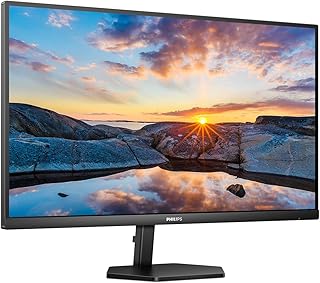
Philips 27E1N3300A/00 27" Widescreen IPS WLED Black
Why We Love It

Samsung 24-Inch IPS Full HD 1080p 75Hz Borderless Monitor
Why We Love It

KOORUI Gaming Monitor 24-inch IPS FHD 1080p
Why We Love It
Quick Pick
10 Best Wled Ips Computer Monitor Of 2026
Quick Pick
ThinkVision T24i-30 23.8 Full HD WLED LCD Monitor - 16:9
Lenovo ThinkVision T27i-30 27 Full HD WLED LCD Monitor - 16:9 - Black
Lenovo ThinkVision S22-4e 22 Inch FHD Monitor - 16:9 - (IPS), Black
Lenovo ThinkVision S24i-30 24" Class Full HD LED Monitor - 16:9 - Raven Black, Storm Gray
Lenovo ThinkVision T24i-30 23.8 inches FHD Monitor | 1920x1080 Resolution | IPS | 60Hz Refresh | 6ms | WLED Backlight | 1xHDMI, 1xDP, 1xVGA| tilt, Lift, Pivot, Swivel Function | Eyesafe | Raven Black
Lenovo ThinkVision T27-40 27" Full HD LED Monitor - 16:9/120 Hz/IPS/WLED/USB Hub/Eclipse Black (64A5MAT6US)
Philips 27E1N3300A/00 27" Widescreen IPS WLED Black Multimedia Monitor (1920x1080/1ms/HDMI)
Samsung 24-Inch IPS Full HD 1080p 75Hz Borderless Monitor With HDMI, VGA - LS24C310
KOORUI Gaming Monitor 24-inch IPS FHD 1080p, 200Hz 1ms HDR400 90% DCI-P3 Color Gamut, Adaptive Sync Ultra Slim Frame, VESA Mountable, HDMI x 2, DisplayPort, Black, G2411P
Buying Guide: Wled Ips Computer Monitor
📋 Table of Contents
1What's the difference between WLED and standard LED backlighting in IPS monitors?
WLED (White LED) uses white LEDs for backlighting, offering better color accuracy and energy efficiency compared to older CCFL technology. For most users, WLED IPS is the standard choice now and provides good brightness and color consistency across the screen.
2What screen size should I choose for office work and design?
For office work, 24-27 inches is ideal—large enough to reduce eye strain without requiring excessive head movement. If you do graphic design or photo editing, 27 inches or larger gives you more workspace, while 24 inches suits compact desks better.
3Does refresh rate matter for an IPS monitor if I'm not gaming?
For office, design, or video editing work, 60Hz is sufficient since you're not competing in fast-paced games. Higher refresh rates (75Hz+) can feel smoother for scrolling and general use, but the difference is less noticeable than in gaming.
4What specs should I prioritize: resolution, color accuracy, or brightness?
It depends on your use case—designers need 1440p+ resolution and 99% sRGB color accuracy, while office workers are fine with 1080p and basic color coverage. Brightness (300-350 nits) matters most if your workspace has strong natural light.
5Is it worth spending more for a monitor with USB-C and built-in speakers?
USB-C is worth the extra cost if you use MacBooks or need to charge your laptop from one cable, while built-in speakers are rarely worth paying extra for—external speakers deliver much better audio. Prioritize USB-C based on your actual workflow needs.
How we choose
Our editors are people who genuinely love testing and writing about products. We compare each product's real-world usability and strengths, then distill what matters most into our own "Why We Love It" points — so you get an honest, at-a-glance sense of what counts before you buy.