10 Best Wireless Vertical Mice Of 2026
Wireless Vertical Mice — Reviews, Recommendations & Updated Buying Guide November 2026


Logitech Lift Vertical Ergonomic Mouse
Why We Love It


UGREEN Vertical Wireless Mouse BT5.4/2.4G Ergonomic 4000DPI
Why We Love It

TECKNET Ergonomic Mouse, Wireless Bluetooth Vertical Mouse
Why We Love It

TECKNET Ergonomic Mouse
Why We Love It

Logitech MX Vertical Ergonomic Mouse
Why We Love It

Ergonomic Mouse
Why We Love It

TECKNET Ergonomic Mouse, Wireless Bluetooth Vertical Mouse
Why We Love It
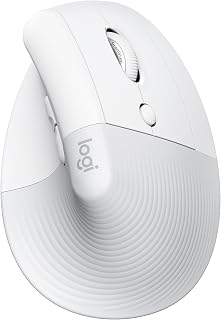
Logitech Lift Vertical Ergonomic Mouse
Why We Love It

UGREEN Wireless Trackball Mouse
Why We Love It

Logitech Wave Keys & Lift Vertical Mouse
Why We Love It
Quick Pick
10 Best Wireless Vertical Mice Of 2026
Quick Pick
Logitech Lift Vertical Ergonomic Mouse, Wireless, Bluetooth or Logi Bolt USB Receiver, Quiet clicks, 4 Buttons, Compatible with Windows/macOS/iPadOS, Laptop, PC-Graphite | Wireless, Bluetooth or Logi Bolt, Silent clicks, 4 buttons, Windows/macOS/iPadOS, Laptop, PC - Grey
UGREEN Vertical Wireless Mouse BT5.4/2.4G Ergonomic 4000DPI 6-Button | Vertical wireless mouse, Bluetooth5.4/2.4G, ergonomic, 4000 DPI, 6 buttons, wrist relief, for PC Mac
TECKNET Ergonomic Mouse, Wireless Bluetooth Vertical Mouse, 4800 DPI Optical Tracking, 6 Adjustable DPI, Quiet Clicks, 2.4GHz with USB A Receiver, 6 Buttons, Wide Compatibility (Single-mode)
TECKNET Ergonomic Mouse, Wireless Rechargeable Vertical Mouse for Carpal Tunnel Right Hand, 4800 DPI 5 Adjustable Levels 2.4GHz with USB-A Receiver, Silent Click, for Laptop, PC (Rechargeable)
Logitech MX Vertical Ergonomic Mouse, Multi-Device, Bluetooth or 2.4GHz Wireless with USB Unifying Receiver, 4000 DPI Optical Tracking, 4 Buttons, Fast Charging, Laptop/PC/Mac/iPad OS- Black
Ergonomic Mouse, Vertical Mouse Wireless Mouse 6 Buttons Optical Carpal Tunnel Mouse, 5 Adjustment Levels, Up to 4800DPI Silent Click Mouse Office Mouse for Laptop, Desktop, Carpal Tunnel Relief
TECKNET Ergonomic Mouse, Wireless Bluetooth Vertical Mouse, 4800 DPI Optical Tracking, 6 Adjustable DPI, Quiet Clicks, 2.4GHz with USB A Receiver, 6 Buttons, Wide Compatibility (Dual-mode)
Logitech Lift Vertical Ergonomic Mouse, Wireless, Bluetooth or Logi Bolt USB Receiver, Quiet clicks, 4 Buttons, Compatible with Windows/macOS/iPadOS, Laptop, PC-White | Wireless, Bluetooth, Logi Bolt USB Receiver, Silent Clicks, 4 Buttons, Windows/macOS/iPadOS, Laptop, PC - White
UGREEN Wireless Trackball Mouse, Rechargeable Ergonomic Mouse,Bluetooth&USB | Smooth High-speed Scroll Wheel, Finger Control, 40dB Silent, Customisable Button, for Office/Business Trip, Laptop/Desktop
Logitech Wave Keys & Lift Vertical Mouse - Ergonomic Wireless Keyboard and Mouse Combo - with Cushioned Palm Rest, Easy-Switch, Bluetooth, for Multi-OS, Windows/Mac, US/INTL - Graphite
Buying Guide: Wireless Vertical Mice
📋 Table of Contents
1What sensor type offers the best accuracy for vertical mice?
Optical sensors are generally more accurate and reliable on most surfaces than laser or hybrid sensors. For high-precision tasks like graphic design or gaming, look for a sensor with at least 4000 DPI and adjustable sensitivity settings to suit different tasks and surfaces.
2How long can I expect the battery to last on a typical use cycle?
Most wireless vertical mice offer 10–30 days of battery life on a single charge, depending on usage intensity and features like RGB lighting. Mice with low-power Bluetooth or energy-saving modes can extend this, while frequent use may require recharging every few days.
3Are vertical mice suitable for all hand sizes and grip styles?
Vertical mice are designed to reduce wrist strain, but not all models fit every hand. Look for adjustable palm rests, thumb buttons, and a contoured shape that supports your hand’s natural position. Smaller or larger hands may benefit from models with a more compact or extended design.
4What connectivity options should I prioritize for reliability and convenience?
Bluetooth is ideal for multi-device use and avoids cable clutter, while a 2.4GHz dongle often provides lower latency for gaming or fast-paced work. If you need to switch between devices frequently, choose a mouse with at least two Bluetooth profiles or a quick-switch feature.
5What extra features are worth paying more for?
Customizable buttons, programmable profiles, and ergonomic wrist support can justify a higher price for long-term use. However, basic models with a solid sensor, good battery life, and a comfortable shape often provide excellent value for most users without unnecessary extras.
How we choose
Our editors are people who genuinely love testing and writing about products. We compare each product's real-world usability and strengths, then distill what matters most into our own "Why We Love It" points — so you get an honest, at-a-glance sense of what counts before you buy.