10 Best Wireless Rgb Gaming Mice Of 2026
Wireless Rgb Gaming Mice — Reviews, Recommendations & Updated Buying Guide November 2026


Rechargeable Wireless Gaming Mouse - Silent Click
Why We Love It


Wireless Mouse, Gaming Mouse
Why We Love It

Wireless Gaming Mouse Bluetooth Mouse RGB Rechargeable 2.4G
Why We Love It

Redragon M810 Pro Wireless Gaming Mouse 10000 DPI
Why We Love It

TECKNET Wireless Gaming Mouse Rechargeable - 8000 DPI
Why We Love It

Furycube G11 Wireless Gaming Mouse for FPS & Competitive
Why We Love It

Logitech G G502 X PLUS LIGHTSPEED Wireless RGB Gaming Mouse
Why We Love It
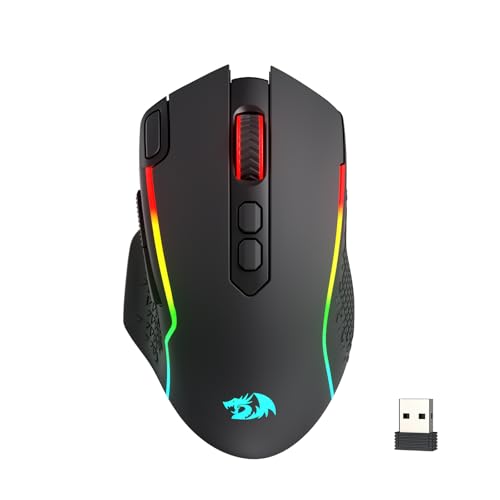
Redragon M810 MAX 3-Mode Wireless Gaming Mouse
Why We Love It

Wireless Mouse Wireless Gaming Mouse
Why We Love It

Redragon M612 Wireless RGB Optical Gaming Mouse 8000 DPI
Why We Love It
Quick Pick
10 Best Wireless Rgb Gaming Mice Of 2026
Quick Pick
Rechargeable Wireless Gaming Mouse - Silent Click, Colorful RGB Light, Dual Mode (Bluetooth 5.1 + USB 2.4G), 25Hrs Battery, Ergonomic Design, Adjustable DPI (3200), for PC, Laptop, Mac, iOS & Android
Wireless Mouse, Gaming Mouse, Dual Mode (Bluetooth 5.1 + USB) 2.4GHz, Wireless Mouse Gaming with RGB Backlit, 25Hrs for Windows/Mac, Rechargeable
Wireless Gaming Mouse Bluetooth Mouse RGB Rechargeable 2.4G USB Cordless Computer Mice with 7 Color Backlit, 6 Buttons & Silent Click for Laptop, iPad, Mac OS, PC, Windows -Black
Redragon M810 Pro Wireless Gaming Mouse 10000 DPI Wired/Gamer with Quick Fire Button, 8 Macro Keys, 45 Hours Continuous Power and RGB Backlight for PC/Mac/Laptop,
TECKNET Wireless Gaming Mouse Rechargeable - 8000 DPI, Long-Lasting 100Hrs Battery, RGB Backlit, 6 Programmable Buttons, Dual Connectivity (2.4G + USB-C) for PC, Mac, Laptop - Black
Furycube G11 Wireless Gaming Mouse for FPS & Competitive Gaming, 2.4G/USB-C/BT Tri-mode with 400mAh Battery, 22K DPI, PAW3311 Sensor, RGB Lighting, Programmable Buttons, for Win/Mac
Logitech G G502 X PLUS LIGHTSPEED Wireless RGB Gaming Mouse - Optical mouse with LIGHTFORCE hybrid switches, LIGHTSYNC RGB, HERO 25K gaming sensor, compatible with PC - macOS/Windows - Black | LIGHTFORCE, LIGHTSYNC RGB Hybrid Button Optical Mouse, 25K Hero Gaming Sensor, Compatible with PC - MacOS/Windows - Black
Redragon M810 MAX 3-Mode Wireless Gaming Mouse, 12000 DPI Wired/Wireless RGB Mouse w/Rapid Fire Key, 8 Macro Buttons, 188-Hour Reliable Power Capacity for PC/Mac/Laptop
Wireless Mouse Wireless Gaming Mouse, Rechargeable Pc Mouse with RGB Backlight 6 Buttons Adjustable Lightweight Honeycomb Shell for Laptops, PC, Computers, Etc (BLACK)
Redragon M612 Wireless RGB Optical Gaming Mouse 8000 DPI Remapping Keys | Cable-Free 0 Delay, Redefine Keybinding Macro, Vibing Backlight, Ergonomic Grip Body Comfort
Buying Guide: Wireless Rgb Gaming Mice
📋 Table of Contents
1What polling rate is ideal for competitive gaming?
A 1000Hz polling rate ensures the lowest possible input lag, making it ideal for fast-paced games. While 500Hz is still responsive, 1000Hz provides the most accurate and immediate tracking for precise movements and quick reflexes.
2How long should the battery last on a wireless RGB gaming mouse?
Look for at least 40-60 hours of battery life on a single charge for regular use. Mice with RGB lighting may drain the battery faster, so models with a 'gaming mode' that disables LEDs can extend runtime during long sessions.
3Does the type of sensor really affect performance?
Yes — optical sensors are best for smooth surfaces, while laser sensors work on more textures but can be less accurate. A high-quality sensor with at least 12,000 DPI and 400+ IPS ensures precision and responsiveness for all gaming scenarios.
4Are RGB lighting effects just for show, or do they help?
RGB lighting can help with visibility in dark environments and personalisation, but it doesn’t impact performance. Look for mice that let you customise lighting zones or sync with other RGB gear for a cohesive setup without sacrificing function.
5What should I look for in a wireless connection standard?
A dedicated 2.4GHz dongle typically offers lower latency and more reliable performance than Bluetooth. For the best experience, choose a mouse with a high-end wireless protocol (like HyperSpeed or Lightspeed) to avoid lag and interference during intense gameplay.
How we choose
Our editors are people who genuinely love testing and writing about products. We compare each product's real-world usability and strengths, then distill what matters most into our own "Why We Love It" points — so you get an honest, at-a-glance sense of what counts before you buy.