10 Best Wireless Printers Of 2026
Wireless Printers — Reviews, Recommendations & Updated Buying Guide November 2026


Epson EcoTank L3351 Printer | Perfect for Home Use
Why We Love It

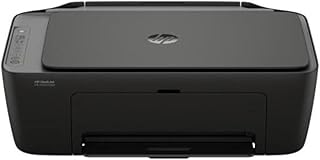
HP DeskJet Ink Advantage 2976 All-in-One Printer
Why We Love It

Canon Pixma TS3640 Printer
Why We Love It

Brother Wireless All In One Ink Tank Printer
Why We Love It

HP | Smart Tank 582 | Wireless | Print
Why We Love It

HP Smart Tank 581 Wireless All In One Printer
Why We Love It

HP OfficeJet Pro 9123 All-in-One Printer - Wireless
Why We Love It

HP | Smart Tank | Wireless | Print
Why We Love It

HP DeskJet Ink Advantage Printer | DJ2975 | Wireless | Print
Why We Love It

Epson EcoTank Home L3250 Wi‑Fi Ink Tank Printer
Why We Love It
Quick Pick
10 Best Wireless Printers Of 2026
Quick Pick
Epson EcoTank L3351 Printer | Perfect for Home Use | Wireless | A4 | Print, Copy, Scan | Includes up to 3 Years of Ink
HP DeskJet Ink Advantage 2976 All-in-One Printer, Color Printer for Home, Print, copy, scan, Wireless; Print from phone or tablet
Canon Pixma TS3640 Printer - Black - UAE VERSION WITH OFFICIAL WARRANTY.
Brother Wireless All In One Ink Tank Printer, DCP-T530DW, Automatic Duplex Print, Wireless & Mobile Print, Compact Design, Black
HP | Smart Tank 582 | Wireless | Print, Copy, Scan | Manual Duplex | Print Speed: 12ppm(black) / 5ppm(color) | Up to 18000 black or 6000 color pages included | ST582 | UAE Version
HP Smart Tank 581 Wireless All In One Printer, Print, Scan, Copy, Print up to 6000 black or 6000 color pages - Grey [4A8D4A]
HP OfficeJet Pro 9123 All-in-One Printer - Wireless, Automatic document feeder, Two-sided printing, Two-sided scanning, Scan to PDF/Email, Touchscreen
HP | Smart Tank | Wireless | Print, Copy, Scan | Automatic Duplex | Print Speed: 12ppm(black) / 7ppm(color) | Up to 18000 black or 8000 color pages included | ST670 | UAE Version
HP DeskJet Ink Advantage Printer | DJ2975 | Wireless | Print, Copy, Scan | Manual Duplex | Print Speed: 7.5 black / 5.5 color ppm | 60-sheet input tray | UAE Version [A24J2C]
Epson EcoTank Home L3250 Wi‑Fi Ink Tank Printer | 3‑in‑1 Print/Scan/Copy | 8100 Black & 6500 Colour Pages | Ultra‑Low‑Cost EcoTank System
Buying Guide: Wireless Printers
📋 Table of Contents
1What print speed should I look for in a wireless printer?
For home use, 10-15 pages per minute (ppm) is standard, while 20+ ppm is better for frequent or large-volume printing. Higher speeds reduce wait times, but may come with a higher price tag and more noise.
2How does wireless connectivity affect performance?
Wi-Fi 5 (802.11ac) offers faster and more stable connections than older standards like Wi-Fi 4. Bluetooth is suitable for short-range use, but not ideal for printing from multiple devices or across a large home.
3What resolution is best for different uses?
For everyday documents, 600 x 600 dpi is sufficient, but 1200 x 1200 dpi or higher is better for photos or detailed graphics. Higher resolution increases print quality but may slow down the printing process.
4Should I choose a color or black-and-white wireless printer?
Color printers are ideal for photos, presentations, or mixed-use households, while black-and-white models are more cost-effective and faster for text-heavy tasks. Consider your budget and how often you need color prints.
5What paper capacity is right for my needs?
A 250-sheet tray is standard for home use, while 500-sheet trays or multi-tray systems are better for offices or heavy printing. Larger capacity reduces the need for frequent refills and interruptions.
How we choose
Our editors are people who genuinely love testing and writing about products. We compare each product's real-world usability and strengths, then distill what matters most into our own "Why We Love It" points — so you get an honest, at-a-glance sense of what counts before you buy.