10 Best Wireless Monitor For Macbook Of 2026
Wireless Monitor For Macbook — Reviews, Recommendations & Updated Buying Guide November 2026


UPERFECT Wireless Portable Monitor with Battery 8000mAh
Why We Love It


MagicRaven Wireless Portable Monitor
Why We Love It

Ingnok Portable Monitor for Laptop with Adjustable Stand
Why We Love It

MagicRaven Laptop Screen Extender
Why We Love It

Cocopar Portable Monitor Travel Display with Speaker HDMI
Why We Love It

MagicRaven Portable Monitor, Laptop Screen Extender
Why We Love It

Portable Wireless Monitor (2026)
Why We Love It
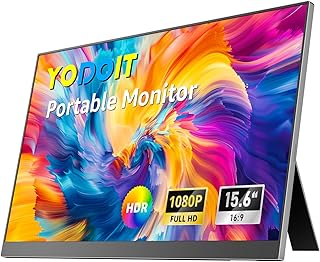
Yodoit Portable Monitor 15.6" with Kickstand FHD 1920x1080P
Why We Love It

InnoView Portable Monitor
Why We Love It

Wireless Portable Monitor with Battery
Why We Love It
Quick Pick
10 Best Wireless Monitor For Macbook Of 2026
Quick Pick
UPERFECT Wireless Portable Monitor with Battery 8000mAh, 15.6" 1080P
MagicRaven Wireless Portable Monitor, Laptop Screen Extender
Ingnok Portable Monitor for Laptop with Adjustable Stand,15.6 Inch | Built-in Speakers,FHD 1080P Laptop Screen Extender for Laptop,mini PC,MacBook,PS5/4, Xbox, Switch,1.44lb Easy to Setup
MagicRaven Laptop Screen Extender, Portable Monitor for Laptop | USB C Second Display, Travel Monitor for Mac PS4/5 Xbox Switch PC Phone - 14 Inch
cocopar Portable Monitor Travel Display with Speaker HDMI USB-C Second Screen for Laptop MacBook Pro Air Surface Computer PC Xbox PS4/5, VESA Mountable, 15.6 Inch
MagicRaven Portable Monitor, Laptop Screen Extender, Mobile Display - 15.6" | Second Computer Gaming Display, Travel Monitor for Laptop Mac PS4/5 Xbox Switch PC Phone
Portable Wireless Monitor (2026), 15.6 Inch Portable Wireless Monitor WiFi 1080P, Laptop IPS Screen Extension, Supports AirPlay/Miracast, HDMI, USB C, for Laptop/PC/Mobile Phone/PS3/4
Yodoit Portable Monitor 15.6" with Kickstand FHD 1920x1080P IPS Second External Display Laptop Screen Extender | USB-C & HDMI Connectivity, Built-in Speakers, for Laptop, PC, Mac, PS3/4/5, Xbox
InnoView Portable Monitor, 15.6 Inch FHD 1080P HDMI USB C Second External Monitor for Laptop, Desktop, MacBook, Phones, Tablet, PS5/4, Xbox, Switch, Built-in Speaker with Protective Case
Wireless Portable Monitor with Battery, Laptop Screen Extender - 16"
Buying Guide: Wireless Monitor For Macbook
📋 Table of Contents
1What should I look for in a wireless monitor for MacBook?
Look for compatibility with your MacBook's ports (like USB-C or Thunderbolt), resolution support, and whether it includes a built-in stand or requires an external one.
2What are the key specifications to consider?
Key specs include resolution (at least 1080p for clarity), refresh rate (60Hz is standard), connectivity options, and whether it supports macOS natively for optimal performance.
3How do I ensure the monitor is the right size and compatible with my MacBook?
Check the monitor's dimensions and weight to ensure it fits your workspace, and confirm it uses a port your MacBook has, such as USB-C or HDMI with an adapter.
4When should I pay more for a wireless monitor?
Pay more if you need higher resolution (like 4K), better color accuracy, or advanced features like touch support or built-in speakers for a more integrated experience.
5What are common mistakes to avoid when buying a wireless monitor for MacBook?
Common mistakes include ignoring port compatibility, underestimating the need for an external stand, and not checking if the monitor is optimized for macOS, which can affect performance and display quality.
How we choose
Our editors are people who genuinely love testing and writing about products. We compare each product's real-world usability and strengths, then distill what matters most into our own "Why We Love It" points — so you get an honest, at-a-glance sense of what counts before you buy.