10 Best Wireless Gaming Mice For Pc Of 2026
Wireless Gaming Mice For Pc — Reviews, Recommendations & Updated Buying Guide November 2026


HyperX Pulsefire Haste 2 Core Wireless – Gaming Mouse for PC
Why We Love It


Rechargeable Wireless Gaming Mouse - Silent Click
Why We Love It

Razer Viper V3 HyperSpeed
Why We Love It

ATTACK SHARK X11SE Wireless Gaming Mouse
Why We Love It

Wireless Mouse Wireless Gaming Mouse
Why We Love It

TECKNET Wireless Gaming Mouse Rechargeable - 8000 DPI
Why We Love It

UGREEN Wireless Mouse 2.4G Silent Ergonomic Mice 1600DPI for
Why We Love It

TECKNET Wireless Mouse, 2.4G Ergonomic Optical Mouse
Why We Love It
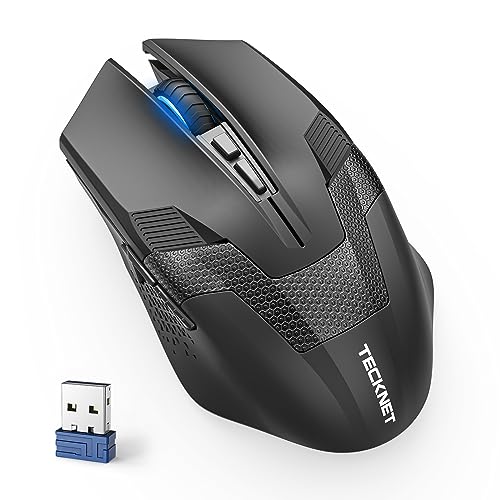
TECKNET Wireless Mouse-USB Ergonomic Optical Cordless Mouse
Why We Love It

Wireless Gaming Mouse Bluetooth Mouse RGB Rechargeable 2.4G
Why We Love It
Quick Pick
10 Best Wireless Gaming Mice For Pc Of 2026
Quick Pick
HyperX Pulsefire Haste 2 Core Wireless – Gaming Mouse for PC, Long Battery Life, Lightweight, Custom Core Sensor, Dual Wireless Connectivity, Black
Rechargeable Wireless Gaming Mouse - Silent Click, Colorful RGB Light, Dual Mode (Bluetooth 5.1 + USB 2.4G), 25Hrs Battery, Ergonomic Design, Adjustable DPI (3200), for PC, Laptop, Mac, iOS & Android
Razer Viper V3 HyperSpeed - Wireless Esports Mouse (Focus Pro 30K Optical Sensor, Up to 280 hours of Battery Life, Mechanical Mouse Switches Gen-2, 4000 Hz Wireless Polling Rate) Black
ATTACK SHARK X11SE Wireless Gaming Mouse, 63g Superlight With PixArt PAW3311 Sensor, 22000 DPI, Tri-Mode BT/2.4Ghz/Wired, 1000Hz Polling rate, 300mAh Battery, Dual Driver, for PC/Xbox/PS/Mac (Black)
Wireless Mouse Wireless Gaming Mouse, Rechargeable Pc Mouse with RGB Backlight 6 Buttons Adjustable Lightweight Honeycomb Shell for Laptops, PC, Computers, Etc (BLACK)
TECKNET Wireless Gaming Mouse Rechargeable - 8000 DPI, Long-Lasting 100Hrs Battery, RGB Backlit, 6 Programmable Buttons, Dual Connectivity (2.4G + USB-C) for PC, Mac, Laptop - Black
UGREEN Wireless Mouse 2.4G Silent Ergonomic Mice 1600DPI for PC/Mac | AAA battery included, wireless mouse, 2.4G, silent clicks, 3 DPI (800/1200/1600), 5 buttons, ergonomic, for PC Mac
TECKNET Wireless Mouse, 2.4G Ergonomic Optical Mouse, Computer Mouse for Laptop, PC, Computer, Chromebook, Notebook, 6 Buttons, 24 Months Battery Life, 2600 DPI, 5 Adjustment Levels - Purple
TECKNET Wireless Mouse-USB Ergonomic Optical Cordless Mouse with 8 Buttons,12-Month Battery Life,4800 DPI Optical Tracking,High-Precision 5 Adjustable DPI for PC/Mac/Laptop, Black
Wireless Gaming Mouse Bluetooth Mouse RGB Rechargeable 2.4G USB Cordless Computer Mice with 7 Color Backlit, 6 Buttons & Silent Click for Laptop, iPad, Mac OS, PC, Windows -Black
Buying Guide: Wireless Gaming Mice For Pc
📋 Table of Contents
1What polling rate is ideal for competitive gaming?
A 1000Hz polling rate is standard for low latency and responsiveness, ensuring your mouse inputs reach the game as quickly as possible. For casual use, 500Hz is sufficient, but 1000Hz is recommended for fast-paced or competitive play.
2How long should the battery last on a wireless gaming mouse?
Look for at least 20-40 hours of battery life on a single charge for most users. Mice with RGB lighting or high polling rates may drain faster, so consider a model with a quick-charge feature if you need a top-up during long sessions.
3Does the type of sensor really affect performance?
Yes — optical sensors are good for most surfaces, while laser sensors offer higher precision on glossy or reflective ones. A high DPI (12000+ is common) with adjustable sensitivity lets you fine-tune tracking for different games and playstyles.
4Are wired charging or replaceable batteries better for me?
Wired charging is more convenient for frequent users, as it avoids running out of power unexpectedly. Replaceable batteries offer long-term use but require more maintenance and may not be available in all models.
5What accessories are worth including with a wireless gaming mouse?
A durable mouse bungee reduces cable drag, and a spare charging cable ensures you’re always ready to play. Some models include a carrying case or extra weights to customise the mouse’s feel and portability.
How we choose
Our editors are people who genuinely love testing and writing about products. We compare each product's real-world usability and strengths, then distill what matters most into our own "Why We Love It" points — so you get an honest, at-a-glance sense of what counts before you buy.