10 Best Wireless Gaming Controllers For Pc Of 2026
Wireless Gaming Controllers For Pc — Reviews, Recommendations & Updated Buying Guide November 2026


GameSir Nova Lite Wireless Controller for PC
Why We Love It


Angju USB Wireless Gaming Controller Gamepad for PC/Laptop
Why We Love It

EasySMX X15 Wireless PC Controller for Gaming
Why We Love It

Microsoft Xbox Series X Wireless Controller
Why We Love It

EasySMX D10 Wireless Game Controller
Why We Love It
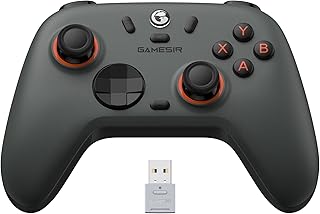
GameSir Nova 2 Lite Wireless Controller with Hall Effect
Why We Love It

PlayStation DualSense® Wireless Controller – Techno Red
Why We Love It

TERRIFI X15 Wireless PC Controller
Why We Love It

AceGamer 2 Pack Controller for PS4,Wireless Controller for
Why We Love It

Wireless Pro Gaming Controller for PC
Why We Love It
Quick Pick
10 Best Wireless Gaming Controllers For Pc Of 2026
Quick Pick
GameSir Nova Lite Wireless Controller for PC, Hall Effect Sticks & Trigger | Bluetooth Controller Gamepad with Hall Effect Trigger,Turbo,Rumble Vibration, Android, Switch & Steam Deck
Angju USB Wireless Gaming Controller Gamepad for PC/Laptop Computer(Windows XP/7/8/10) & PS3 & Android & Steam - [Black] (Black)
EasySMX X15 Wireless PC Controller for Gaming, Hall Effect Joysticks | 2 Back Buttons, 1000mah Battery, Gamepad for Windows PC, Steam, Switch, Android, Black
Microsoft Xbox Series X Wireless Controller, Black
EasySMX D10 Wireless Game Controller – TMR Anti-Drift Joysticks, Dual-Mode Triggers, 1000Hz Polling, Mechanical Buttons, RGB – Bluetooth Gamepad for PC/Switch/Switch2/iOS/Android with Charging Dock
GameSir Nova 2 Lite Wireless Controller with Hall Effect Joysticks & Triggers, 2.4G & Wired 1000Hz Polling Rate, Macro Back Buttons, PC Gamepad Compatible with PC/Switch/Steam/iOS/Android (Grey)
PlayStation DualSense® Wireless Controller – Techno Red - For PS5, PC, MAC & Mobile
TERRIFI X15 Wireless PC Controller, Gaming Controller with 7 RGB Lights, Hall Joystick & Trigger, Bluetooth Compatible with PC, Switch, Mobile Phone, and Tablet, Black
AceGamer 2 Pack Controller for PS4,Wireless Controller for PS4/Pro/Slim/PC,Gamepad Joystick with Turbo/Back Button/Dual Vibration/6-Axis Gyro Sensor/Touch Panel (Black & White)
Wireless Pro Gaming Controller for PC, Battery-Free with USB Receiver, Features Dual Shock Vibration, Ergonomic Design, D-Pad & Dual Analog Sticks for Windows 10/11, Laptop, Computer Gaming.
Buying Guide: Wireless Gaming Controllers For Pc
📋 Table of Contents
1What connection types should I look for in a wireless controller for PC?
Prioritize Bluetooth 5.0 or higher for stable, low-latency performance, and check if the controller supports USB-C or a 2.4GHz dongle for faster response times in competitive gaming. Some models offer dual connectivity for flexibility across devices.
2How important is battery life for a wireless gaming controller?
Look for at least 20-30 hours of gameplay on a single charge for casual use, and 40+ hours for models with energy-efficient designs. Controllers with quick-charge features can provide 2-3 hours of play from a 10-minute charge, which is handy for short sessions.
3What is the difference between analog and digital triggers?
Analog triggers offer variable pressure sensitivity, which is essential for precise actions in racing or action games, while digital triggers only register full or no input. For immersive gameplay, analog triggers are a must-have, especially for PC games that support advanced input methods.
4Are programmable buttons worth the extra cost?
Programmable buttons can be a game-changer for complex games or custom setups, allowing you to map macros or frequently used commands. However, for most casual or mainstream games, standard button layouts are sufficient, so consider your specific needs before paying a premium.
5What should I check for PC compatibility?
Ensure the controller is compatible with your operating system and supports the games you play. Look for models with built-in Windows or Steam support, or check if third-party software is required for full functionality and customization.
How we choose
Our editors are people who genuinely love testing and writing about products. We compare each product's real-world usability and strengths, then distill what matters most into our own "Why We Love It" points — so you get an honest, at-a-glance sense of what counts before you buy.