10 Best Wireless Drawing Tablet Of 2026
Wireless Drawing Tablet — Reviews, Recommendations & Updated Buying Guide November 2026


HUION HS64 Graphics Drawing Tablet Battery-Free Stylus
Why We Love It


XP-Pen Deco 01 V3 Drawing Tablet
Why We Love It

XPPen 6 * 4 inch Drawing Tablet with 16384 Pressure Levels
Why We Love It

XP-Pen G430S OSU Tablet Ultrathin Graphic Tablet 4 x 3 inch
Why We Love It
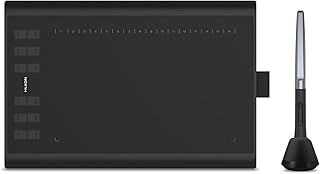
HUION Inspiroy H1060P Graphics Drawing Tablet
Why We Love It

HUION Inspiroy Frego Samll Wireless Drawing Tablet
Why We Love It

XP-PEN Deco mini7W Graphic Drawing Tablet Wireless 2.4GHz
Why We Love It

HUION Inspiroy Keydial KD200 Wireless Graphics Drawing
Why We Love It

XP-PEN Deco LW Graphics Drawing Tablet 10x6 Inch Working
Why We Love It

HUION Inspiroy Frego Medium Wireless Drawing Tablet
Why We Love It
Quick Pick
10 Best Wireless Drawing Tablet Of 2026
Quick Pick
HUION HS64 Graphics Drawing Tablet Battery-Free Stylus Android Windows macOS with 6.3 x 4 in Working Area Pen Tablet for Linux, Mac, Windows PC and Android
XP-Pen Deco 01 V3 Drawing Tablet, 10x6.25 Inch, 16384 Levels Pressure | Graphic Tablet, Battery-Free Stylus with Tilt Function, 8 Shortcut Keys, Compatible with PC, Chromebook, Android, MAC
XPPen 6 * 4 inch Drawing Tablet with 16384 Pressure Levels IT640 Digital Graphic Art Tablet Battery-Free Stylus 60° Tilt Support OSU Drawing Pad for Beginner Compatible with Android Windows macOS
XP-Pen G430S OSU Tablet Ultrathin Graphic Tablet 4 x 3 inch Digital Tablet Drawing Pen Tablet for OSU!8192 Levels 266RPS (Rev A)
HUION Inspiroy H1060P Graphics Drawing Tablet, 10 x 6.25 in, 12+16 Hot Keys | 8192 Pressure Levels, Battery-Free Stylus, Digital Art Tablet Works with Mac, Windows PC and Android
HUION Inspiroy Frego Samll Wireless Drawing Tablet, 6.3 x 3.9 inch Bluetooth Graphics Tablet, Portable for Design, Writing, Photo Editing, Teaching, Compatible with Windows, Mac, Android and Linux
XP-PEN Deco mini7W Graphic Drawing Tablet Wireless 2.4GHz Digital Drawing Pad for Painting, Design, Online Learning and Web Conferences
HUION Inspiroy Keydial KD200 Wireless Graphics Drawing Tablet, 8.9x5.6inch | Bluetooth 5.0-Wireless, with Keyboard Dial, 5 Customized Express Keys, Battery-Free Stylus PW517 Tilt, PC, Mac, Android
XP-PEN Deco LW Graphics Drawing Tablet 10x6 Inch Working Area Digital Pen Bluetooth Wireless Tablet with X3 Smart Chip Pen Tilt Function 8 Shortcut Keys (Black)
HUION Inspiroy Frego Medium Wireless Drawing Tablet, 10 x 6.25 inch | Bluetooth Graphics Tablet,Portable for Design,Writing,Photo Editing,Teaching,Compatible with Windows, Mac, Android and Linux
Buying Guide: Wireless Drawing Tablet
📋 Table of Contents
1What screen size and resolution should I look for in a wireless drawing tablet?
Opt for a 10-12 inch screen with at least 1024x600 resolution for accurate drawing and pressure sensitivity. Larger screens offer more workspace, while higher resolutions improve detail clarity, especially for digital artists or illustrators.
2How does pressure sensitivity affect the drawing experience?
Pressure sensitivity levels (typically 8192 or 4096 levels) determine how responsive the tablet is to your stylus. Higher levels allow for finer control over line weight and texture, which is crucial for detailed work like illustrations or graphic design.
3What’s the difference between active and passive styluses for wireless tablets?
Active styluses use built-in sensors and require pairing with the tablet for features like pressure sensitivity and tilt recognition. Passive styluses rely on capacitive touch and are cheaper but lack advanced features, making them less ideal for serious artists.
4How important is battery life for a wireless drawing tablet?
Look for at least 8-12 hours of continuous use on a single charge for portability. Longer battery life is essential for artists who work on the go, while shorter life may be acceptable for studio use with frequent charging.
5What accessories are worth investing in for a wireless drawing tablet?
A high-quality stylus with replaceable tips and a protective case are essential. Additional accessories like a stand for hands-free drawing or a stylus pouch for travel can enhance usability and protect your investment.
How we choose
Our editors are people who genuinely love testing and writing about products. We compare each product's real-world usability and strengths, then distill what matters most into our own "Why We Love It" points — so you get an honest, at-a-glance sense of what counts before you buy.