10 Best Wireless Controllers For Android Of 2026
Wireless Controllers For Android — Reviews, Recommendations & Updated Buying Guide November 2026


GameSir Nova Lite Wireless Controller for PC
Why We Love It


ViBon Wireless Mobile Gaming Controller for iPhone
Why We Love It
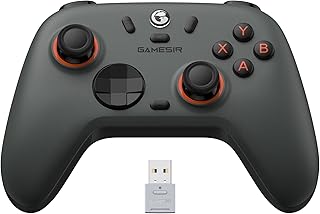
GameSir Nova 2 Lite Wireless Controller with Hall Effect
Why We Love It

Begally Switch Controller Wireless for Switch/Lite/OLED
Why We Love It
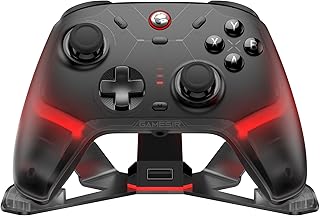
GameSir Cyclone 2 PC Controller Mag-Res TMR Sticks 1000Hz
Why We Love It

BOXPUT BPR1S Plus 2.4G Wireless Air Mouse Voice Remote
Why We Love It

8BitDo Ultimate 2 Wireless Controller for Windows & Android
Why We Love It

PlayStation DualSense® Wireless Controller – Techno Red
Why We Love It

Angju USB Wireless Gaming Controller Gamepad for PC/Laptop
Why We Love It

PC controller
Why We Love It
Quick Pick
10 Best Wireless Controllers For Android Of 2026
Quick Pick
GameSir Nova Lite Wireless Controller for PC, Hall Effect Sticks & Trigger | Bluetooth Controller Gamepad with Hall Effect Trigger,Turbo,Rumble Vibration, Android, Switch & Steam Deck
ViBon Wireless Mobile Gaming Controller for iPhone, Android, iPad, Tablet, PC, Phone Controller with Phone Clip Supports Cloud Game, COD Mobile, Genshin Immpact, Remote Player Gamepad
GameSir Nova 2 Lite Wireless Controller with Hall Effect Joysticks & Triggers, 2.4G & Wired 1000Hz Polling Rate, Macro Back Buttons, PC Gamepad Compatible with PC/Switch/Steam/iOS/Android (Grey)
Begally Switch Controller Wireless for Switch/Lite/OLED Wireless Gamepad for PC/iOS/Android with RGB/Programmable/Motion Control/Vibration/Turbo/Wakeup
GameSir Cyclone 2 PC Controller Mag-Res TMR Sticks 1000Hz Report Rate Hall & Micro 2-in-1 Triggers RGB Lighting with Charging Dock for PC/Switch/iOS/Android (Black)
BOXPUT BPR1S Plus 2.4G Wireless Air Mouse Voice Remote Control with IR Learning Gyroscope Wireless Remote Controller for PC Smart TV Android TV Box HTPC Laptop Projector (Batteries are not included)
8BitDo Ultimate 2 Wireless Controller for Windows & Android, Gaming Controller with TMR Joysticks, Switchable Hall Effect/Tactile Triggers, RGB Fire Ring, 8Speed Tech - WUCHANG: Fallen Feathers
PlayStation DualSense® Wireless Controller – Techno Red - For PS5, PC, MAC & Mobile
Angju USB Wireless Gaming Controller Gamepad for PC/Laptop Computer(Windows XP/7/8/10) & PS3 & Android & Steam - [Black] (Black)
PC controller, Wireless Controller for Windows PC and Android, Hall Effect Joysticks and Triggers
Buying Guide: Wireless Controllers For Android
📋 Table of Contents
1What connection types are best for Android compatibility?
Look for Bluetooth 5.0 or higher for stable, low-latency performance with most Android devices. Some controllers also support USB-C wired connections for faster response times, which is ideal for gaming apps that demand precision.
2Do I need a controller with Android-specific features?
Yes — many Android games use different button layouts than consoles, so a controller with customizable button mapping or built-in Android profiles (like for Steam Link or RetroArch) will work better and avoid compatibility issues.
3How long does the battery typically last?
Most wireless controllers for Android offer 8–15 hours of gameplay on a single charge, depending on usage and power-saving features. A model with a built-in battery indicator and quick-charge support can help avoid unexpected shutdowns during long sessions.
4Are vibration feedback and haptic features worth it?
Vibration and haptic feedback enhance immersion in games, but they also drain the battery faster. If you prioritize longer playtime or use the controller for non-gaming apps, consider a model without these features to save power and reduce cost.
5What accessories should I consider buying with it?
A charging cable or stand is essential for regular use, and a protective case can prevent damage from drops. Some users also benefit from a Bluetooth adapter if their Android device doesn’t support Bluetooth controllers natively.
How we choose
Our editors are people who genuinely love testing and writing about products. We compare each product's real-world usability and strengths, then distill what matters most into our own "Why We Love It" points — so you get an honest, at-a-glance sense of what counts before you buy.