10 Best Wireless Carplay In Dash Video Of 2026
Wireless Carplay In Dash Video — Reviews, Recommendations & Updated Buying Guide November 2026


Wireless CarPlay Adapter for Apple iPhone
Why We Love It


BIGTHREE Car Stereo Wireless Apple Carplay Android Auto
Why We Love It

OTTOCAST Play2Video Ultra
Why We Love It

Carlinkit Latest Ai Box LED
Why We Love It

Wireless CarPlay Adapter for Factory Wired Systems
Why We Love It

4 in 1 Wireless CarPlay Adapter and Android Auto Wireless
Why We Love It
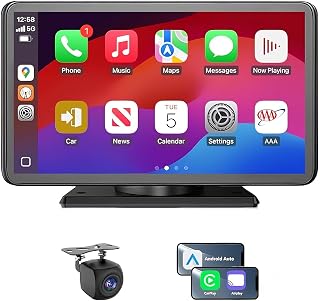
FUNAURORE Wireless CarPlay Screen for Car
Why We Love It

New (2026) OTTOCAST P3 Pro CarPlay AI Box
Why We Love It

Wireless CarPlay Adapter for iPhone & Android Auto 2-in-1
Why We Love It

Wireless CarPlay Adapter for iPhone
Why We Love It
Quick Pick
10 Best Wireless Carplay In Dash Video Of 2026
Quick Pick
Wireless CarPlay Adapter for Apple iPhone - Upgrade Wired CarPlay to Wireless Device, Mini T-shaped for Cars, USB Plug and Play, Auto Reconnect for In-Dash Video
BIGTHREE Car Stereo Wireless Apple Carplay Android Auto, Portable 7 Inch IPS Touchscreen Radio Carplay Screen in Dash Navigation Unit with Bluetooth, Mirror Link, Voice Control, FM/AUX Cable
OTTOCAST Play2Video Ultra – Wireless CarPlay & Android Auto Adapter with YouTube, Netflix, Spotify, IPTV | 5GHz WiFi, Auto Connect, No Delay
Carlinkit Latest Ai Box LED, Android 13, Qualcomm 6225, 8GB+128GB, Wireless CarPlay Android Auto 3-in-1 Dongle comes with Google Play Store, Streaming Video, Only for the Vehicle with Wired CarPlay
Wireless CarPlay Adapter for Factory Wired Systems, Plug and Play with HDMI Port, Compatible with 2016+ CarPlay Vehicles & iOS 10+ iPhones, Supports Fire TV
4 in 1 Wireless CarPlay Adapter and Android Auto Wireless Adapter, Support AirPlay and MirrorLink for Screen Mirroring, 5.8GHz Fast Car Play Dongle for Cars with Factory Wired CarPlay, Colourful
FUNAURORE Wireless CarPlay Screen for Car, 7" Android Auto, Backup Camera | Backup camera with night vision, Bluetooth audio, Mirror link, GPS navigation, Voice control, Portable, Fit all vehicles
New (2026) OTTOCAST P3 Pro CarPlay AI Box, 3-in-1 Wireless CarPlay & Android Auto Adapter with HDMI Output, 8GB+128GB, 5G WiFi, Split Screen, Download Any App for Wired CP/AA Vehicles
Wireless CarPlay Adapter for iPhone & Android Auto 2-in-1, Upgrade Wired to Wireless with Auto-Connect, Plug & Play USB/Type C for Cars with Built-in Wired CarPlay, Lifetime OTA Updates
Wireless CarPlay Adapter for iPhone – Plug & Play CarPlay Dongle – Converts Wired CarPlay to Wireless – Fast Auto-Connect, Low Latency, USB-A & USB-C Compatible – English Manual Included
Buying Guide: Wireless Carplay In Dash Video
📋 Table of Contents
1What resolution should I look for in a wireless CarPlay dash video system?
Opt for at least 1080p Full HD resolution for clear, sharp video. 4K models offer even better detail but may require a more powerful processor and higher bandwidth, which can affect performance in older or budget vehicles.
2Does wireless CarPlay support rearview camera integration?
Yes, many wireless CarPlay systems support rearview camera input, but you must ensure the system is compatible with your vehicle’s camera interface. Look for models that use HDMI or CAN bus connections for reliable integration.
3What’s the difference between a wireless CarPlay adapter and a built-in system?
A wireless CarPlay adapter connects via USB or Wi-Fi and allows you to use your phone’s screen as the display, while a built-in system integrates directly into the car’s infotainment screen. Built-in systems often offer better performance and a more seamless experience, but adapters are more affordable and easier to install.
4How does latency affect the performance of a wireless CarPlay dash video setup?
Latency can cause a delay between your phone’s input and the video display, which is especially noticeable when using navigation or video apps. Look for systems with low-latency Wi-Fi or USB-C connections to ensure smooth, real-time performance.
5Are there any common mistakes to avoid when installing a wireless CarPlay dash video system?
Avoid using low-quality USB cables or power sources, as they can cause instability or crashes. Also, ensure your phone and the CarPlay system are running compatible software versions, and always back up your settings before making changes to the setup.
How we choose
Our editors are people who genuinely love testing and writing about products. We compare each product's real-world usability and strengths, then distill what matters most into our own "Why We Love It" points — so you get an honest, at-a-glance sense of what counts before you buy.