10 Best Winfun Large Screen Laptops Of 2026
Winfun Large Screen Laptops — Reviews, Recommendations & Updated Buying Guide November 2026


Winfun Premium Pro Laptop for Kids
Why We Love It


Winfun Let's Learn Bilingual Kids Laptop
Why We Love It
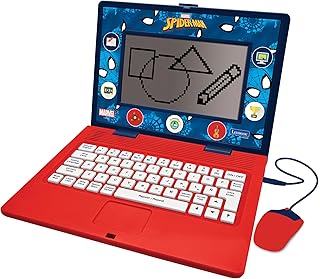
Lexibook, Spider-Man Educational Laptop for kids, JC599SPi2
Why We Love It

LEXIBOOK Educational Laptop for kids
Why We Love It

Lexibook Disney Frozen
Why We Love It

WINFUN LAPTOP JUNIOR UNICORN
Why We Love It

Winfun Baby's Learning Pad
Why We Love It

LEXIBOOK Educational Laptop, JC798i1
Why We Love It

Vtech My Laptop^Tm, Pink
Why We Love It

LEXIBOOK JC598SPi5 Spider-Man Educational and Bilingual
Why We Love It
Quick Pick
10 Best Winfun Large Screen Laptops Of 2026
Quick Pick
winfun Premium Pro Laptop for Kids | Interactive Educational Learning Laptop Toy | 60 Fun Activities | Teaches Letters, Numbers, Math, Music & Games | Large LCD Screen | QWERTY Keyboard
winfun Let's Learn Bilingual Kids Laptop
Lexibook, Spider-Man Educational Laptop for kids, JC599SPi2 | Spanish/English, 170 activities, Large screen, Learning games and music
LEXIBOOK Educational Laptop for kids, JC599i1 | French/English, 170 activities, Languages, Mathematics, Logic
Lexibook Disney Frozen - Bilingual and Educational Laptop French/English - Toy for Children, 170 Activities to Learn, Play Games and Music, Large Screen - JC599FZi1
WINFUN LAPTOP JUNIOR UNICORN, 008083-01
Winfun Baby's Learning Pad – Educational Tablet Toy with Light-Up Buttons & Child-Friendly Games | Interactive Musical Toy with Letters, Numbers & Fun Sounds | Infant Ages 6 Months+
LEXIBOOK Educational Laptop, JC798i1 | French/English, 130 activities, Colour screen, Languages, Maths, Logic, Music
Vtech My Laptop^Tm,Pink,, 1 of Piece
LEXIBOOK JC598SPi5 Spider-Man Educational and Bilingual Laptop Italian/English-Toy with 124 Activities to Learn, Play Games and Music-Blue/White
Buying Guide: Winfun Large Screen Laptops
📋 Table of Contents
1What screen size should I pick for a Winfun large screen laptop?
Winfun large screen laptops typically come in 15-17 inch displays, with 15.6" being the sweet spot for portability and workspace. Choose 17" if you spend most time at a desk and need more screen real estate, or stick with 15.6" if you travel frequently.
2What processor and RAM do I need for everyday use?
For browsing, streaming, and office work, an Intel Core i5 or AMD Ryzen 5 with 8GB RAM is sufficient. If you do video editing, multitasking, or programming, jump to an i7/Ryzen 7 with 16GB RAM for noticeably better performance.
3How much storage space do Winfun large screen laptops have?
Most models come with 256GB to 512GB SSD storage, with some premium versions offering up to 1TB. 256GB works if you use cloud storage; go for 512GB if you store lots of files, photos, or videos locally.
4What should I check about battery life on a large screen laptop?
Large screen laptops typically get 5-8 hours of real-world battery life depending on the processor and screen brightness. Check the actual wattage of the battery (measured in Wh) and read user reviews for real performance under your typical workload.
5Is it worth paying extra for a dedicated graphics card in a Winfun laptop?
Yes, if you do gaming, 3D design, or video editing—a dedicated GPU makes a huge difference. Skip it if you only do office work and streaming, as integrated graphics handle those tasks fine and you'll save money and battery life.
How we choose
Our editors are people who genuinely love testing and writing about products. We compare each product's real-world usability and strengths, then distill what matters most into our own "Why We Love It" points — so you get an honest, at-a-glance sense of what counts before you buy.