10 Best Windows Pc Of 2026
Windows Pc — Reviews, Recommendations & Updated Buying Guide November 2026


BOSGAME E5 Mini PC Windows 11 Pro
Why We Love It

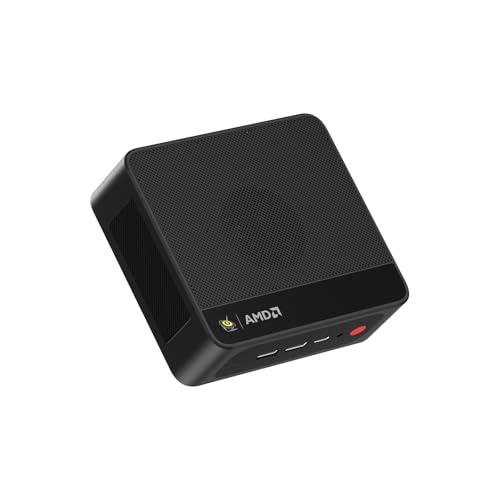
Beelink SER5 Mini PC
Why We Love It

BOSGAME E2neo Home-Office-Mini-PC
Why We Love It

Lenovo (Upgraded) AIO A100 All-in-One Desktop PC
Why We Love It
Beelink SER5 MAX Mini PC
Why We Love It

BOSGAME P3 Lite Office-Gaming-Mini PC
Why We Love It

HP EliteDesk 800 G3 DM/Core i5 6500T 2.5GHz / 8GB RAM /
Why We Love It
BOSGAME E5 Mini PC Windows 11 Pro
Why We Love It

Beelink EQR5 Mini PC
Why We Love It

Lenovo ThinkCentre M93p Tiny USDT Mini PC Intel Core i5
Why We Love It
Quick Pick
10 Best Windows Pc Of 2026
Quick Pick
BOSGAME E5 Mini PC Windows 11 Pro, Ryzen 5300U (Beats 4300U, Up to 3.8GHz), 16GB DDR4 RAM 512GB SSD Micro PC, Triple 4K Display, Dual 2.5G LAN, WiFi 5, BT5.0, Mini Computer for Home, Office
Beelink SER5 Mini PC, AMD Ryzen 5 5500U 6C/12T Up to 4.0GHz, 16GB DDR4 RAM 480GB NVMe SSD, Supports 4K Triple Display, 2.5G LAN, WiFi6 BT5.4, Mini Desktop Computer
BOSGAME E2neo Home-Office-Mini-PC, Ryzen 5 3500U (Βeat 4300U/N150, up to 3.7GHz) 16GB DDR4 RAM 512GB NVME SSD Mini Desktop computer, Dual HDMI2.0, Triple Sreen Display, WiFi5, BT 5.0, RJ45 LAN, WOL
Lenovo (Upgraded) AIO A100 All-in-One Desktop PC – 23.8" FHD IPS Display, Intel N100 (i3 Alternative), 8GB DDR4, 512GB SSD, Wi-Fi 6, Windows 11 Pro, USB Keyboard & Mouse Included – Cloud Grey
Beelink SER5 MAX Mini PC, AMD Ryzen 7 7735U (8C/16T Up to 4.75GHz), 16GB LPDDR5 500GB PCIe4 SSD, Dual M.2 Slot, 2.5G LAN, WiFi6 BT5.4, 4K Triple Display(HDMI/DP/Type-C), Mini PC for Office Gaming Home
BOSGAME P3 Lite Office-Gaming-Mini PC, Ryzen 7 6800H (Up to 4.7GHz), 32GB DDR5 RAM, 1TB PCIe4.0 SSD Mini Computer, USB4/HDMI2.0/DisplayPort, 8K Triple Display, Dual RJ45 LAN, Wi-Fi 6E, BT 5.2 Small PC
HP EliteDesk 800 G3 DM/Core i5 6500T 2.5GHz / 8GB RAM / 256GB SSD/Intel HD Graphics/Windows 10 Pro (Refurbished)
BOSGAME E5 Mini PC Windows 11 Pro, Ryzen 5300U (Beats 4300U/N150, Up to 3.8GHz), 8GB DDR4 RAM 256GB SSD, HDMI/DP/USB-C, Triple 4K Display, Dual 2.5G LAN, WiFi 5, BT5.0, Mini Computer for Home Office
Beelink EQR5 Mini PC, AMD Ryzen 5 5500U 16GB DDR4 480GB SSD, Dual Gigabit LAN, WiFi6 BT5.2, Dual HDMI 4K@60Hz Mini Computer for Office Business Home
Lenovo ThinkCentre M93p Tiny USDT Mini PC Intel Core i5 512GB SSD Hard Drive 16GB RAM Windows 10 Pro MAR Business Desktop PC
Buying Guide: Windows Pc
📋 Table of Contents
1What should I look for when choosing a Windows PC?
Consider your primary use, such as gaming, work, or general browsing, and look for a PC with appropriate performance, display quality, and storage capacity.
2What are the key specifications to check?
Key specs include processor (CPU) speed and generation, RAM size, storage type (SSD vs. HDD), graphics card (for gaming), and display resolution.
3How do I ensure the PC is the right size and compatible with my needs?
Check the form factor (desktop, laptop, all-in-one) and ensure it fits your workspace. Verify compatibility with peripherals, software, and any required ports.
4When should I pay more for a Windows PC?
Pay more if you need high performance for tasks like video editing, gaming, or running multiple applications simultaneously, or if you require a longer warranty and better customer support.
5What are common mistakes to avoid when buying a Windows PC?
Common mistakes include underestimating the need for RAM or storage, ignoring the importance of a good cooling system, and not checking for necessary ports or connectivity options.
How we choose
Our editors are people who genuinely love testing and writing about products. We compare each product's real-world usability and strengths, then distill what matters most into our own "Why We Love It" points — so you get an honest, at-a-glance sense of what counts before you buy.