10 Best Whole Home Wifi Mesh System Of 2026
Whole Home Wifi Mesh System — Reviews, Recommendations & Updated Buying Guide November 2026


TP-Link Deco M4(3-pack) AC1200Mbps Whole Home Mesh WiFi
Why We Love It


TP-Link Deco M4(2-Pack) AC1200Mbps Whole Home Mesh System
Why We Love It

TP-Link Deco X20 AX1800 Whole Home Mesh WiFi 6 System
Why We Love It
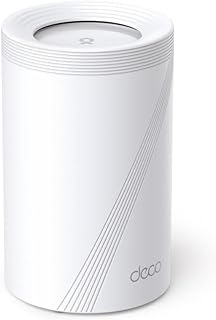
TP-Link Deco BE65
Why We Love It

TP-Link Deco X10 AX1500Mbps Dual Band WiFi 6 Router
Why We Love It

TP-Link Deco X55 AX3000 WiFi 6 Mesh System
Why We Love It

TP-Link Deco S7(3-pack) AC1900Mbps Whole Mesh WiFi System
Why We Love It

TP Link Deco X10
Why We Love It

TP-LINK Deco M4 2-pack wireless router Dual-band (2.4 GHz /
Why We Love It

TP Link Deco E4 AC1200 Advanced Whole Home Mesh Wi Fi System
Why We Love It
Quick Pick
10 Best Whole Home Wifi Mesh System Of 2026
Quick Pick
TP-Link Deco M4(3-pack) AC1200Mbps Whole Home Mesh WiFi System, up to 4000 sq ft Coverage, Qualcomm CPU, Dual-Band WiFi Booster with Gigabit Ports, Compatible with Amazon Echo/Alexa, Parent Control
TP-Link Deco M4(2-Pack) AC1200Mbps Whole Home Mesh System, Seamless & Speedy WiFi Extender, Up to 2800 ft² Coverage, Work with Amazon Alexa, Router and Internet Booster Replacement
TP-Link Deco X20 AX1800 Whole Home Mesh WiFi 6 System, AI-Driven Mesh, Up to 5,800 Sq ft Coverage, 1 GHz Quad-Core CPU, Compatible with Amazon Alexa, With TP-Link HomeShield's kit, Pack of 3, White
TP-Link Deco BE65 | BE9300 Whole Home Mesh WiFi 7 System | 1-Pack
TP-Link Deco X10 AX1500Mbps Dual Band WiFi 6 Router, Home Seamless Roaming | "WiFi Router with 2x2G Ports, Parental Control, AI Driven Mesh, Voice Control, WiFi Dead Zone Killer, MU-MIMO, Easy Setup"
TP-Link Deco X55 AX3000 WiFi 6 Mesh System, Deco X55(3-Pack) | Covers up to 6500 Sq.Ft. , Replaces Wireless Router and Extender, 3 Gigabit ports per unit, supports Ethernet Backhaul
TP-Link Deco S7(3-pack) AC1900Mbps Whole Mesh WiFi System, Dual-Band WiFi Booster with Gigabit Ports, Coverage up to 5,600 ft2, Connect 150 devices, 1.2 GHz CPU, Work Amazon Alexa, Parental Controls
TP Link Deco X10, Wi Fi 6,AX1500 Dual Band Whole Home Mesh System|5 GHz Band Access |Upto 1500 Mbps Gigabit Speed|Coverage Upto 2100 sq.ft.|Connect up to 120 Devices|OFDMA & MU-MIMO
TP-LINK Deco M4 2-pack wireless router Dual-band (2.4 GHz / 5 GHz) Gigabit Ethernet Black,White Deco M4 2-pack, Dual-band (2.4 GHz / 5 GHz), IEEE 802.11ac, 867 Mbit/s, 300 Mbit/s, 867 Mbit/
TP Link Deco E4 AC1200 Advanced Whole Home Mesh Wi Fi System, Covergae upto 4000 Sq. Ft. Parental Controls 3 Pack, White, DECO E4(3-PACK)
Buying Guide: Whole Home Wifi Mesh System
📋 Table of Contents
1How many nodes do I need for my home size?
For homes under 1,500 sq ft, one or two nodes may suffice, but most homes need three to five nodes for full coverage. Larger homes or those with thick walls should aim for at least one node per 500 sq ft to avoid dead zones.
2What’s the difference between Wi-Fi 5 and Wi-Fi 6 mesh systems?
Wi-Fi 6 offers faster speeds, better performance with multiple devices, and improved efficiency in crowded networks. If you have smart home devices, gaming consoles, or stream 4K content, Wi-Fi 6 is worth the upgrade for future-proofing and reliability.
3Should I prioritize speed or coverage when choosing a mesh system?
Coverage is usually more critical than speed for most homes. A system with strong signal reach and good wall penetration ensures consistent connectivity, while speed can be optimized later with a better router or internet plan if needed.
4What’s the benefit of a system with a built-in router?
A mesh system with a built-in router eliminates the need for a separate modem-router combo, simplifying setup and reducing clutter. It also ensures seamless integration and better performance by handling both internet delivery and mesh network coordination in one unit.
5How important is the app experience for managing the mesh system?
A user-friendly app is essential for monitoring coverage, managing nodes, and troubleshooting. Look for apps with real-time maps, signal strength indicators, and easy node setup. Poor app design can make it hard to optimize your network or identify weak spots.
How we choose
Our editors are people who genuinely love testing and writing about products. We compare each product's real-world usability and strengths, then distill what matters most into our own "Why We Love It" points — so you get an honest, at-a-glance sense of what counts before you buy.