10 Best Webcams For Conference Of 2026
Webcams For Conference — Reviews, Recommendations & Updated Buying Guide November 2026


UGREEN 4K/30fps Webcam for PC
Why We Love It


EMEET C980 PRO 3-in-1 1080P Webcam with Microphone and
Why We Love It

AnkerWork B600 Video Bar with Video Conference Camera and
Why We Love It

OBSBOT Meet 2-4K Webcam for PC with 1/2" Sensor
Why We Love It

Angetube 4K AI Webcam
Why We Love It

Logitech BCC950 Video Conference Webcam with Hands-Free
Why We Love It
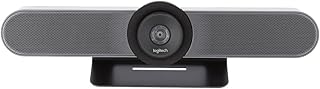
Logitech MeetUp Video Conferencing System
Why We Love It

UGREEN FineCam 4K Webcam
Why We Love It

OBSBOT Tiny 2 Lite 4K Webcam for PC
Why We Love It
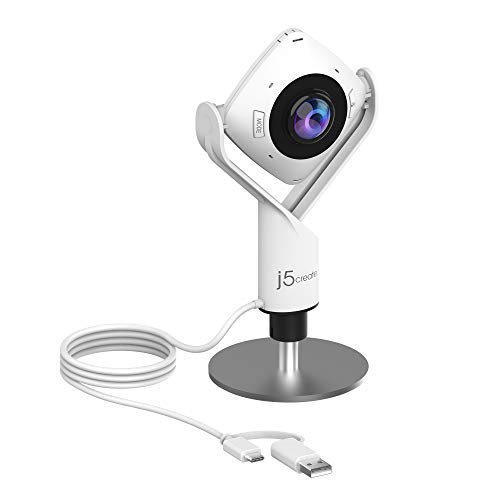
J5create 360 Degree All Around Meeting Webcam
Why We Love It
Quick Pick
10 Best Webcams For Conference Of 2026
Quick Pick
UGREEN 4K/30fps Webcam for PC, Full HD Webcam for Laptop, Clear Stereo Audio Microphone, Auto Light Correction, 70° View Web Cam USB Camera for Live Streaming, Video Calling, Conferences | Support Clear Stereo Audio Microphone, 70° View Web Cam USB Camera for Laptop, Live Streaming, Video Calling, Conferences
EMEET C980 PRO 3-in-1 1080P Webcam with Microphone and Speaker, 60°-98° | Wide Angle Webcam w/ 4 Noise Cancel Mics 2 Speakers, Auto Low Light Correction W/Cover USB Camera for Online Conference/Class
AnkerWork B600 Video Bar with Video Conference Camera and Built-In Light, AI Noise Cancellation, 4-Mic Array, 2K Resolution, Superior Sound, Webcam with Light, Web Camera with Microphone
OBSBOT Meet 2-4K Webcam for PC with 1/2" Sensor, AI Framing & Autofocus, Beauty Mode, Lightweight, HDR, Webcam with Microphone, 60 FPS, Web cam for Streaming, Meeting, Gaming, etc. (Cloud White)
Angetube 4K AI Webcam, PC Camera with AI Tracking, Dual Noise Cancelling Microphone, USB 3.0, Remote Control, Adjustable FOV, Compatible with Zoom Teams Webex
Logitech BCC950 Video Conference Webcam with Hands-Free Calling, HD 1080p, 180° Field of View, Broadband Audio, Motorised Camera, Multidirectional Speaker, for 1-4 People, PC/Mac - Black
Logitech MeetUp Video Conferencing System, Ultra HD 4K/1080p/720p, 3 Microphones/Adjustable Speakers, Wide Field of View 120°, PC/Mac/Laptop/MacBook/Tablet-Black, 4K
UGREEN FineCam 4K Webcam, 1/2.55" Sensor, AI Noise Canceling Microphone | Auto Focus &Face AE, Portrait Mode with Privacy Cover and Tripod, Compatible for PC Mac Streaming Conference OBS Zoom Teams
OBSBOT Tiny 2 Lite 4K Webcam for PC, AI Tracking PTZ Streaming Camera with 1/2" Sensor, Gesture Control, 60 FPS, HDR, Microphones, Web Camera for Desktop Computer, Laptop, Meeting, Video Calls, etc.
j5create 360 Degree All Around Meeting Webcam
Buying Guide: Webcams For Conference
📋 Table of Contents
1What resolution and frame rate are essential for clear video calls?
For professional conferencing, look for at least 1080p resolution at 30fps for smooth, sharp video. 4K webcams (3840x2160) offer extra detail but may require a strong internet connection and compatible software to avoid lag or buffering.
2Should I prioritize a built-in microphone or use an external one?
A built-in mic with noise cancellation is sufficient for small meetings in quiet spaces, but for larger groups or noisy environments, an external mic ensures clearer audio. Check if the webcam supports dual mics for better directional sound capture.
3What field of view is best for group meetings?
A 90° field of view captures a standard desk setup, while 120° or more is better for group meetings or when you need to include more people in the frame. Wider angles may slightly distort edges, so balance coverage with image quality.
4How important is auto-focus and low-light performance?
Auto-focus ensures you stay in sharp view even if you move, and low-light correction helps maintain clarity in dimly lit rooms. Look for models with IR (infrared) sensors or advanced software enhancements for better visibility in darker settings.
5Are USB or wireless connections better for conferencing webcams?
USB webcams offer stable, plug-and-play performance with minimal latency, making them ideal for most users. Wireless options (like Bluetooth or Wi-Fi) provide flexibility but may introduce lag or require additional setup, which can be a drawback in real-time meetings.
How we choose
Our editors are people who genuinely love testing and writing about products. We compare each product's real-world usability and strengths, then distill what matters most into our own "Why We Love It" points — so you get an honest, at-a-glance sense of what counts before you buy.