10 Best Waveshare Smart Home Displays Of 2026
Waveshare Smart Home Displays — Reviews, Recommendations & Updated Buying Guide November 2026


ESP32-S3 AI Smart Speaker Development Board
Why We Love It


KASTWAVE 1.69" IPS LCD Display Module - 240x280 Resolution
Why We Love It

Hosyond 3.5'' 320x480 Touch Screen with ESP32 Module WiFi+BT
Why We Love It

Waveshare ESP32-S3 4.3 Inch LCD Touch Screen Development
Why We Love It

Waveshare 7inch HDMI LCD (H) (with case) 1024x600 Resolution
Why We Love It

Waveshare 2inch LCD Display Module IPS Screen 240×320
Why We Love It

Waveshare 4.2inch E-Ink Display Module Communicating via SPI
Why We Love It

Waveshare 7.5inch E-Ink Raw Display Compatible with
Why We Love It

Waveshare ESP32-S3 AI Smart Speaker Development Board
Why We Love It
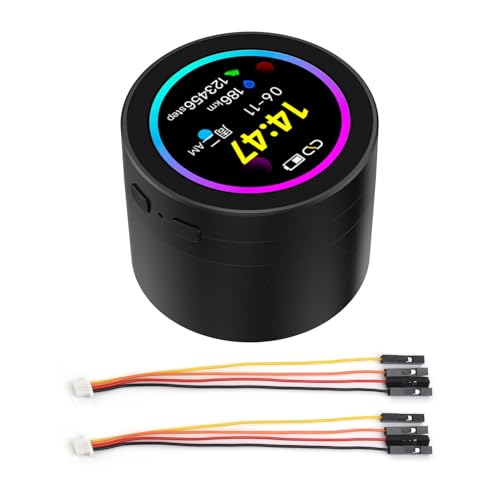
Waveshare ESP32-S3 1.85inch Round LCD Development Board
Why We Love It
Quick Pick
10 Best Waveshare Smart Home Displays Of 2026
Quick Pick
ESP32-S3 AI Smart Speaker Development Board, Supports Dual-MIC Audio Capture, AI Speech Interaction, Surround RGB Lighting, External LCD Displays and Cameras, 2.4GHz Wi-Fi & BlE 5, etc.
KASTWAVE 1.69" IPS LCD Display Module - 240x280 Resolution, 262K Colors, SPI Interface with ST7789V2 Driver, Compatible with Arduino, Raspberry Pi, STM32
Hosyond 3.5'' 320x480 Touch Screen with ESP32 Module WiFi+BT Dual-core ST7796 Driver LCD TFT Smart Display Screen for Arduino IoT
Waveshare ESP32-S3 4.3 Inch LCD Touch Screen Development Board, 800 × 480 65K RGB Display Screen with Case, Support 2.4 GHz Wi-Fi and Bluetooth 5, 32-Bit LX7 Dual-Core Processor
Waveshare 7inch HDMI LCD (H) (with case) 1024x600 Resolution Monitor IPS Capacitive Touch Screen with Toughened Glass Cover Supports Multi Mini PC Raspberry Pi BB Black Banana Pi
waveshare 2inch LCD Display Module IPS Screen 240×320 Resolution with Embedded Controller Communicating via SPI Interface.
Waveshare 4.2inch E-Ink Display Module Communicating via SPI Interface E-Paper with Embedded Controller for Raspberry Pi
Waveshare 7.5inch E-Ink Raw Display Compatible with Raspberry Pi 4B/3B+/3B/2B/B+/A+/Zero/Zero W/WH/Zero 2W Series Boards 800×480 Resolution with SPI Interface Without PCB
Waveshare ESP32-S3 AI Smart Speaker Development Board, Dual Microphones, Noise Reduction, RGB Lighting, External Display & Camera Support
Waveshare ESP32-S3 1.85inch Round LCD Development Board, 360×360, Supports W-F & Blue-T BLE 5, AI Speech, Smart Speaker Box, ESP32 with Display, with Speaker Box
Buying Guide: Waveshare Smart Home Displays
📋 Table of Contents
1What screen size is best for my space and use?
For a living room or kitchen, 10-15 inches is ideal for voice commands and video calls. Smaller 7-8 inch models work well in tight spaces like a countertop or desk, while larger 20+ inch displays are better for group use or media streaming.
2How important is a built-in camera and microphone?
If you plan to use video calls or security features, a high-resolution camera and noise-canceling mic are essential. Some models offer privacy shutters or disable options for added security when not in use.
3What smart assistant is best for a smart display?
Both major voice assistants work well, but choose based on your existing ecosystem. If you already use one extensively, it will offer smoother integration, faster response, and better access to compatible smart home devices.
4Can I use third-party apps and services?
Most smart displays support popular apps like YouTube, Spotify, and messaging platforms. Check if the model you're considering allows sideloading or has a store with the apps you need for a more personalized experience.
5How do I ensure good connectivity and performance?
Look for dual-band Wi-Fi (2.4GHz and 5GHz) and Bluetooth 5.0 for stable connections. A model with at least 2GB RAM and 16GB storage will handle multitasking and app switching smoothly, especially for streaming and voice commands.
How we choose
Our editors are people who genuinely love testing and writing about products. We compare each product's real-world usability and strengths, then distill what matters most into our own "Why We Love It" points — so you get an honest, at-a-glance sense of what counts before you buy.