10 Best Wacom Graphic Tablets Of 2026
Wacom Graphic Tablets — Reviews, Recommendations & Updated Buying Guide November 2026


Wacom Intuos S tavoletta Grafica 2540 lpi (linee per
Why We Love It


Wacom Intuos M Black–with Pen
Why We Love It

Wacom Intuos Medium
Why We Love It
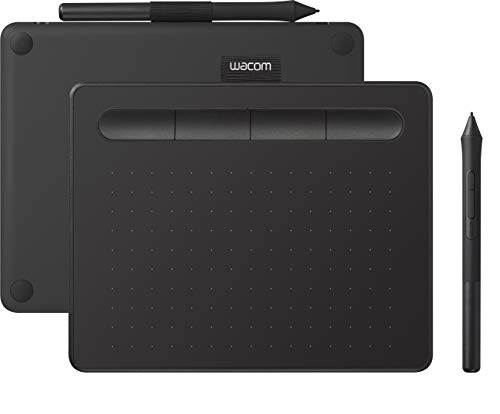
Wacom Intuos CTL-4100/K0-CX Digital Graphics Pen Tablet for
Why We Love It

Wacom One Medium, Pen Tablet
Why We Love It

Wacom Intuos Pro S (EN DE RU SV PL)
Why We Love It

Wacom Intuos Pro Large
Why We Love It

Wacom One 14, Pen Display
Why We Love It

Wacom Intuos Small Bluetooth Graphics Drawing Tablet
Why We Love It

Wacom Intuos S BLT Black
Why We Love It
Quick Pick
10 Best Wacom Graphic Tablets Of 2026
Quick Pick
Wacom Intuos S tavoletta Grafica 2540 lpi (linee per pollice) 152 x 95 mm USB/Bluetooth Nero
Wacom Intuos M Black–with Pen, Stylus Battery-Free & Pressure-Sensitive, Compatible with Windows, Mac & Android, Perfect Tablet for Drawing, Graphics or Remote Working | Graphics tablet (PC required), Wacom natural pencil experience and precise control for drawing, painting and editing photos
Wacom Intuos Medium, the Innovative Tablet Incl. Pro Pen 3, Compact and Lightweight-a Versatile Choice for Illustrators, Designers, and Photo Editors | Graphics tablet (PC required), compact, ultra-thin, pen-on-paper feel for seamless workflow, Japanese technology
Wacom Intuos CTL-4100/K0-CX Digital Graphics Pen Tablet for Drawing (Black) Small (7.8-inch x 6.3-inch) | Battery Free Pen with 4096 Pressure | Compatible with Windows, Mac & Android
Wacom One Medium, Pen Tablet, incl. battery-free Pen with tilt recognition | Drawing Tablet (PC required), slim, lightweight with trusted pen technology for natural drawing, writing and photo editing
Wacom Intuos Pro S (EN DE RU SV PL)
Wacom Intuos Pro Large - Innovative Graphics Tablet Including Wacom Pro Pen 3 Large Work Surface for Video Editing, 3D Modelling & Animation - Maximum Precision & Control for Professionals
Wacom One 14, Pen Display, Full HD, incl. battery-free Standard Pen | Drawing Tablet (PC necessary), Pen-on-paper feel with anti-glare etched glass, lightweight FHD with Japanese technology.
Wacom Intuos Small Bluetooth Graphics Drawing Tablet, Portable for Teachers, Students and Creators, 4 Customizable ExpressKeys, Compatible with Chromebook Mac OS Android and Windows - Black
Wacom Intuos S BLT Black - Manga Edition
Buying Guide: Wacom Graphic Tablets
📋 Table of Contents
1What's the difference between a pen display and a pen tablet?
A pen tablet has no screen—you draw on a surface while looking at your monitor, which takes practice to get used to. A pen display has a built-in screen where you draw directly, making it more intuitive but also more expensive and heavier.
2Which Wacom size should I buy—small, medium, or large?
Small tablets work for detailed work and tight spaces, while medium offers a good balance for most creative tasks. Large tablets suit digital painting and animation where you need bigger hand movements, though they take up desk space.
3What's the difference between Wacom's product lines?
Wacom One is budget-friendly for beginners, Wacom Pen Display offers better screens at mid-range prices, and Wacom Pro models deliver professional-grade pressure sensitivity and colour accuracy. Choose based on your skill level and how much precision your work demands.
4How important are pressure levels and tilt support?
Pressure levels matter if you use brushes that respond to drawing force—8,192 levels is standard now and works well for most people. Tilt support helps if you paint or sketch with natural brush strokes, though it's less critical for graphic design or photo editing.
5Do I need Wacom's latest model or is an older one fine?
Older Wacom models work just as well for most tasks; the newer versions mainly offer slightly better screens or faster processors. Skip the latest if your budget is tight—focus instead on getting the right size and type for your workflow.
How we choose
Our editors are people who genuinely love testing and writing about products. We compare each product's real-world usability and strengths, then distill what matters most into our own "Why We Love It" points — so you get an honest, at-a-glance sense of what counts before you buy.