10 Best Vlogging Kits For Android Of 2026
Vlogging Kits For Android — Reviews, Recommendations & Updated Buying Guide November 2026

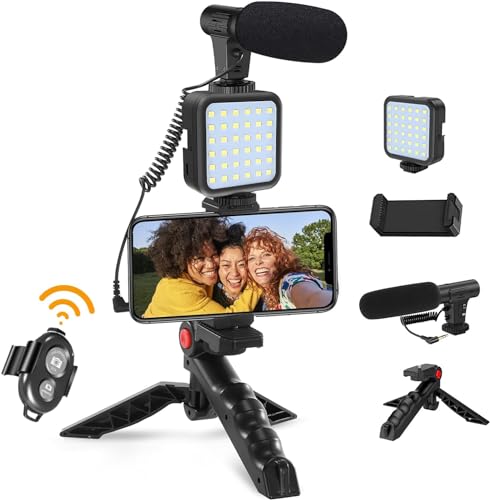
Vlogging Kit, YouTube Kit for iPhone & Android
Why We Love It


TERRIFI Phone Vlog Video Kit
Why We Love It

Smartphone Video Kit
Why We Love It

Vlogging Kit for iPhone/Android
Why We Love It

Fitto VK-A10 All-In-1 Vlogging Kit with Tripod & Microphone
Why We Love It

Belkin Stage Creator Kit with Tripod Stand
Why We Love It

Portable 3-Axis Gimbal Stabilizer for Smartphone
Why We Love It

Vlogging Kit for iPhone
Why We Love It

71" Content Creator Essentials Vlogging Kit
Why We Love It

YAyusi Magnetic Vlogging Kit for iPhone/Android
Why We Love It
Quick Pick
10 Best Vlogging Kits For Android Of 2026
Quick Pick
Vlogging Kit, YouTube Kit for iPhone & Android, Compatible Video Vlog Kit with Microphone LED Light Tripod, Remote Control, for Instagram YouTube Recording Facebook Live(Not Including Batteries)
TERRIFI Phone Vlog Video Kit, Smartphone Vlogging Kit for iPhone & Android - Youtube Starter Kit, Podcast equipment Includes 3.5 mm audio jack, Tripod, Shotgun Mic, LED Fill Light, Holder
Smartphone Video Kit - Vlogging & Youtuber Kit with Microphone, Light, 50" Extendable Tripod, Phone Clip & Remote Control, Compatible with iPhone/Smartphones/Cameras
Vlogging Kit for iPhone/Android, 67" Selfie Stick Tripod for Wireless Remote, Adjustable Phone Tripod for TikTok/YouTube Starter Content Creator Essentials Kit
Fitto VK-A10 All-In-1 Vlogging Kit with Tripod & Microphone for YouTube & Social Media
Belkin Stage Creator Kit with Tripod Stand, Magnetic Phone Mount, Dual Wireless Microphones, Portable Content & Vlogging Setup for iPhone, Android, TikTok, YouTube, Streaming, Instagram Creators
Portable 3-Axis Gimbal Stabilizer for Smartphone, Foldable Gimbal Gimble, Face Trakcing Stabilizer for Video Recording, for Apple/Android/Huawei/Samsung, TikTok YouTube Vlogging Kit
Vlogging Kit for iPhone,YouTube Starter Kit,Youtuber Kit Beginner Content Creator Essentials Kit for Android Phone,Vlogging Camera Kit with Extendable Tripod/Wireless Microphone/RGB Fill-in Light
71" Content Creator Essentials Vlogging Kit - 2 Lights & 2 Mics
yAyusi Magnetic Vlogging Kit for iPhone/Android, 71" Auto Face Tracking Tripod for iPhone with Light, Magnetic Microphone/Remote Control, Content Creator Essentials Starter Kit for TikTok and YouTube
Buying Guide: Vlogging Kits For Android
📋 Table of Contents
1What resolution and frame rate should the camera support for quality vlogs?
Look for at least 1080p at 30fps for smooth, clear video, but 4K at 24-30fps is ideal for higher production value. Frame rate matters more than resolution for action or movement, so 60fps in 1080p is better for shaky or fast scenes.
2Do I need a vlogging kit with a built-in microphone or should I get an external one?
Built-in mics are convenient but often lack clarity. For clear audio, choose a kit with a directional external mic that reduces background noise and picks up your voice from 1-2 meters away, especially in windy or noisy environments.
3What type of phone mount is best for vlogging on an Android device?
A flexible arm mount with a phone clamp and rotating head gives the most control for positioning your phone. Avoid suction or magnetic mounts if you're on the move, as they can be unstable on uneven surfaces or during motion.
4How important is a pop filter in a vlogging kit for Android users?
A pop filter is essential for reducing plosive sounds like 'p' and 'b' that cause audio distortion. It's especially useful for vloggers who speak directly into the mic and want to maintain a professional sound without post-editing.
5What accessories should I look for in a complete vlogging kit for Android?
A good kit should include a tripod, external mic, phone mount, pop filter, and a carrying case. Some also include a ring light or selfie stick, but prioritize the essentials first to avoid clutter and unnecessary costs.
How we choose
Our editors are people who genuinely love testing and writing about products. We compare each product's real-world usability and strengths, then distill what matters most into our own "Why We Love It" points — so you get an honest, at-a-glance sense of what counts before you buy.