10 Best Video Switchers With Screen Of 2026
Video Switchers With Screen — Reviews, Recommendations & Updated Buying Guide November 2026


FoMaKo 4K HDMI Video Mixer Switcher
Why We Love It

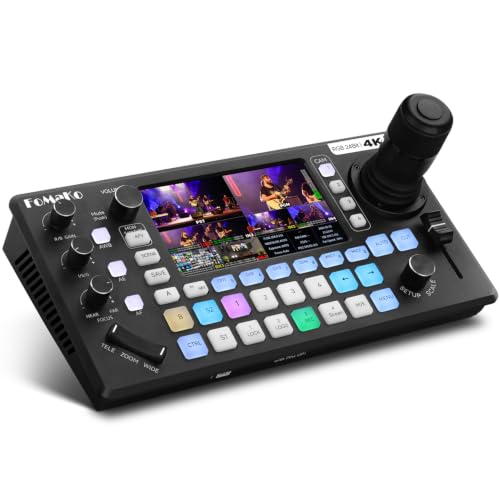
FoMaKo 4K HDMI Multi-Camera Streaming Video Mixer Switcher
Why We Love It

FEELWORLD L4 Multi-camera Video Mixer Switcher 10.1"Touch
Why We Love It

OSEE GoStream Deck HDMI/USB Live Streaming Video Switcher
Why We Love It

Mixer Plus Compact Video Switcher 4 HDMI with 4''Built-in
Why We Love It

UGREEN 4K@60 Hz HDMI Switch
Why We Love It

YoloLiv Instream All-in-One Vertical Live Video Streaming
Why We Love It

Roland V-8HD HD Video Switcher
Why We Love It

RGBlink Mini-pro V3 Video Mixer Switcher with 4 x 4K HDMI
Why We Love It

KVM USB C Two-Way Switch 1X2/2X1 USB 3.1 Splitter Data Video
Why We Love It
Quick Pick
10 Best Video Switchers With Screen Of 2026
Quick Pick
FoMaKo 4K HDMI Video Mixer Switcher, 10.1 Inch FHD LCD Screen, 5-CH Live Streaming Switcher, 4K 60FPS Input, 1080p 60FPS Output, Support PTZ Controller, SDI + HDMI Video Switcher,M6(NDI Upgradeable)
FoMaKo 4K HDMI Multi-Camera Streaming Video Mixer Switcher, Integrated 4D Joystick PTZ Camera Controller, 5.5" LCD Screen, XLR Audio and USB/SD Recording,4K 60FPS Input, 1080p 60FPS Output,KC800
FEELWORLD L4 Multi-camera Video Mixer Switcher 10.1"Touch Screen USB3.0 Fast Streamin
OSEE GoStream Deck HDMI/USB Live Streaming Video Switcher
Mixer Plus Compact Video Switcher 4 HDMI with 4''Built-in Screen, Portable Live Streaming Switcher for Multi-Camera, Online Class, Event, YouTube, OBS, Zoom
UGREEN 4K@60 Hz HDMI Switch, Bidirectional, 2-in-1-out/1-in-2-out | 3D, Compatible with Xbox, PS4, PS5, Blu-ray Players, Roku, TV Sticks, HDTVs and Monitors
YoloLiv Instream All-in-One Vertical Live Video Streaming Encoder Switcher Recorder Monitor for Instagram Tiktok
Roland V-8HD HD Video Switcher
RGBlink Mini-pro V3 Video Mixer Switcher with 4 x 4K HDMI Inputs, Dual HDMI/USB3.0 Outputs, PTZ Controller with 2.1-Inch On-Board Monitor, Ideal for Live Streaming, Worship, Gamers, and Live Events
KVM USB C Two-Way Switch 1X2/2X1 USB 3.1 Splitter Data Video Switcher 8K @30Hz PD 100W for PC Monitor Mobile Phone
Buying Guide: Video Switchers With Screen
📋 Table of Contents
1What input types should I look for in a video switcher with screen?
Look for at least HDMI and SDI inputs to connect cameras, laptops, or other video sources. Some models also support USB or analog inputs, which can be useful for older devices or webcams. The more input types you have, the more flexible your setup can be for different sources.
2How important is the built-in screen size and resolution?
A screen of at least 7 inches with HD resolution (1080p or higher) is ideal for previewing and switching between sources clearly. Larger screens (10-12 inches) offer better visibility in bright environments, while smaller screens may be sufficient for compact or portable setups.
3What are the key differences between live and pre-recorded switching?
Live switching requires real-time input from multiple sources and is best for events or broadcasts. Pre-recorded switching allows for editing and timing, making it suitable for video production. Choose a switcher that supports your workflow, whether it's live streaming or post-production editing.
4How many video sources can I realistically connect at once?
Most entry-level switchers support 4-8 inputs, while professional models can handle 12 or more. Consider how many cameras, laptops, or other devices you plan to use simultaneously. More inputs mean fewer switches and a smoother live production experience.
5Are built-in effects like transitions and keying worth the extra cost?
Yes — built-in effects like DVE transitions, chroma keying, and picture-in-picture can save time and money by eliminating the need for external software or hardware. If you plan to do live broadcasts or multi-camera shoots, these features can significantly enhance your production quality.
How we choose
Our editors are people who genuinely love testing and writing about products. We compare each product's real-world usability and strengths, then distill what matters most into our own "Why We Love It" points — so you get an honest, at-a-glance sense of what counts before you buy.