10 Best Video Switchers For Live Streaming Of 2026
Video Switchers For Live Streaming — Reviews, Recommendations & Updated Buying Guide November 2026


Blackmagic Design ATEM Mini Pro HDMI Live Stream Switcher
Why We Love It


FoMaKo 4K HDMI Video Mixer Switcher
Why We Love It

OSEE GoStream Deck HDMI/USB Live Streaming Video Switcher
Why We Love It
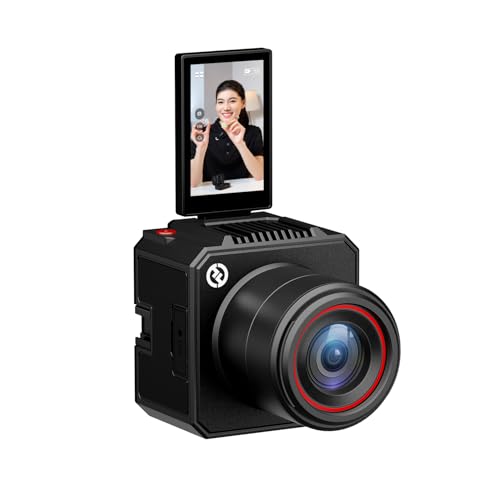
Hollyland VenusLiv Air Live Streaming Camera
Why We Love It

RØDE RØDECaster Video S
Why We Love It
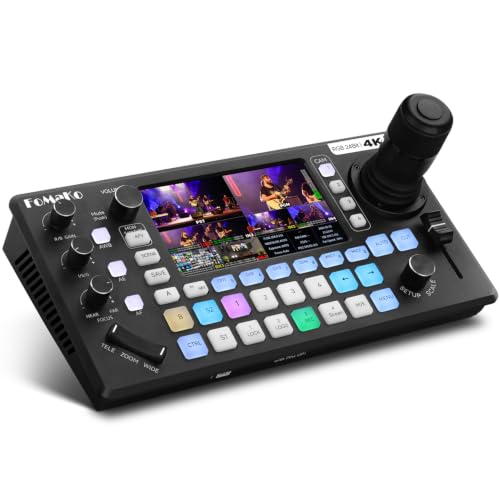
FoMaKo 4K HDMI Multi-Camera Streaming Video Mixer Switcher
Why We Love It

Osee GoStream Deck HDMI Pro Live Streaming Multi Camera
Why We Love It

Mixer Plus Compact Video Switcher 4 HDMI with 4''Built-in
Why We Love It

Blackmagic Design Atem Mini Pro HDMI Live Stream Switcher
Why We Love It

Osee GoStream Deck 4xHDMI Switcher
Why We Love It
Quick Pick
10 Best Video Switchers For Live Streaming Of 2026
Quick Pick
Blackmagic Design ATEM Mini Pro HDMI Live Stream Switcher
FoMaKo 4K HDMI Video Mixer Switcher, 10.1 Inch FHD LCD Screen, 5-CH Live Streaming Switcher, 4K 60FPS Input, 1080p 60FPS Output, Support PTZ Controller, SDI + HDMI Video Switcher,M6(NDI Upgradeable)
OSEE GoStream Deck HDMI/USB Live Streaming Video Switcher
Hollyland VenusLiv Air Live Streaming Camera,1/1.3" CMOS/F1.05 Custom Lens,4K30p/UVC/HDMI Video Output,Built for 24/7 Streaming,AI Tuning/Green Screen/Image Overlay/Skin Beauty/Color Correction
RØDE RØDECaster Video S – Podcast Video Switcher and Audio Interface –
FoMaKo 4K HDMI Multi-Camera Streaming Video Mixer Switcher, Integrated 4D Joystick PTZ Camera Controller, 5.5" LCD Screen, XLR Audio and USB/SD Recording,4K 60FPS Input, 1080p 60FPS Output,KC800
osee GoStream Deck HDMI Pro Live Streaming Multi Camera Video Mixer Switcher
Mixer Plus Compact Video Switcher 4 HDMI with 4''Built-in Screen, Portable Live Streaming Switcher for Multi-Camera, Online Class, Event, YouTube, OBS, Zoom
Blackmagic Design Atem Mini Pro HDMI Live Stream Switcher (Authorized Reseller)
Osee GoStream Deck 4xHDMI Switcher, Video Mixer Live
Buying Guide: Video Switchers For Live Streaming
📋 Table of Contents
1How many input sources do I need for my live stream?
Most live streams use 3-5 sources like cameras, phones, or screens, so look for a switcher with at least 4 inputs. More inputs let you add graphics, social feeds, or backup cameras without extra hardware.
2What input types should I prioritize?
HDMI is standard for cameras and laptops, while USB is better for webcams or smartphones. Some switchers also support SDI for professional setups. Match the inputs to your gear to avoid adapters or signal loss.
3Do I need built-in streaming or just switching?
Integrated streaming saves you a capture card and software setup, but requires a stable internet connection. If you prefer more control, choose a switcher that outputs to a computer for streaming via OBS or similar software.
4What resolution and frame rate should I look for?
1080p at 30fps is standard for most live streams, but 4K or 60fps is better for high-end production. Ensure the switcher supports your camera’s output and streaming platform’s requirements to avoid downscaling or lag.
5Are key features like chroma key and audio mixing essential?
Chroma key (green screen) and audio mixing are must-haves for polished streams, especially for interviews or virtual sets. Entry-level switchers often lack these, so check if they’re included or available via add-ons or software.
How we choose
Our editors are people who genuinely love testing and writing about products. We compare each product's real-world usability and strengths, then distill what matters most into our own "Why We Love It" points — so you get an honest, at-a-glance sense of what counts before you buy.