10 Best Video Mixers For Live Streaming Of 2026
Video Mixers For Live Streaming — Reviews, Recommendations & Updated Buying Guide November 2026


Blackmagic Design ATEM Mini Pro HDMI Live Stream Switcher
Why We Love It


FoMaKo 4K HDMI Video Mixer Switcher
Why We Love It
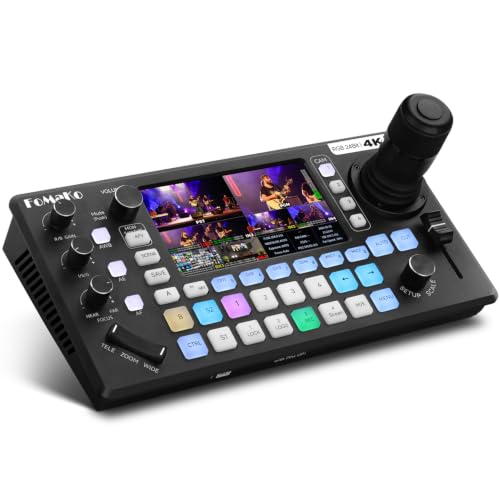
FoMaKo 4K HDMI Multi-Camera Streaming Video Mixer Switcher
Why We Love It

RØDE RØDECaster Video S
Why We Love It

Osee GoStream Deck HDMI Pro Live Streaming Multi Camera
Why We Love It
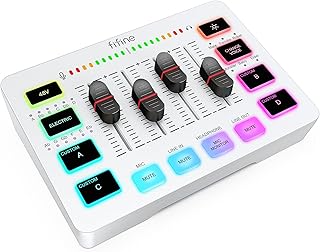
FIFINE AmpliGame SC3 White Audio Mixer for
Why We Love It

Osee GoStream Deck 4xHDMI Switcher
Why We Love It

SINWE Podcast Equipment Bundle
Why We Love It

Mixer Plus Compact Video Switcher 4 HDMI with 4''Built-in
Why We Love It

RGBlink mini-ISO Video Switcher
Why We Love It
Quick Pick
10 Best Video Mixers For Live Streaming Of 2026
Quick Pick
Blackmagic Design ATEM Mini Pro HDMI Live Stream Switcher
FoMaKo 4K HDMI Video Mixer Switcher, 10.1 Inch FHD LCD Screen, 5-CH Live Streaming Switcher, 4K 60FPS Input, 1080p 60FPS Output, Support PTZ Controller, SDI + HDMI Video Switcher,M6(NDI Upgradeable)
FoMaKo 4K HDMI Multi-Camera Streaming Video Mixer Switcher, Integrated 4D Joystick PTZ Camera Controller, 5.5" LCD Screen, XLR Audio and USB/SD Recording,4K 60FPS Input, 1080p 60FPS Output,KC800
RØDE RØDECaster Video S – Podcast Video Switcher and Audio Interface –
osee GoStream Deck HDMI Pro Live Streaming Multi Camera Video Mixer Switcher
FIFINE AmpliGame SC3 White Audio Mixer for Gaming/Video/Podcast Recording | Streaming RGB PC Mixer, XLR Microphone Interface, Individual Control, Volume Fader, Mute Button, 48V Phantom Power
Osee GoStream Deck 4xHDMI Switcher, Video Mixer Live
SINWE Podcast Equipment Bundle, Condenser Microphone with Tripod Stand and Professional Audio Mixer for Studio Recording Vocals, Voice Overs, Streaming Broadcast and YouTube Videos
Mixer Plus Compact Video Switcher 4 HDMI with 4''Built-in Screen, Portable Live Streaming Switcher for Multi-Camera, Online Class, Event, YouTube, OBS, Zoom
RGBlink mini-ISO Video Switcher, SDI & HDMI Video Mixer for Live Streaming
Buying Guide: Video Mixers For Live Streaming
📋 Table of Contents
1How many input channels do I actually need for live streaming?
For basic setups, 4-6 inputs (cameras, screens, microphones) are usually enough. If you plan to layer multiple video sources or include graphics, look for 8 or more inputs to avoid limitations during production.
2What resolution and frame rate should the mixer support?
A minimum of 1080p at 60fps is ideal for crisp, smooth live streams. Some mixers support 4K, but ensure your cameras and output platform can handle it to avoid unnecessary complexity or dropped frames.
3Do I need a hardware mixer or can I use software instead?
Hardware mixers offer faster switching and tactile controls, which are great for live events. Software mixers are more flexible and cost-effective for solo creators, but may require a powerful computer to run smoothly.
4What connectivity options are essential for live streaming?
Look for HDMI and SDI inputs for cameras, USB for webcams, and at least one HDMI or USB output for your stream. Ethernet or USB-C to Ethernet adapters help ensure a stable internet connection for your stream.
5Are built-in effects like transitions and keying worth it?
Yes — built-in transitions (dip, wipe, mix) and chroma keying save time and reduce the need for post-production. For basic streams, a few preset effects are enough, but advanced users may want customizable options.
How we choose
Our editors are people who genuinely love testing and writing about products. We compare each product's real-world usability and strengths, then distill what matters most into our own "Why We Love It" points — so you get an honest, at-a-glance sense of what counts before you buy.