10 Best Video Mixer Switchers Of 2026
Video Mixer Switchers — Reviews, Recommendations & Updated Buying Guide November 2026


Blackmagic Design ATEM Mini Pro HDMI Live Stream Switcher
Why We Love It


FoMaKo 4K HDMI Video Mixer Switcher
Why We Love It
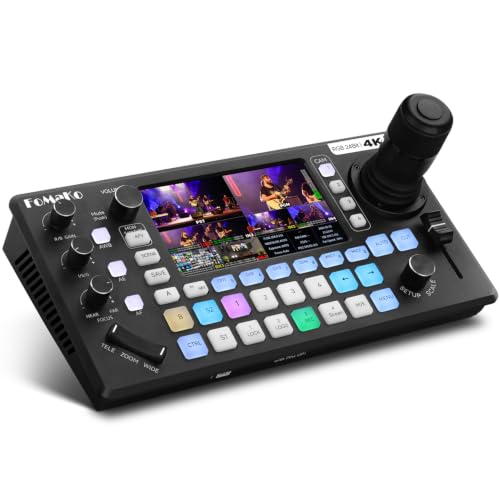
FoMaKo 4K HDMI Multi-Camera Streaming Video Mixer Switcher
Why We Love It

RØDE RØDECaster Video S
Why We Love It

FEELWORLD L4 Multi-camera Video Mixer Switcher 10.1"Touch
Why We Love It

Osee GoStream Deck 4xHDMI Switcher
Why We Love It

Osee GoStream Deck HDMI Pro Live Streaming Multi Camera
Why We Love It

RGBlink mini-ISO Video Switcher
Why We Love It

Mixer Plus Compact Video Switcher 4 HDMI with 4''Built-in
Why We Love It

Osee GoStream Duet 4xSDI/HDMI Switcher
Why We Love It
Quick Pick
10 Best Video Mixer Switchers Of 2026
Quick Pick
Blackmagic Design ATEM Mini Pro HDMI Live Stream Switcher
FoMaKo 4K HDMI Video Mixer Switcher, 10.1 Inch FHD LCD Screen, 5-CH Live Streaming Switcher, 4K 60FPS Input, 1080p 60FPS Output, Support PTZ Controller, SDI + HDMI Video Switcher,M6(NDI Upgradeable)
FoMaKo 4K HDMI Multi-Camera Streaming Video Mixer Switcher, Integrated 4D Joystick PTZ Camera Controller, 5.5" LCD Screen, XLR Audio and USB/SD Recording,4K 60FPS Input, 1080p 60FPS Output,KC800
RØDE RØDECaster Video S – Podcast Video Switcher and Audio Interface –
FEELWORLD L4 Multi-camera Video Mixer Switcher 10.1"Touch Screen USB3.0 Fast Streamin
Osee GoStream Deck 4xHDMI Switcher, Video Mixer Live
osee GoStream Deck HDMI Pro Live Streaming Multi Camera Video Mixer Switcher
RGBlink mini-ISO Video Switcher, SDI & HDMI Video Mixer for Live Streaming
Mixer Plus Compact Video Switcher 4 HDMI with 4''Built-in Screen, Portable Live Streaming Switcher for Multi-Camera, Online Class, Event, YouTube, OBS, Zoom
Osee GoStream Duet 4xSDI/HDMI Switcher, Live Video Mixer
Buying Guide: Video Mixer Switchers
📋 Table of Contents
1How many input channels do I actually need?
For basic setups, 4-8 inputs are sufficient for cameras, microphones, and media players. Larger events or multi-camera productions may require 12+ inputs. Choose based on how many sources you plan to mix simultaneously.
2What’s the difference between SDI and HDMI inputs?
SDI supports longer cable runs (up to 300m with SDI 6G) and is preferred for professional environments, while HDMI is common in consumer and semi-pro setups. SDI is more reliable for live broadcasts and studio use.
3Should I prioritize 4K support or frame rate flexibility?
If you're producing high-resolution content, look for 4K at 30fps or 1080p at 60fps. Frame rate flexibility is key for smooth slow-motion or fast-action footage, so check if the switcher supports variable frame rates across all inputs.
4What kind of transitions are essential for my use?
Basic cuts and mixes are standard, but for dynamic content, look for wipe, DVE, and key transitions. Advanced models offer 3D transitions and chroma keying for professional overlays and virtual sets.
5Are built-in audio mixing features worth it?
Yes — a switcher with 4+ audio channels, level control, and ducking can save you from needing a separate mixer. Ensure it supports balanced inputs and has a clear audio meter for live events or multi-microphone setups.
How we choose
Our editors are people who genuinely love testing and writing about products. We compare each product's real-world usability and strengths, then distill what matters most into our own "Why We Love It" points — so you get an honest, at-a-glance sense of what counts before you buy.