10 Best Vertical Wireless Mouse Ergonomic Of 2026
Vertical Wireless Mouse Ergonomic — Reviews, Recommendations & Updated Buying Guide November 2026


Logitech Lift Vertical Ergonomic Mouse
Why We Love It


UGREEN Vertical Wireless Mouse BT5.4/2.4G Ergonomic 4000DPI
Why We Love It

UGREEN Wireless Ergonomic Vertical Mouse
Why We Love It

TECKNET Ergonomic Mouse
Why We Love It

Logitech MX Vertical Ergonomic Mouse
Why We Love It
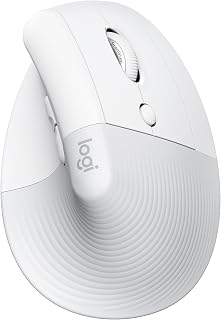
Logitech Lift Vertical Ergonomic Mouse
Why We Love It

TECKNET Ergonomic Mouse, Wireless Bluetooth Vertical Mouse
Why We Love It

UGREEN Wireless Trackball Mouse
Why We Love It

Ergonomic Mouse
Why We Love It

Perixx PERIMICE-713L, Left Handed Wireless Vertical Mouse
Why We Love It
Quick Pick
10 Best Vertical Wireless Mouse Ergonomic Of 2026
Quick Pick
Logitech Lift Vertical Ergonomic Mouse, Wireless, Bluetooth or Logi Bolt USB Receiver, Quiet clicks, 4 Buttons, Compatible with Windows/macOS/iPadOS, Laptop, PC-Graphite | Wireless, Bluetooth or Logi Bolt, Silent clicks, 4 buttons, Windows/macOS/iPadOS, Laptop, PC - Grey
UGREEN Vertical Wireless Mouse BT5.4/2.4G Ergonomic 4000DPI 6-Button | Vertical wireless mouse, Bluetooth5.4/2.4G, ergonomic, 4000 DPI, 6 buttons, wrist relief, for PC Mac
UGREEN Wireless Ergonomic Vertical Mouse, 12-Month Battery Life, 6 Buttons | 57° Ergonomic Angle, 4000DPI Optical Tracking, 4 Adjustable DPI Levels Wireless Silent Mouse for Laptop, Desktop, Macbook
TECKNET Ergonomic Mouse, Wireless Rechargeable Vertical Mouse for Carpal Tunnel Right Hand, 4800 DPI 5 Adjustable Levels 2.4GHz with USB-A Receiver, Silent Click, for Laptop, PC (Rechargeable)
Logitech MX Vertical Ergonomic Mouse, Multi-Device, Bluetooth or 2.4GHz Wireless with USB Unifying Receiver, 4000 DPI Optical Tracking, 4 Buttons, Fast Charging, Laptop/PC/Mac/iPad OS- Black
Logitech Lift Vertical Ergonomic Mouse, Wireless, Bluetooth or Logi Bolt USB Receiver, Quiet clicks, 4 Buttons, Compatible with Windows/macOS/iPadOS, Laptop, PC-White | Wireless, Bluetooth, Logi Bolt USB Receiver, Silent Clicks, 4 Buttons, Windows/macOS/iPadOS, Laptop, PC - White
TECKNET Ergonomic Mouse, Wireless Bluetooth Vertical Mouse, 4800 DPI Optical Tracking, 6 Adjustable DPI, Quiet Clicks, 2.4GHz with USB A Receiver, 6 Buttons, Wide Compatibility (Single-mode)
UGREEN Wireless Trackball Mouse, Rechargeable Ergonomic Mouse,Bluetooth&USB | Smooth High-speed Scroll Wheel, Finger Control, 40dB Silent, Customisable Button, for Office/Business Trip, Laptop/Desktop
Ergonomic Mouse, Vertical Mouse Wireless Mouse 6 Buttons Optical Carpal Tunnel Mouse, 5 Adjustment Levels, Up to 4800DPI Silent Click Mouse Office Mouse for Laptop, Desktop, Carpal Tunnel Relief
perixx PERIMICE-713L, Left Handed Wireless Vertical Mouse, 6 Buttons Design, 3 Level DPI, Power Switch
Buying Guide: Vertical Wireless Mouse Ergonomic
📋 Table of Contents
1What size and weight should I look for in a vertical wireless mouse?
Opt for a mouse that weighs between 80-120 grams and has a compact footprint to reduce hand fatigue. A slightly heavier mouse can offer more stability, but it should still feel balanced in your palm for long use.
2Does wireless connectivity matter for ergonomic performance?
Yes — a mouse with a reliable 2.4 GHz or Bluetooth connection ensures smooth tracking and responsiveness, which is crucial for maintaining a natural hand position. Avoid models with lag or interference that could disrupt your workflow.
3What’s the difference between vertical and traditional mouse designs?
Vertical mice are shaped to align your wrist in a neutral position, reducing strain, while traditional mice often force a bent wrist. Vertical designs typically have a 60-70 degree angle to promote a more natural grip and posture.
4Are scroll wheels and buttons important for ergonomics?
Absolutely — look for a mouse with a scroll wheel that’s easy to reach and buttons placed for a thumb or index finger grip. Customizable buttons can reduce repetitive motions and help maintain a relaxed hand position.
5What battery life should I expect from a vertical wireless mouse?
Most models offer 1-3 months of use on a single charge, depending on usage. Look for mice with low-power Bluetooth or sleep modes to extend battery life, and ensure the charging method (USB-C or proprietary) is convenient for you.
How we choose
Our editors are people who genuinely love testing and writing about products. We compare each product's real-world usability and strengths, then distill what matters most into our own "Why We Love It" points — so you get an honest, at-a-glance sense of what counts before you buy.