10 Best Vcom Thunderbolt Cables Of 2026
Vcom Thunderbolt Cables — Reviews, Recommendations & Updated Buying Guide November 2026


VCOM USB 4 Cable for Thunderbolt 4 (4 FT) - 100W
Why We Love It


VCOM USB4 Cable forThunderbolt 4 Cable 2m
Why We Love It

VCOM 80Gbps USB4 Cable for Thunderbolt 5
Why We Love It
VCOM USB4 Cable (1.2m) with 40Gbps Data Transfer
Why We Love It

CABLEDECONN Thunderbolt 5 240W Extension 80Gbps Super High
Why We Love It

Apple Thunderbolt 5 (USB‑C) Pro Cable (1m)
Why We Love It

Thunderbolt 5 Extension Cable 1m USB 4 Super High Speed
Why We Love It

Belkin Thunderbolt 4 Cable (1M
Why We Love It

CableDeconn USB4 Thunderbolt 4 Extension Cable 1M Elbow 240W
Why We Love It
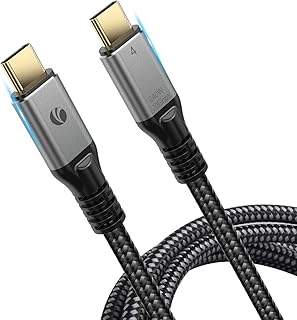
VCOM USB4 Cable for Thunderbolt 4 2m
Why We Love It
Quick Pick
10 Best Vcom Thunderbolt Cables Of 2026
Quick Pick
VCOM USB 4 Cable for Thunderbolt 4 (4 FT) - 100W, 40Gbps Data, 8K@30Hz 5K@60Hz or Dual 4K Video - Compatible With Thunderbolt 3/4 and USB-C for MacBooks, Hub, Docking, and More
VCOM USB4 Cable forThunderbolt 4 Cable 2m, 20Gbps with 100W Charging and 8K@30Hz 5K@60Hz or Dual 4K Video,Compatible with Thunderbolt 3/4 Cable and USB-C,for MacBooks,Hub, Docking, and More
VCOM 80Gbps USB4 Cable for Thunderbolt 5, 3.3FT, 240W, 8K
VCOM USB4 Cable (1.2m) with 40Gbps Data Transfer, Single 8K or Dual 4K Video, 100W Charging, USB C Compatible with Thunderbolt 4/3 MacBook, DELL XPS, Surface Pro, Docking, eGpu
CABLEDECONN Thunderbolt 5 240W Extension 80Gbps Super High Speed Data USB4.0 Cable 240W Quick Charging 16K Ultra HD Video Connection USB Type-C Connector (1m)
Apple Thunderbolt 5 (USB‑C) Pro Cable (1m)
Thunderbolt 5 Extension Cable 1m USB 4 Super High Speed 80Gbps Data 240W Quick Charging 16K Ultra HD Video Connection USB Type-C
Belkin Thunderbolt 4 Cable (1M, 3.3ft Power Cable), USB-C to USB-C Cable w/ 100W Power Delivery, USB 4 Compliant, Compatible with 3, MacBook Pro, eCPU & More - Certified
CableDeconn USB4 Thunderbolt 4 Extension Cable 1M Elbow 240W 8K USB C M/M Fast Charging 40Gbps Data Transmission 8K@60Hz 4K@144Hz Video Compatible with MacBook
VCOM USB4 Cable for Thunderbolt 4 2m, 20Gbps with 240W Charging and 8K@30Hz 5K@60Hz or Dual 4K Video,Compatible with Thunderbolt 3/4 Cable and USB-C,for MacBooks,Hub, Docking, and More
Buying Guide: Vcom Thunderbolt Cables
📋 Table of Contents
1What's the difference between Thunderbolt 3 and Thunderbolt 4 cables from VCOM?
Thunderbolt 4 offers faster data transfer speeds (up to 40 Gbps vs 40 Gbps for TB3, but with better consistency) and improved power delivery for charging larger devices. If you're connecting high-performance storage or multiple 4K displays, Thunderbolt 4 is worth the upgrade; otherwise, Thunderbolt 3 handles most tasks fine.
2How long should my Thunderbolt cable be?
VCOM cables typically come in 1-2 meter lengths, and 2 meters is the safer choice for flexibility around your desk setup without losing performance. Anything longer than 3 meters can start showing signal degradation, so stick to standard lengths.
3Can I use a VCOM Thunderbolt cable for both data transfer and charging?
Yes, Thunderbolt cables are designed to handle both simultaneously, but check the power delivery rating (usually 60W or 100W) to ensure it supports your device's charging needs. Most laptops and tablets work fine with standard cables, but high-power devices may need a higher-rated cable.
4What should I check before buying a VCOM Thunderbolt cable for my specific device?
Verify your device has a Thunderbolt port (not USB-C, which looks similar but isn't compatible) and check the cable's certification—look for official Thunderbolt branding or the Thunderbolt bolt logo. Also confirm the cable supports your specific Thunderbolt version if you need maximum performance.
5Is a more expensive VCOM Thunderbolt cable better than a cheaper one?
Higher-priced cables usually offer better build quality, longer warranties, and more durable connectors rather than faster speeds—all cables with the same Thunderbolt rating transfer data at the same speed. Spend more if you need extra durability or a longer warranty, otherwise mid-range options perform identically.
How we choose
Our editors are people who genuinely love testing and writing about products. We compare each product's real-world usability and strengths, then distill what matters most into our own "Why We Love It" points — so you get an honest, at-a-glance sense of what counts before you buy.