10 Best Usb Type-c Docking Station Of 2026
Usb Type-c Docking Station — Reviews, Recommendations & Updated Buying Guide November 2026


BENFEI USB C MST HUB 8in1 with USB-C to 2*HDMI/1*VGA
Why We Love It


BENFEI ?New For 2024?Benfei 11 In 1 Usb C Mst Laptop Docking
Why We Love It

Anker USB C Hub
Why We Love It

UGREEN Laptop Docking Station Dual Monitor
Why We Love It

UGREEN Laptop Docking Station Dual Monitor
Why We Love It
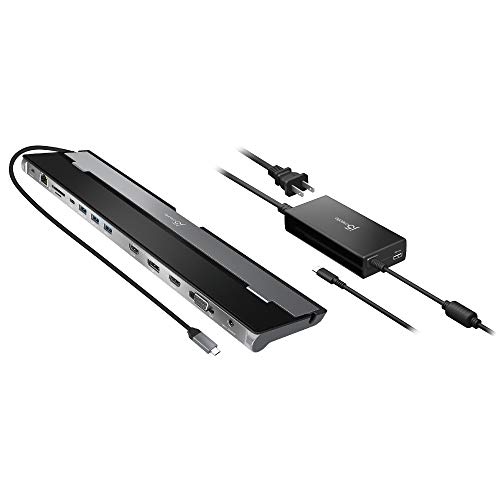
J5create USB Type C Docking Station with 100W PD Charger
Why We Love It

Acer USB C Hub
Why We Love It

Dell Docking Station, 90 W
Why We Love It

USB C Docking Station Dual Monitor for Laptop USB-C Hub
Why We Love It

Selore USB C Docking Station for Laptop Dual HDMI Monitors
Why We Love It
Quick Pick
10 Best Usb Type-c Docking Station Of 2026
Quick Pick
BENFEI USB C MST HUB 8in1 with USB-C to 2*HDMI/1*VGA, to 3*USB 3.0/100W Power Delivery/3.5mm Aux Audio, Compatible with iPhone 15 Pro/Max, MacBook Pro 2023/2022/2021/2020, Surface Book and More
BENFEI ?New For 2024?Benfei 11 In 1 Usb C Mst Laptop Docking Station With Silicone Woven Design Cable, Usb C To 2Hdmi 1Vga, 3Usb 3.0 Sd Tf Card Reader Ethernet 100W Power Delivery 3.5Mm Aux Audio
Anker USB C Hub, 7in1 Multi-Port USB Adapter, 4K@60Hz USBC to HDMI Splitter | 85W Max PD, 2 USB 3.0 & 1 USBC Data Ports, SD/TF Card Reader, for Laptops/Mac and Other Type C Devices (Charger Not Included)
UGREEN Laptop Docking Station Dual Monitor, 10-in-1 Dual 4K@60Hz USB C Hub | 2x HDMI, Single 8K, 100W PD, 1Gbps Ethernet, 4x 5Gbps USB-A/C Data, SD/TF, Revodok Pro Aluminum USB-C Dock for Dell/HP/Lenovo
UGREEN Laptop Docking Station Dual Monitor, 6-in-1 Dual 4K@60Hz USB C Hub | 2xHDMI, Single 8K, 100W Power Delivery, 3x 5Gbps USB Data Ports, Revodok 206 USB-C Dock for Thinkpad, HP, Dell, Lenovo
j5create USB Type C Docking Station with 100W PD Charger - Supports 3 Displays | HDMI, DisplayPort, VGA, 100W PD Charging, 1Gbps Ethernet | for MacBook Pro/Air, XPS, and More (JCD543P)
Acer USB C Hub, 7IN1 USB-C to 4K HDMI, 2×USB 3.0, USBC 5Gbps, 100W, SD/TF | Card Reader, Aluminum Docking Station Multiport Adapter for iPhone 17 Series, MacBook/iPad Pro/Air, S26, Surface Pro (Grey)
Dell Docking Station - 90 W - USB Type-C - Network (RJ-45) - HDMI - 1 x DisplayPorts - DisplayPort - Gigabit Ethernet
USB C Docking Station Dual Monitor for Laptop USB-C Hub Multiport Adapter | 14 in 1 Dongle with 2HDMI Displayport 100W PD Ethernet 6 USB Port Mic/Audio SD/TF Card Reader for Dell/HP/Lenovo/MacBook Air
Selore USB C Docking Station for Laptop Dual HDMI Monitors Splitter Adapter | 4-Display Docking Station Dual HDMI Monitors with 2×HDMI+VGA+DP, PD,USB-A/C, 4K@60Hz USB C Hub for MacBook/Windows
Buying Guide: Usb Type-c Docking Station
📋 Table of Contents
1What should I look for in a USB Type-C docking station?
Look for compatibility with your device, number of ports, power delivery support, and build quality. Ensure it supports the required USB-C version for optimal performance.
2What are the key specifications to check?
Check for USB 3.1 or higher, HDMI 2.0 or higher, DisplayPort 1.4, and support for Thunderbolt 3 if needed. Also, verify the maximum wattage for power delivery.
3How do I ensure the docking station is compatible with my device?
Check your device's USB-C port specifications and ensure the docking station supports the same standards. Some devices may require a specific chipset or protocol.
4When should I pay more for a docking station?
Pay more if you need high-speed data transfer, multiple high-resolution displays, or advanced features like Ethernet or card readers for professional use.
5What are common mistakes to avoid when buying a docking station?
Avoid buying a docking station that doesn't support your device's USB-C version or lacks necessary ports. Also, ensure it provides enough power for your laptop if needed.
How we choose
Our editors are people who genuinely love testing and writing about products. We compare each product's real-world usability and strengths, then distill what matters most into our own "Why We Love It" points — so you get an honest, at-a-glance sense of what counts before you buy.