10 Best Usb Port Extender Of 2026
Usb Port Extender — Reviews, Recommendations & Updated Buying Guide November 2026


Acer USB Hub 3.0
Why We Love It


USB 3.0 Hub 4 Ports
Why We Love It

Aceele USB Hub 3.0 Splitter with 4ft Extension Long Cable
Why We Love It

UGREEN USB Hub 3.0
Why We Love It

BENFEI USB 3.0 Hub 7-Port
Why We Love It

Anker 4-Port USB 3.0 Hub
Why We Love It

BENFEI 4-Port USB Hub: 1x 10Gbps USB 3.2 + 3X USB 2.0- for
Why We Love It

4-Port USB 3.0 Hub [90°/180° Rotatable]
Why We Love It

U124A USB Hub 4 Port USB A Splitter and Multi USB Port hub
Why We Love It
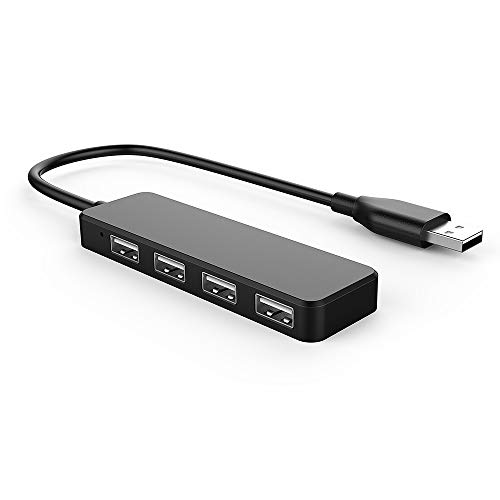
USB Hub,4 Port USB Adapter USB Splitter,Multi USB Port
Why We Love It
Quick Pick
10 Best Usb Port Extender Of 2026
Quick Pick
Acer USB Hub 3.0, Ultra Slim USB Adapter 4 Ports Splitter with Powered USBC | Multiport Extender for PC, Laptop, Keyboard, Mouse, HDD, MacBook Pro/Air, iMac, Surface Pro, macOS, Windows, Linux. -60cm
USB 3.0 Hub 4 Ports, USB Splitter Extender Adapter for Laptop [90°/180° Degree Rotatable], Ultra-Slim Multiple USB HUB for Mouse, Keyboard, Flash Drive, U Disk, Printer, Desktop PC, Xbox, PS5
Aceele USB Hub 3.0 Splitter with 4ft Extension Long Cable Cord | 4-Port Extra Slim Multiport Expander for Desktop Computer PC, PS4, Laptop, Chromebook, iMac, Flash Drive Data and More
UGREEN USB Hub 3.0, USB Splitter 4 Port Ultra Slim with 5Gbps Data Transfer | USB Extender for Mouse, Keyboard, Flash Drive, Card Reader, Printer, Compatible with Laptop, Desktop PC, Xbox, PS5, etc.
BENFEI USB 3.0 Hub 7-Port, Ultra-Slim Portable USB Splitter with 3.3ft Cable - Compatible with MacBook Pro/Air,Mac Pro, Mac Mini, iMac, Surface Pro, XPS, PC, Flash Drive, Mobile HDD (No Charging Port)
Anker 4-Port USB 3.0 Hub, Ultra-Slim Data USB Hub, 2 ft Extended Cable | [Charging Not Supported], for MacBook, Mac Pro, Mac mini, iMac, Surface Pro, XPS, PC, Flash Drive, Mobile HDD
BENFEI 4-Port USB Hub: 1x 10Gbps USB 3.2 + 3X USB 2.0- for Mouse, Keyboard, Flash Drive, Printer - Compatible with Laptop, PC, Xbox, PS5
4-Port USB 3.0 Hub [90°/180° Rotatable],USB Splitter with 1 USB 3.0 Port,2 USB 2.0 Ports,and 1 USB C Data Port, USB Extender Compatible with Laptops,Cars,Surface go,MacBook Air/Pro,and Other Devices
U124A USB Hub 4 Port USB A Splitter and Multi USB Port hub, 1 USB 3.0 Port and 3 USB 2.0 Ports, Plug and Play, Compatible with Laptop, Desktop, Windows, Mac and Linux, by Red Star Tec
USB Hub,4 Port USB Adapter USB Splitter,Multi USB Port Expander for iMac Pro, MacBook Air, Mac mini/Pro, Surface Pro, Notebook PC, Laptop, USB Flash Drives and Mobile HDD (4 in 1 30cm)
Buying Guide: Usb Port Extender
📋 Table of Contents
1What should I look for in a USB port extender?
Look for a reliable build quality, compatibility with your device, and the number of ports it provides. Ensure it supports the required USB version (e.g., USB 3.0 or USB-C) for optimal performance.
2What are the key specifications to check?
Check the USB version, data transfer speed, power delivery capability, and whether it includes features like LED indicators or surge protection for added safety.
3How do I ensure the extender is compatible with my device?
Verify the connector type (e.g., USB-A, USB-C) and check if your device supports the same USB version as the extender to avoid compatibility issues.
4When should I pay more for a USB port extender?
Pay more if you need high-speed data transfer, reliable power delivery for charging devices, or additional features like built-in surge protection or multiple port types.
5What are common mistakes to avoid when buying a USB port extender?
Avoid buying cheap, low-quality extenders that may not support high-speed data transfer or may damage your devices. Also, ensure the extender is not too long or bulky for your intended use.
How we choose
Our editors are people who genuinely love testing and writing about products. We compare each product's real-world usability and strengths, then distill what matters most into our own "Why We Love It" points — so you get an honest, at-a-glance sense of what counts before you buy.