10 Best Usb Microphones For Podcasting Of 2026
Usb Microphones For Podcasting — Reviews, Recommendations & Updated Buying Guide November 2026


RØDE PodMic Versatile Dynamic Broadcast Microphone with XLR
Why We Love It


FIFINE AmpliGame A6T Gaming PC USB Microphone Kit for
Why We Love It

Sennheiser Profile USB Microphone with Table Stand
Why We Love It

Rode NT-USB Mini Versatile Studio-Quality Condenser
Why We Love It

FIFINE T669 Studio Condenser USB Microphone for Recording
Why We Love It

USB Microphone, USB PC Mic for Business Video Conference
Why We Love It
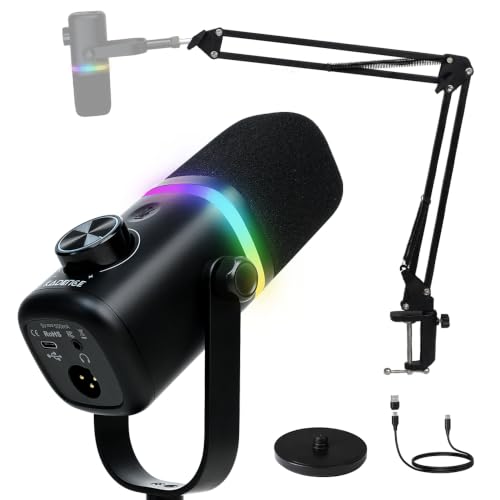
Kadence K777 Home Series Type-C Condenser Mic with Boom Arm
Why We Love It

HyperX QuadCast 2 S – USB Microphone
Why We Love It
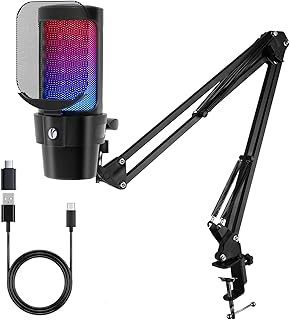
VCOM Gaming USB Microphone
Why We Love It

FDUCE Condenser USB Microphone PC Metal Microphone Kit with
Why We Love It
Quick Pick
10 Best Usb Microphones For Podcasting Of 2026
Quick Pick
RØDE PodMic Versatile Dynamic Broadcast Microphone with XLR and USB Connectivity for Podcasting, Streaming, Gaming, Music and Content Creation
FIFINE AmpliGame A6T Gaming PC USB Microphone Kit for Streaming,Podcasting | Condenser Mic with Boom Arm, Pop Filter, Mute Button for Twitch, Online Chat, RGB Computer Mic for PS4/5 PC Gamer Youtuber
Sennheiser Profile USB Microphone with Table Stand | Plug & Play Design, for Podcasting & Streaming | Cardioid Condenser Capsule | 1.2m USB-C Cable Included | Black (700065)
Rode NT-USB Mini Versatile Studio-Quality Condenser Microphone with Free Software for Podcasting, Streaming, Gaming, Music Production, Vocal and Instrument Recording
FIFINE T669 Studio Condenser USB Microphone for Recording Podcasting | Computer Microphone Kit for Voice Overs, Adjustable Boom Arm Stand, Shock Mount for Vocal, Instruments, Gaming, Streaming
USB Microphone, , USB PC Mic for Business Video Conference, Recording, Chat, Podcasting, Online Class, Mute Button with LED Indicator, Compatible with Macbook, Laptop, PC, Window
Kadence K777 Home Series Type-C Condenser Mic with Boom Arm Stand | Cardioid Microphone with Volume Control & RGB Light | Desktop Stand & Boom Arm Clamp Included | Plug & Play | Black
HyperX QuadCast 2 S – USB Microphone, with RGB Lighting, Streaming and Podcasting, with On-Board Controls, LED Lighting, Removable Shock Mount, PC, Mac, USB-C - Black
VCOM Gaming USB Microphone,Condenser Dynamic Boom Arm Mic for Podcasting,Streaming, with Boom Arm Stand,Quick Mute,Pop Filter,RGB Indicator,Shock Mount,Rotate gain Button, Compatible with PS4/5/PC
FDUCE Condenser USB Microphone PC Metal Microphone Kit with Adjustable Cantilever Stand Shock Mount Desktop Stand for Instrument Dubbing, Recording, Podcasting, YouTube Vocals, Game Streaming (MC88)
Buying Guide: Usb Microphones For Podcasting
📋 Table of Contents
1What sample rate and bit depth should I look for in a USB mic for clear podcasting?
Aim for a sample rate of 44.1kHz or 48kHz and a bit depth of 16-bit or 24-bit. These settings ensure high-quality audio that captures speech clearly and avoids muffled or distorted sound, especially in longer recordings.
2Is a cardioid or omnidirectional pickup pattern better for podcasting?
Cardioid mics are ideal for podcasting as they focus on sound from the front and reduce background noise. Omnidirectional mics pick up sound from all directions, which can lead to unwanted room noise or echo in untreated spaces.
3Should I prioritize a condenser or dynamic mic for my podcast?
Condenser mics offer superior sensitivity and clarity, making them perfect for capturing vocal nuances in a quiet, controlled environment. Dynamic mics are more durable and better at rejecting background noise, but they may sound less detailed for voice-only content.
4What should I look for in a USB mic's noise cancellation or pop filter features?
A built-in pop filter or shock mount helps reduce plosives and handling noise. Look for mics with a noise reduction feature or a dedicated mute button to avoid accidental background noise during recording or live streaming sessions.
5Are external mixers or audio interfaces necessary for a USB mic used in podcasting?
Most USB mics connect directly to a computer and don’t require an external interface. However, if you plan to use multiple mics or want more control over levels and effects, an external mixer or audio interface can offer greater flexibility and sound quality.
How we choose
Our editors are people who genuinely love testing and writing about products. We compare each product's real-world usability and strengths, then distill what matters most into our own "Why We Love It" points — so you get an honest, at-a-glance sense of what counts before you buy.