10 Best Usb Hubs Of 2026
Usb Hubs — Reviews, Recommendations & Updated Buying Guide November 2026


UGREEN USB Hub 3.0
Why We Love It


UGREEN USB C Hub
Why We Love It

UGREEN USB C Hub with 4×USB 3.0 Data and 5V/2.4A USB C Power
Why We Love It

USB HUB Type-C to 4 Port USB 3.0+USB 2.0 Hub USB Adapter
Why We Love It

4 Port USB3.0 Splitter Adapter Hub
Why We Love It

UGREEN Powered USB Hub 3.0
Why We Love It

Anker USB Hub, 4-in-1 USB Splitter
Why We Love It
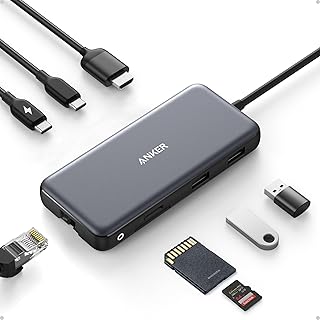
Anker USB C Hub
Why We Love It

UGREEN Uno USB C Hub 6-in-1
Why We Love It

USB C Hub, 8 in 1 Type C Hub Multiport Adapter with 4K HDMI
Why We Love It
Quick Pick
10 Best Usb Hubs Of 2026
Quick Pick
UGREEN USB Hub 3.0, USB Splitter 4 Port Ultra Slim with 5Gbps Data Transfer | USB Extender for Mouse, Keyboard, Flash Drive, Card Reader, Printer, Compatible with Laptop, Desktop PC, Xbox, PS5, etc.
UGREEN USB C Hub, 5-in-1 USB Hub for Laptops, 4K HDMI to USB-C Adapter | 100W PD, 3 USB-A Data Ports, Aluminum Compact Multiport Adapter for MacBook Air/Pro, HP, Dell, iPad, Galaxy Dex and More
UGREEN USB C Hub with 4×USB 3.0 Data and 5V/2.4A USB C Power Ports, 15cm | 5Gbps Type C to A Adapter for PC Laptop Tablet Phone Compatible with MacBook, iPad, iPhone 17, Plug and Play
USB HUB Type-C to 4 Port USB 3.0+USB 2.0 Hub USB Adapter Station Slim Portable Data Hub USB Aluminum
4 Port USB3.0 Splitter Adapter Hub - WEETOTUNG Ultra-Slim Multiport USB Hub - for Fast Data Transfer and USB Device Extender
UGREEN Powered USB Hub 3.0, 7-Ports Charging Extender Data Hub (12V/2A) | Splitter Extension, Power USB A Adapter (12V/2A Not Fast Charge) with Individual On/Off Switches for Laptop, PC
Anker USB Hub, 4-in-1 USB Splitter, USB Extender, Computer Accessories | Multiport adapter with 5Gbps Data Transfer for USB-A Port Laptop, PC, Desktop and More (Charging Not Supported)(USB-A, 0.6m)
Anker USB C Hub, 8-in-1 Multiport Ethernet Adapter with 4K@60Hz HDMI Port | 85W Max PD, 10Gbps USB C & 2 USB-A Data Ports, microSD/SD Card Reader, for Laptops, MacBook Pro, XPS, iPad and More
UGREEN Uno USB C Hub 6-in-1, 4K@60Hz HDMI, 10Gbps USB C & A Data, PD Ports | Type C Adapter for PC Tablet Phone Compatible with MacBook Air, iPad, iPhone 17/16/15 Pro and More
USB C Hub, 8 in 1 Type C Hub Multiport Adapter with 4K HDMI, PD Power Delivery, USB-C, Ethernet, 2 USB, SD/TF Card Reader Compatible with Mac Book Pro XPS and More Type C Devices
Buying Guide: Usb Hubs
📋 Table of Contents
1How many USB ports do I actually need?
Count your devices that need charging or data transfer simultaneously—phone, tablet, keyboard, mouse, external drive—then add one or two extras for future gadgets. Most people find 4-7 ports practical; anything beyond that gets cluttered and rarely used.
2What's the difference between USB 2.0, 3.0, and 3.1 hubs?
USB 3.0 and 3.1 transfer data much faster (ideal for large files and external drives), while USB 2.0 is slow but sufficient for keyboards, mice, and charging phones. If you work with video or large datasets, go for USB 3.0 or higher; otherwise, USB 2.0 saves money.
3Should I buy a powered hub or unpowered one?
Powered hubs have their own power adapter and can charge multiple devices quickly, while unpowered hubs draw power from your computer and work only for low-power devices like keyboards. Get a powered hub if you're charging phones, tablets, or running power-hungry devices; unpowered works fine for basic office gear.
4What should I check about cable length and design?
Look for a cable length that reaches your desk setup comfortably—typically 1-2 meters is standard—and consider a compact or vertical design if your workspace is cramped. Some hubs sit flat, others are vertical or stackable, so match the form factor to your desk space.
5Does it matter which brand I choose?
Reputable brands offer better build quality, faster data speeds, and reliable customer support, reducing the risk of damaged devices or failed connections. Budget brands work fine if you're just charging phones, but for frequent data transfer or expensive devices, spending more on a trusted brand is worth it.
How we choose
Our editors are people who genuinely love testing and writing about products. We compare each product's real-world usability and strengths, then distill what matters most into our own "Why We Love It" points — so you get an honest, at-a-glance sense of what counts before you buy.