10 Best Usb Gaming Microphones For Ps4 Of 2026
Usb Gaming Microphones For Ps4 — Reviews, Recommendations & Updated Buying Guide November 2026


FIFINE AmpliGame A6T Gaming PC USB Microphone Kit for
Why We Love It

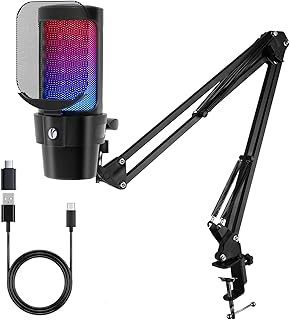
VCOM Gaming USB Microphone
Why We Love It

EKSA USB Gaming Headset for PC
Why We Love It

FIFINE AmpliGame A6V USB Gaming Microphone
Why We Love It

FIFINE A6TW USB Condenser Microphone Kit
Why We Love It

UGREEN USB Condenser Gaming Microphone for Streaming and
Why We Love It

FIFINE H9 Wired Gaming Headset with Microphone
Why We Love It
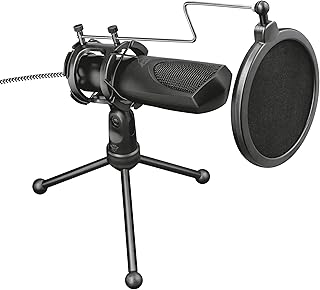
Trust Gaming GXT 232 Mantis Streaming Gaming Microphone for
Why We Love It

TONOR USB Gaming Microphone for PC PS4/5
Why We Love It

NUBWO Wireless Gaming Headset with Mic for Ps5 Ps4 PC
Why We Love It
Quick Pick
10 Best Usb Gaming Microphones For Ps4 Of 2026
Quick Pick
FIFINE AmpliGame A6T Gaming PC USB Microphone Kit for Streaming,Podcasting | Condenser Mic with Boom Arm, Pop Filter, Mute Button for Twitch, Online Chat, RGB Computer Mic for PS4/5 PC Gamer Youtuber
VCOM Gaming USB Microphone,Condenser Dynamic Boom Arm Mic for Podcasting,Streaming, with Boom Arm Stand,Quick Mute,Pop Filter,RGB Indicator,Shock Mount,Rotate gain Button, Compatible with PS4/5/PC
EKSA USB Gaming Headset for PC - Computer Headphones with 7.1 Surround Sound Stereo Noise Canceling Mic/Microphone RGB Light - Gaming Headphones for PS4/PS5 Console Laptop, Wired
FIFINE AmpliGame A6V USB Gaming Microphone, Condenser RGB Mic for Streaming | Quick Mute, RGB Indicator, Tripod Stand, Pop Filter, Shock Mount, Gain Control, for Discord Twitch Podcasts Videos YouTube
FIFINE A6TW USB Condenser Microphone Kit,Gaming Streaming PC Mic
UGREEN USB Condenser Gaming Microphone for Streaming and Voice Chat | 24-bit/96kHz Audio, Quick Mute and Zero-Latency Monitoring; Includes Pop Filter, Shock Mount and 7 RGB Modes for PC and PS5
FIFINE H9 Wired Gaming Headset with Microphone, 3.5mm and USB Connectivity | 50mm Drivers, 7.1 Surround Sound, Lightweight, Soft Ear Cusion, Detachable Boom Mic, USB Control Box, for PC, Xbox, PS4/5
Trust Gaming GXT 232 Mantis Streaming Gaming Microphone for PC, PS4 and PS5, USB Connected, Including Shock Mount, Pop Filter and Tripod Stand, Black
TONOR USB Gaming Microphone for PC PS4/5, Cardioid Condenser Microphone | with Tripod for Podcast, Streaming, Studio, Computer, Mic RGB with Adjustable Modes and Brightness, Quick Silence, TC310
NUBWO Wireless Gaming Headset with Mic for Ps5 Ps4 PC, Zero Interference, 100-Hour Battery All-Day Play, 23ms Sync for Fortnite & Call of Duty/FPS Gamers, Triple Mode All Devices Compatible - Green
Buying Guide: Usb Gaming Microphones For Ps4
📋 Table of Contents
1What USB microphone specs are essential for PS4 use?
Look for a USB-C or USB-A connection compatible with your PS4 model, a built-in stand or clip, and a noise-canceling feature to reduce background interference. A unidirectional pickup pattern ensures your voice is clear while minimizing room noise.
2Do I need a separate audio interface or software?
Most USB gaming microphones for PS4 are plug-and-play and require no additional software. However, some models offer companion apps for adjusting EQ, sensitivity, or mute settings, which can enhance your in-game communication experience.
3How does sensitivity affect my microphone's performance?
Higher sensitivity (measured in dB) captures quieter sounds, but can also pick up unwanted noise. For gaming, aim for a sensitivity range of -40 to -50 dB, which balances clarity and noise control for most environments and voice types.
4What's the difference between a USB mic and a 3.5mm mic for PS4?
USB mics connect directly to the PS4 and often include built-in sound processing, while 3.5mm mics require a separate adapter and may offer less control over audio quality. USB mics are generally easier to set up and more versatile for streaming or voice chat.
5Are RGB lighting features worth considering?
RGB lighting is mostly for aesthetics and doesn't impact audio quality. If you want a visually striking setup, look for models with customizable LED colors. Otherwise, prioritize sound performance and compatibility over lighting features.
How we choose
Our editors are people who genuinely love testing and writing about products. We compare each product's real-world usability and strengths, then distill what matters most into our own "Why We Love It" points — so you get an honest, at-a-glance sense of what counts before you buy.