10 Best Usb Gaming Microphones For Pc Of 2026
Usb Gaming Microphones For Pc — Reviews, Recommendations & Updated Buying Guide November 2026


FIFINE AmpliGame A6T Gaming PC USB Microphone Kit for
Why We Love It


FIFINE AmpliGame AM8 USB/XLR Dynamic Microphone for Gaming
Why We Love It

UGREEN USB Condenser Gaming Microphone for Streaming and
Why We Love It

FIFINE AmpliGame A6V USB Gaming Microphone
Why We Love It

USB Microphone, USB PC Mic for Business Video Conference
Why We Love It

ATTACK SHARK L80PRO Wireless Gaming Headset
Why We Love It
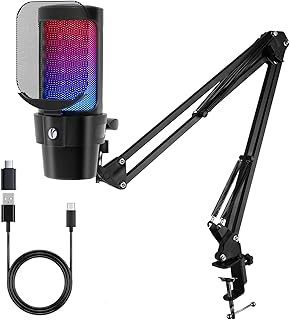
VCOM Gaming USB Microphone
Why We Love It

FIFINE Studio XLR Dynamic Microphone
Why We Love It

FDUCE Gaming USB Microphone for PC
Why We Love It

TONOR USB Gaming Microphone for PC PS4/5
Why We Love It
Quick Pick
10 Best Usb Gaming Microphones For Pc Of 2026
Quick Pick
FIFINE AmpliGame A6T Gaming PC USB Microphone Kit for Streaming,Podcasting | Condenser Mic with Boom Arm, Pop Filter, Mute Button for Twitch, Online Chat, RGB Computer Mic for PS4/5 PC Gamer Youtuber
FIFINE AmpliGame AM8 USB/XLR Dynamic Microphone for Gaming Streaming | Podcast Mic with RGB Light, Mute Button, Headphones Jack, Desktop Stand, for Vocal Recording Singing YouTube, Metal
UGREEN USB Condenser Gaming Microphone for Streaming and Voice Chat | 24-bit/96kHz Audio, Quick Mute and Zero-Latency Monitoring; Includes Pop Filter, Shock Mount and 7 RGB Modes for PC and PS5
FIFINE AmpliGame A6V USB Gaming Microphone, Condenser RGB Mic for Streaming | Quick Mute, RGB Indicator, Tripod Stand, Pop Filter, Shock Mount, Gain Control, for Discord Twitch Podcasts Videos YouTube
USB Microphone, , USB PC Mic for Business Video Conference, Recording, Chat, Podcasting, Online Class, Mute Button with LED Indicator, Compatible with Macbook, Laptop, PC, Window
ATTACK SHARK L80PRO Wireless Gaming Headset, Adjustable Dual Mics, 3D Surround Sound, Lightweight Headset with 20ms Low Latency, 40mm Drivers,3 Modes (2.4G/Bluetooth/Wired) for PC/PS/XBOX (White)
VCOM Gaming USB Microphone,Condenser Dynamic Boom Arm Mic for Podcasting,Streaming, with Boom Arm Stand,Quick Mute,Pop Filter,RGB Indicator,Shock Mount,Rotate gain Button, Compatible with PS4/5/PC
FIFINE Studio XLR Dynamic Microphone, USB PC Podcast Microphone for Streaming Recording, XLR/USB Vocal Mic with Tap-to-Mute, Gain Knob, Headphones Monitoring-Amplitank K688 White
FDUCE Gaming USB Microphone for PC,RGB Condenser Computer Mic with Tripod Stand,Quick Mute,Gain Control,Cardioid Mic for Streaming, Podcast, Twitch, YouTube, PC, Computer, PS5, (M160)
TONOR USB Gaming Microphone for PC PS4/5, Cardioid Condenser Microphone | with Tripod for Podcast, Streaming, Studio, Computer, Mic RGB with Adjustable Modes and Brightness, Quick Silence, TC310
Buying Guide: Usb Gaming Microphones For Pc
📋 Table of Contents
1What sample rate should I look for in a USB gaming microphone for PC?
Aim for at least 44.1kHz for clear voice capture, but 48kHz or higher is better for professional-grade audio. Higher sample rates reduce distortion and improve clarity, especially in competitive or streaming scenarios.
2Does a unidirectional or omnidirectional mic suit gaming better?
Unidirectional mics (cardioid pattern) are ideal for gaming as they focus on your voice and reject background noise. Omnidirectional mics pick up sound from all directions, making them less suitable for noisy environments or voice chat.
3What is the benefit of a built-in pop filter or shock mount?
A built-in pop filter reduces plosive sounds like 'p' and 'b' for cleaner audio, while a shock mount minimizes vibrations and handling noise. These features are especially important for streamers or voice chat where audio quality is key.
4How does USB vs. XLR connectivity affect performance for PC gaming?
USB mics are plug-and-play and ideal for PC gaming due to their ease of use and built-in preamps. XLR mics require an external audio interface and are more common in professional setups, but not necessary for casual or competitive gaming on a PC.
5Are RGB lighting features worth considering in a gaming microphone?
RGB lighting is mostly for aesthetics and doesn't affect audio quality. If you want a visually striking setup, look for customizable lighting options, but prioritize sound performance and noise cancellation over visual features.
How we choose
Our editors are people who genuinely love testing and writing about products. We compare each product's real-world usability and strengths, then distill what matters most into our own "Why We Love It" points — so you get an honest, at-a-glance sense of what counts before you buy.