10 Best Usb External Cooling Fan Of 2026
Usb External Cooling Fan — Reviews, Recommendations & Updated Buying Guide November 2026


BIGTHREE Cooling Fan for PS4
Why We Love It


ElecGear PS4 Pro Turbo Cooling Fan
Why We Love It
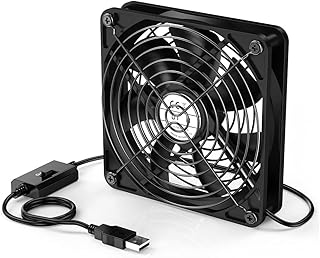
TERRIFI PC Fans 120mm 5V Cooling Fan 3-Degree Speed Switch
Why We Love It

JUSPRO Cooling Fan for PS5 Pro
Why We Love It

Excefore 40mm 5V Cooling Fan 2 Pack
Why We Love It

CoolCold Ice Magic 3 Mini Laptop Cooling Fan USB Plug
Why We Love It

Quiet 120mm USB Cooling Fan with 31.5" Extension Cable
Why We Love It
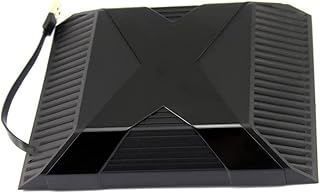
SKEIDO PG-X010 External Cooling Fan USB Power 35 Degree
Why We Love It
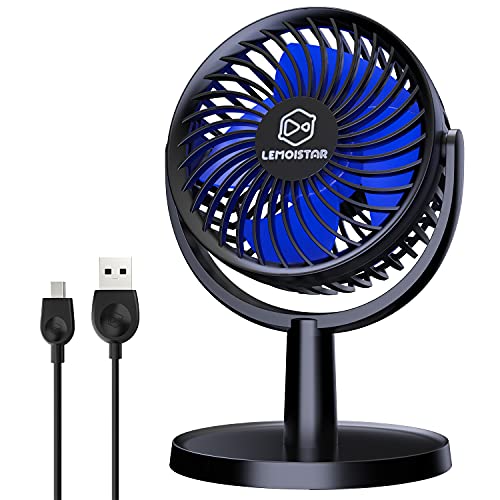
LEMOISTAR Small Desk Fan
Why We Love It

PANO-MOUNTS 4x120mm 240mm 5V USB Powered Cooling Fan for
Why We Love It
Quick Pick
10 Best Usb External Cooling Fan Of 2026
Quick Pick
BIGTHREE Cooling Fan for PS4, Turbofan for PS4, Control Cooling Fans, USB External Cooler 5 Fan Turbo Temperature Control Cooling Fans for Sony PlayStation 4 Gaming Console.
ElecGear PS4 Pro Turbo Cooling Fan - External USB Cooler with Auto Temperature Sensor Controlled Radiator Heat Exhaust for Sony PlayStation 4 Pro Console
TERRIFI PC Fans 120mm 5V Cooling Fan 3-Degree Speed Switch Portable Home Office Fans Metal USB Powered Cooling Fan for Laptop/TV Box/AV cabint/PS4/Router (120 mm)
JUSPRO Cooling Fan for PS5 Pro, Quiet Upgraded 4 Cooler with Adjustable Speed, Auto On/Off, Cooling Accessories with USB 3.0 Port and LED Light for PlayStation 5 Pro
Excefore 40mm 5V Cooling Fan 2 Pack, Portable Home Office Fans, Metal USB Powered, Compatible with Laptop/TV Box/AV Cabinet/PS4/Router
CoolCold Ice Magic 3 Mini Laptop Cooling Fan USB Plug Exhaust Fan Speed Adjustable Notebook cooler Lighted
Quiet 120mm USB Cooling Fan with 31.5" Extension Cable - 5V Case Fan for Receiver, DVR, Game Console, Router, and Electronic Devices
SKEIDO PG-X010 External Cooling Fan USB Power 35 Degree Smart Auto-Sensing Built-in Cooler Temperature Control Fan compatible with XBox One
LEMOISTAR Small Desk Fan, 4 Speeds, Personal USB Mini Fans with Quiet Operation, Powerful Airflow, 310° Rotation, Tiny Cooling Table Fan for Office, Bedroom, Computer-Black against Blue
PANO-MOUNTS 4x120mm 240mm 5V USB Powered Cooling Fan for Router Rack DIY Audio Video Network Cabinet Server Cooling Projects and Equipment Workstation Mining Machine Laptop Cooling Fan Stand
Buying Guide: Usb External Cooling Fan
📋 Table of Contents
1What airflow capacity (CFM) should I look for in a USB external cooling fan?
Look for a fan with at least 10-20 CFM (cubic feet per minute) for effective cooling. Higher CFM means stronger airflow, which is better for hot environments or larger spaces, but may consume more power from your USB port.
2Does the fan's size affect its performance or portability?
Smaller fans (around 5-8 cm in diameter) are more portable and easier to place on laptops or desks, but may not cool as effectively as larger models. Balance size with your cooling needs and available space.
3What should I check about the fan's power consumption and compatibility?
Ensure the fan uses no more than 1.5A at 5V to avoid overloading your USB port or charging cable. Most modern USB fans are compatible with USB 2.0 or 3.0 ports, but check for a USB-C or Type-A connector that matches your device.
4Are there differences between brushless and brushed motor fans?
Brushless motors are more efficient, quieter, and longer-lasting, but tend to be more expensive. Brushed motors are cheaper but may wear out faster and produce more noise over time.
5What features should I prioritize for noise reduction?
Look for fans with rubberized bases or dampening materials to reduce vibration and noise. Fans with adjustable speed settings allow you to balance cooling power with quiet operation, especially in shared or quiet environments.
How we choose
Our editors are people who genuinely love testing and writing about products. We compare each product's real-world usability and strengths, then distill what matters most into our own "Why We Love It" points — so you get an honest, at-a-glance sense of what counts before you buy.