10 Best Usb C Splitters Of 2026
Usb C Splitters — Reviews, Recommendations & Updated Buying Guide November 2026


USB C Splitter 1 in 2 Out
Why We Love It

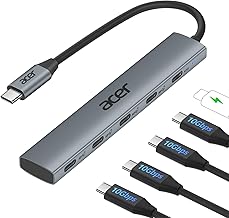
Acer 10 Gbps USB C Hub
Why We Love It

USB C Splitter for SteamDeck
Why We Love It

USB C Splitter with 100W Fast Charging
Why We Love It

TERRIFI USB C Splitter
Why We Love It

BENFEI USB C Splitter 1 in 2 Out Dual USB C Audio Jack
Why We Love It

USB C Splitter Y Cable
Why We Love It

USB C Splitter 3 in 1
Why We Love It

Type-C Splitter
Why We Love It

USB C Male to Dual USB Female Adapter
Why We Love It
Quick Pick
10 Best Usb C Splitters Of 2026
Quick Pick
USB C Splitter 1 in 2 Out, USB Type C Splitter, USB C Female to Multi Type C Male Port Power Charging Cable Cable for Laptop Mac Flash Drive Keyboard Mouse.
Acer 10 Gbps USB C Hub, USBC Splitter with 4*USB C 3.2 and 100W PD Port | Type-C Multiport Adapter Fast Data Transfer Compatible for MacBook Neo/Pro/Air, iPad, Surface Pro, XPS-0.5FT【No Video Output】
USB C Splitter for SteamDeck, 100W PD Charging & 4K@60Hz Video Output, 90 Degree Type-C Male to Dual Female Adapter with USB 3.1 & USB 2.0 Data Port for Steam Deck, ROG Ally, Switch, Laptop
USB C Splitter with 100W Fast Charging, Dual USB C Headphone and Charger Adapter Dongle for iPhone 16/15 Series, iPad, MacBook, Galaxy S24/S23 and More (White)
TERRIFI USB C Splitter, USB C to USB C Female Adapter, USB C Male to 2USB-C Female Cord Double USB C Port Hub USB C Charging Split Adapter for Mac, Xbox One, PS5, Laptop (NOT for Monitor)
BENFEI USB C Splitter 1 in 2 Out Dual USB C Audio Jack Adapter with 60W Fast Charging, Type C Audio Headphone Compatible with iPhone 16/16 Pro/Pro Max, Samsung Galaxy S25/S24/S23 iPad Pro, Pixel 9
USB C Splitter Y Cable, USB C Female to Dual Male Adapter, 2-Pack Type C Charging Cord for Phone Tablet Earbuds Smart Watch, 5V 3A 15W, 30cm, Black PVC, Data Sync, Durable
USB C Splitter 3 in 1, Dual USB-C Audio and Charging Adapter with PD 60W, USBs C Data Dongle Compatible with iPhone 15/15 Pro, Galaxy S24/S23, Pixel 8/7
Type-C Splitter, 1 in 3 Out USB-C Male to 3 USB C Female Splitter Cable Charging Multi Port OTG Splitter Adapter Equipped with Data Transmission
USB C Male to Dual USB Female Adapter, USB C Splitter, Type C OTG Adapter, Dual USB Port Hub, Compatible with iPhone 15 Max, MacBook Pro, iPad Air, Surface GO, Xbox One, PS5
Buying Guide: Usb C Splitters
📋 Table of Contents
1What data transfer speeds can I expect from a USB-C splitter?
Most USB-C splitters support USB 3.1 Gen 1 speeds (up to 5 Gbps), but some high-end models offer USB 3.2 or even Thunderbolt 3 (up to 40 Gbps). Check the product specs for the exact speed, as it affects how fast you can transfer large files or stream 4K video.
2Does the splitter support power delivery to charge my laptop?
Yes, but only if it uses a full-size USB-C port with Power Delivery (PD) support. Look for a splitter with a single USB-C upstream port that can deliver 60W or more to charge laptops like MacBooks or Dell XPS models while using other connected devices.
3How many ports do I really need, and what types should I prioritize?
For most users, 2–4 ports are enough, including at least one HDMI or USB-A for peripherals. Prioritize ports that match your devices — for example, an SD card slot for photographers or a DisplayPort for dual monitors — rather than just going for the highest port count.
4Can I use multiple high-power devices at once without issues?
It depends on the splitter’s power budget. Using a 4K monitor, a fast SSD, and a USB-C charger simultaneously may exceed the 100W limit of some splitters, causing instability. Look for models rated for 60W or more if you plan to run multiple power-hungry devices at once.
5Are all USB-C splitters compatible with my laptop or tablet?
No — compatibility depends on your device’s USB-C version and supported protocols. Some older or budget devices only support data and charging, not video output. Check your device’s specs for Thunderbolt 3, DisplayPort Alt Mode, or USB 3.1 support to ensure the splitter will work as intended.
How we choose
Our editors are people who genuinely love testing and writing about products. We compare each product's real-world usability and strengths, then distill what matters most into our own "Why We Love It" points — so you get an honest, at-a-glance sense of what counts before you buy.