10 Best Usb-c Mechanical Keyboards For Gaming Of 2026
Usb-c Mechanical Keyboards For Gaming — Reviews, Recommendations & Updated Buying Guide November 2026


EPOMAKER x Aula F75 Gasket Mechanical Keyboard
Why We Love It


Seeken Gaming Keyboard
Why We Love It

GAMEON PRIMEX GO-MK260-RS 60% RGB Mechanical Wired Gaming
Why We Love It

Game Keyboard&Mouse Combo, 75% Tri-Mode BT5.0/2.4GHz/USB-C
Why We Love It

YINDIAO Ajazz AK820 Mechanical Keyboard with CNC Knob
Why We Love It
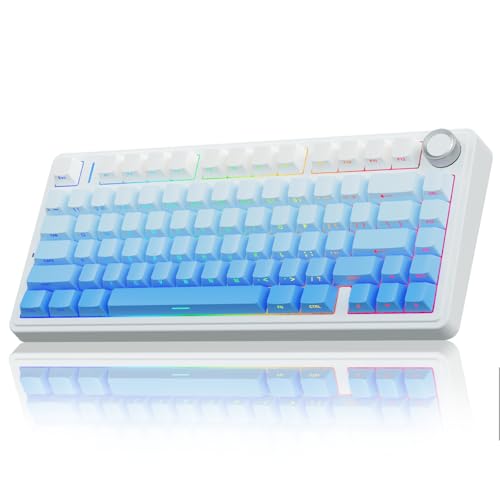
AULA F75 Mechanical Keyboard Gaming
Why We Love It

AULA 99 Key Purple Keyboard
Why We Love It

GravaStar Mercury K1 Mechanical Keyboard with Aluminium
Why We Love It

T98 Wireless Mechanical Keyboard Arabic 98% Gaming Bluetooth
Why We Love It

96% Wired Gaming Keyboard
Why We Love It
Quick Pick
10 Best Usb-c Mechanical Keyboards For Gaming Of 2026
Quick Pick
EPOMAKER x Aula F75 Gasket Mechanical Keyboard, 75% Wireless Hot Swappable Gaming Keyboard with Five-Layer Padding&Knob, BT/2.4GHz/USB-C, RGB (Black Gradient, LEOBOG Reaper Switch)
Seeken Gaming Keyboard – Compact 60% Design Mechanical Keyboard, Wired Keyboard with RGB, Anti-Ghosting, 21-Key Rollover, USB-C, Windows/Mac/Linux Compatible, Plug‑and‑Play, Black (Red Switches)
GAMEON PRIMEX GO-MK260-RS 60% RGB Mechanical Wired Gaming Keyboard – Red Switch, English/Arabic Layout, Compact Design, RGB Backlighting, USB-C Connectivity
Game Keyboard&Mouse Combo, 75% Tri-Mode BT5.0/2.4GHz/USB-C, Mechanical Keyboard+3D 1600DPI Mice with Smart Display 80 Keys Knob Volume Control 2000mAh Battery for Mac Laptop Computer PC Gamer (Black)
YINDIAO Ajazz AK820 Mechanical Keyboard with CNC Knob Control,75% ANSI Layout,81Keys Gasket Mount Wired Gaming Keyboard,5 Sound Absorbing Foam,Hot-swappable,White Backlit,for PC,MAC (Grey&White)
AULA F75 Mechanical Keyboard Gaming, 2.4 GHz/Type-C/BT5.0 Wireless Gaming Keyboard 75 Percent, Side Engraved, Gasket Structure, Hot-Swap Wireless Keyboard RGB, QWERTY (Blue with Colour Gradient)
AULA 99 Key Purple Keyboard, Wireless Gaming Keyboard with Number Pad | RGB Backlit,Programmable,Creamy Sounding,Tri-Mode BT/2.4GHz/USB-C,2000mAh Membrane Keyboard,Thocky Computer Keyboards
GravaStar Mercury K1 Mechanical Keyboard with Aluminium Frame, 75% Wireless Gaming Keyboard, Hot Swap Custom Keyboard with Button, Gasket, RGB Tri-Mode Keyboard, PBT Keycaps, 8000 mAh White
T98 Wireless Mechanical Keyboard Arabic 98% Gaming Bluetooth Keyboard | Gaming Keyboard with Hot Swappable RGB Backlit, BT/2.4G/USB-C Mechanical Keyboard Wireless, Screen, Computer Software Support
96% Wired Gaming Keyboard, Creamy Quiet Keyboard with Volume Knob | Membrane Silent Keyboard, 98 Keys with Number Pad, Rainbow Backlit, USB-A to Type-C, for Windows PC Laptop Games- Black/Grey
Buying Guide: Usb-c Mechanical Keyboards For Gaming
📋 Table of Contents
1What switch type is best for competitive gaming?
Red or brown switches are popular for gaming due to their tactile feedback and low actuation force. Red switches offer linear, smooth keystrokes for fast tapping, while browns provide a slight bump for better control in long sessions.
2How important is a USB-C connection for a gaming keyboard?
USB-C ensures a durable, reversible connection and supports faster data transfer and power delivery. It’s especially useful for laptops and modern devices, and avoids wear from repeated plugging and unplugging.
3What keycap material should I prioritize for long-term use?
Double-shot PBT keycaps are more durable and resist wear better than ABS, keeping legends clear and textures consistent. They also offer a better tactile and visual experience, especially for high-use gaming keys like WASD and spacebar.
4Do I need a keyboard with per-key RGB lighting for gaming?
Per-key RGB is mostly for aesthetics and personalization, not performance. If you want to match your setup or highlight specific keys, it’s worth considering, but it adds cost and complexity without affecting gameplay speed or accuracy.
5What cable length should I look for in a wired gaming keyboard?
A 2-meter cable is ideal for most setups, giving enough reach for desktops and some flexibility for movement. Shorter cables can cause strain on the port, while longer ones may tangle or look messy if not managed properly.
How we choose
Our editors are people who genuinely love testing and writing about products. We compare each product's real-world usability and strengths, then distill what matters most into our own "Why We Love It" points — so you get an honest, at-a-glance sense of what counts before you buy.