10 Best Usb C Hub Of 2026
Usb C Hub — Reviews, Recommendations & Updated Buying Guide November 2026


UGREEN USB C Hub
Why We Love It


UGREEN USB C Hub
Why We Love It

USB C Hub, 8 in 1 Type C Hub Multiport Adapter with 4K HDMI
Why We Love It

UGREEN Uno USB C Hub 6-in-1
Why We Love It

Acer USB C Hub
Why We Love It

UGREEN USB C Hub 6-in-1
Why We Love It

UGREEN USB C Hub
Why We Love It
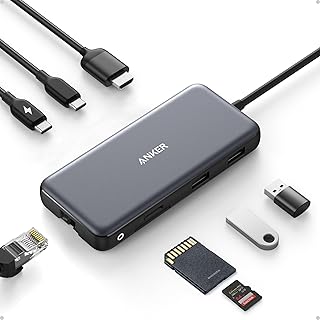
Anker USB C Hub
Why We Love It

USB HUB Type-C to 4 Port USB 3.0+USB 2.0 Hub USB Adapter
Why We Love It

Anker USB-C Hub, 5-in-1 USB Hub for Laptops
Why We Love It
Quick Pick
10 Best Usb C Hub Of 2026
Quick Pick
UGREEN USB C Hub, 6 in 1Revodok 4K@60Hz HDMI USB-C Multiport Adaptor | Type-C to HDMI Adapter, 4x 10Gbps USB-A & C Data Port, 100W PD, Aluminum Dock for MacBook Neo/Air/Pro, HP Laptops
UGREEN USB C Hub, 5-in-1 USB Hub for Laptops, 4K HDMI to USB-C Adapter | 100W PD, 3 USB-A Data Ports, Aluminum Compact Multiport Adapter for MacBook Air/Pro, HP, Dell, iPad, Galaxy Dex and More
USB C Hub, 8 in 1 Type C Hub Multiport Adapter with 4K HDMI, PD Power Delivery, USB-C, Ethernet, 2 USB, SD/TF Card Reader Compatible with Mac Book Pro XPS and More Type C Devices
UGREEN Uno USB C Hub 6-in-1, 4K@60Hz HDMI, 10Gbps USB C & A Data, PD Ports | Type C Adapter for PC Tablet Phone Compatible with MacBook Air, iPad, iPhone 17/16/15 Pro and More
Acer USB C Hub, 7IN1 USB-C to 4K HDMI, 2×USB 3.0, USBC 5Gbps, 100W, SD/TF | Card Reader, Aluminum Docking Station Multiport Adapter for iPhone 17 Series, MacBook/iPad Pro/Air, S26, Surface Pro (Grey)
UGREEN USB C Hub 6-in-1, Ethernet, 4K 60Hz HDMI, PD, 10Gbps USB C& A | 4K 60Hz HDMI, 100W PD Charging, 10Gbps USB Hub 3.2 Data for iPhone, MacBook Air, M1, M2, M3, iPad, Pro Max
UGREEN USB C Hub, 9 in 1 Ethernet Adapter 4K@60Hz HDMI Docking Station | 170MB/s SD/TF, 1Gbps Ethernet, 3x 10Gbps USB-A/C Ports, 100W PD, 30cm Cable, Aluminum Compact for MacBook, HP, Dell
Anker USB C Hub, 8-in-1 Multiport Ethernet Adapter with 4K@60Hz HDMI Port | 85W Max PD, 10Gbps USB C & 2 USB-A Data Ports, microSD/SD Card Reader, for Laptops, MacBook Pro, XPS, iPad and More
USB HUB Type-C to 4 Port USB 3.0+USB 2.0 Hub USB Adapter Station Slim Portable Data Hub USB Aluminum
Anker USB-C Hub, 5-in-1 USB Hub for Laptops, 4K HDMI Multiport Adapter | USB C Dongle with 90W Max Power Delivery, 3×5Gbps USB A Data Ports, for MacBook, Dell, and More (Charger Not Included)
Buying Guide: Usb C Hub
📋 Table of Contents
1How do I know if a USB-C hub will work with my laptop?
Check if your laptop has a USB-C port and what power delivery wattage it supports (usually 60W, 85W, or 100W). Match the hub's power delivery rating to your laptop's needs — underpowered hubs won't charge your device while you work, while oversized ones are just unnecessary spending.
2What's the difference between a USB-C hub and a USB-C docking station?
Hubs are compact and portable with basic ports like USB 3.0, HDMI, and SD card readers, while docking stations are larger with more connections and better for permanent desk setups. Pick a hub if you move between locations, and a docking station if you need many peripherals in one place.
3Do I need a hub with high power delivery if I mostly just add extra ports?
If you're only connecting low-power devices like mice and external drives, a basic 30-45W hub is fine. But if you'll charge your laptop at the same time, get one matching your laptop's power requirements to avoid slow or zero charging.
4What specs matter most when comparing USB-C hubs?
Prioritize the number and type of ports you actually need, power delivery wattage for charging, and USB 3.0+ speeds for fast file transfers. Less important but nice-to-have features include 4K video support and additional protocols like Thunderbolt 3.
5Is it worth paying more for a premium brand USB-C hub?
Established brands usually offer better build quality and reliable customer support, which matters if you're connecting expensive equipment. Budget hubs work fine for basic use, but can have compatibility issues or fail faster — choose premium if you rely on it daily.
How we choose
Our editors are people who genuinely love testing and writing about products. We compare each product's real-world usability and strengths, then distill what matters most into our own "Why We Love It" points — so you get an honest, at-a-glance sense of what counts before you buy.