10 Best Usb-c Hard Drive Enclosures Of 2026
Usb-c Hard Drive Enclosures — Reviews, Recommendations & Updated Buying Guide November 2026


UGREEN 6Gbps 2.5 Inch Hard Drive Enclosure Type C USB-C SATA
Why We Love It


WEETOTUNG USB-C HDD Hard Drive Enclosure transparent Type C
Why We Love It

HDD SSD 2.5" USB 3.0 USB-C External Hard Drive Enclosure
Why We Love It
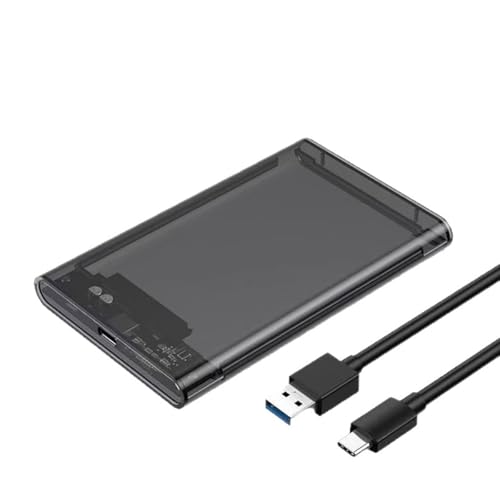
WEETOTUNG USB-C HDD Hard Drive Enclosure transparent Type C
Why We Love It

UGREEN 2.5 Inch Hard Drive Enclosure
Why We Love It

UGREEN 10Gbps M.2 NVMe Enclosure USB C 3.2 Gen 2 for M and
Why We Love It

UGREEN External Hard Drive Enclosure 3.5 USB 3.0 to SATA
Why We Love It

WD 2TB Elements Portable External Hard Drive
Why We Love It

TERRAMASTER D4-320 External Hard Drive Enclosure 4-Bay
Why We Love It

Azonee M.2 to USB Docking Station
Why We Love It
Quick Pick
10 Best Usb-c Hard Drive Enclosures Of 2026
Quick Pick
UGREEN 6Gbps 2.5 Inch Hard Drive Enclosure Type C USB-C SATA HDD/SSD Caddy | Compatible with 2.5" SATA SSD/HDD, Samsung 870 EVO, Crucial, Kingston, WD Blue. Works with Windows, macOS, Linux, PS4, Xbox.
WEETOTUNG USB-C HDD Hard Drive Enclosure transparent Type C to sata adapter Compatible for 9.5mm 7mm 2.5 Inch SATA I II III, PS4, HDD, SSD, Fast Speed UASP (Transparent)
HDD SSD 2.5" USB 3.0 USB-C External Hard Drive Enclosure - WEETOTUNG Dual Port 5Gbps Tool-Free UASP for sata I/II/III - Universal Storage PC/Mac/MacBook/PS4/PS5/Xbox
WEETOTUNG USB-C HDD Hard Drive Enclosure transparent Type C to sata adapter Compatible for 9.5mm 7mm 2.5 Inch for sata I II III, PS4, HDD, SSD, Fast Speed UASP (Transparent Black)
UGREEN 2.5 Inch Hard Drive Enclosure, 5Gbps USB 3.0 SSD Enclosure | External SATA HDD Caddy, UASP SSD Reader, Hard Drive Caddy for 2.5-Inch SSD/HDD, Samsung 870 EVO, WD and Crucial Drives
UGREEN 10Gbps M.2 NVMe Enclosure USB C 3.2 Gen 2 for M and M&B Key | Aluminum, PCIe Adapter Solid State Drive External Reader , Support UASP & Trim in Size 2230/2242/2260/2280
UGREEN External Hard Drive Enclosure 3.5 USB 3.0 to SATA Hard Drive Enclosure with Power Adapter Compatible with 3.5 2.5 Inch Hard Drive, WD, Seagate, Toshiba, HDD, SSD 10TB, UASP-UK Plug Tool-Free
WD 2TB Elements Portable External Hard Drive, USB-C connectivity, USB 3.2 Gen 1 / USB 3.0 interface, compatible with Windows, Mac, Android and iOS devices, Black
TERRAMASTER D4-320 External Hard Drive Enclosure 4-Bay (Diskless)
Azonee M.2 to USB Docking Station, USB 3.1 Gen 2 10Gbps, High Speed M.2 to USB C Data Transfer External Hard Drive Enclosure, Base Case RTL9210B Chips for 2230/2242/2260/2280 SSD
Buying Guide: Usb-c Hard Drive Enclosures
📋 Table of Contents
1What storage drive types are compatible with USB-C enclosures?
Most USB-C enclosures support 2.5-inch SATA SSDs or HDDs, M.2 NVMe SSDs, or mSATA drives. Check the enclosure’s internal design to ensure it fits your drive type and size, especially if you're using a smaller or newer form factor like M.2.
2Does the enclosure support USB 3.2 or Thunderbolt 3?
Look for USB 3.2 Gen 2 (10Gbps) or Thunderbolt 3 (40Gbps) for faster data transfer speeds, especially with large files. USB 2.0 or 3.1 Gen 1 (5Gbps) will be significantly slower for high-capacity drives or video editing workflows.
3What cooling features should I consider for long use?
Enclosures with built-in fans or heat-dissipating materials help prevent overheating during extended transfers or in warm environments. Passive cooling is fine for occasional use, but active cooling is better for heavy or continuous data workloads.
4Is a metal or plastic enclosure better for durability and performance?
Metal enclosures offer better heat dissipation and durability, making them ideal for high-performance drives and frequent use. Plastic is lighter and cheaper but may not handle heat as well and can feel less premium over time.
5What accessories or software come with the enclosure?
Some enclosures include mounting screws, a USB-C to USB-A adapter, or backup software. These extras can simplify setup and improve usability, especially if you're using the drive across multiple devices or need automated backups.
How we choose
Our editors are people who genuinely love testing and writing about products. We compare each product's real-world usability and strengths, then distill what matters most into our own "Why We Love It" points — so you get an honest, at-a-glance sense of what counts before you buy.