10 Best Usb-c Computer Speakers For Monitor Of 2026
Usb-c Computer Speakers For Monitor — Reviews, Recommendations & Updated Buying Guide November 2026


CREATIVE Pebble 2.0
Why We Love It


Dell 27 Plus USB-C Monitor - S2725QC
Why We Love It

CREATIVE Sound Blaster GS3 (Black) Compact RGB Gaming
Why We Love It

Dell 27 Plus USB-C Monitor - S2725DC
Why We Love It

Sound Blaster GS3 Compact RGB Gaming Soundbar
Why We Love It

Computer Speakers with Microphone for Desktop PC
Why We Love It

Sound Blaster GS5 Compact RGB Gaming Soundbar
Why We Love It

Computer Speakers
Why We Love It

CREATIVE Pebble X Plus 2.1 USB-C Computer Speakers with
Why We Love It
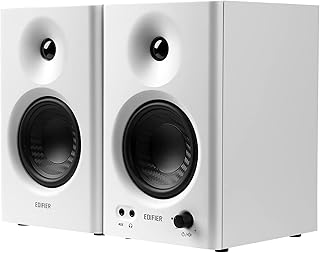
Edifier MR4 Powered Studio Monitor Speakers
Why We Love It
Quick Pick
10 Best Usb-c Computer Speakers For Monitor Of 2026
Quick Pick
CREATIVE Pebble 2.0, USB Desktop Stereo Speakers for PC/Laptop, Black | USB-Powered, 2.0 Speaker, Compact, Stereo, PC Speakers, Laptop Speakers, Minimal Design, Desktop Audio, Black
Dell 27 Plus USB-C Monitor - S2725QC, 4K UHD (3840x2160), 120Hz, IPS, 4ms, AMD FreeSync Premium, 99% sRGB, Height Adjust, Built-in Speakers, 2 USB-C, 2 HDMI, 2 USB, 3 Year Warranty | AMD FreeSync Premium, 99% sRGB, Height Adjust, Built-in Speakers, 2 USB-C, 2 HDMI, 2 USB, 3 Year Warranty
CREATIVE Sound Blaster GS3 (Black) Compact RGB Gaming Soundbar with SuperWide technology, Powered via USB, Bluetooth 5.4, Headphone-out port, For PC and Mac
Dell 27 Plus USB-C Monitor - S2725DC, QHD (2560x1440), 144Hz, IPS, 1ms MPRT, AMD FreeSync, 99% sRGB, Height Adjustment, Built-in Speakers, 2 USB-C, DisplayPort, HDMI, 2 USB-A, 3 Year Warranty
Sound Blaster GS3 Compact RGB Gaming Soundbar, Superwide, White | RGB Gaming Soundbar, Bluetooth, USB-C, Under Monitor, PC, Console, Compact Design, White
Computer Speakers with Microphone for Desktop PC, USB Monitor Speakers with Clip, Wired Laptop Sound Bar, Stereo & Bass, PC Speaker w/Mic for Meeting/Gaming/Online Learning, Easily Clamps to Monitor
Sound Blaster GS5 Compact RGB Gaming Soundbar, For TV and PC, Black | RGB Gaming Soundbar, Bluetooth, USB-C, SuperWide, Desktop Audio, TV, PC, Immersive Sound
Computer Speakers, 2.0 Channels USB Powered 3.5mm AUX RGB PC Speakers with 7 Colorful LED Mode Stereo Bass Desktop Speakers for PC/Laptop/Desktop/Projector
CREATIVE Pebble X Plus 2.1 USB-C Computer Speakers with Subwoofer | 2.1 Speakers, USB-C, Subwoofer, RGB Lighting, Elevated Drivers, Desktop Audio
Edifier MR4 Powered Studio Monitor Speakers, 4" Active Near-field Monitor Speaker - White (Pair)
Buying Guide: Usb-c Computer Speakers For Monitor
📋 Table of Contents
1What power output (in watts) should I look for in USB-C computer speakers for a monitor?
For clear, room-filling sound, aim for 5-10W per speaker (10-20W total for stereo). Lower wattage (2-4W) works for small desks or quiet environments, but may lack bass and volume for larger spaces.
2Does a 3.5mm audio jack matter if I'm using USB-C?
Yes — some USB-C speakers include a 3.5mm port for connecting wired microphones or older headphones. If you need to plug in extra devices, look for models with dual ports or a USB-C hub built in.
3What's the difference between USB-C powered and battery-powered speakers?
USB-C powered speakers draw power directly from your monitor or laptop, so they’re always on and don’t need charging. Battery-powered models offer portability but require recharging and may not deliver the same consistent sound quality over time.
4Are built-in mics and webcams worth it in USB-C speakers?
If you use video calls often, built-in mics and webcams can be convenient. However, they’re often basic and may not match the quality of a dedicated webcam or external mic. Look for models with noise cancellation and a decent field of view if you prioritize video clarity.
5How do I know if the speakers will fit my monitor setup?
Check the speaker dimensions and mounting options — some clip onto the monitor stand, while others sit on the desk. Look for a VESA mount or adjustable arm if you want to position the speakers precisely without cluttering your workspace.
How we choose
Our editors are people who genuinely love testing and writing about products. We compare each product's real-world usability and strengths, then distill what matters most into our own "Why We Love It" points — so you get an honest, at-a-glance sense of what counts before you buy.