10 Best Usb-c Capture Cards For Streaming Of 2026
Usb-c Capture Cards For Streaming — Reviews, Recommendations & Updated Buying Guide November 2026

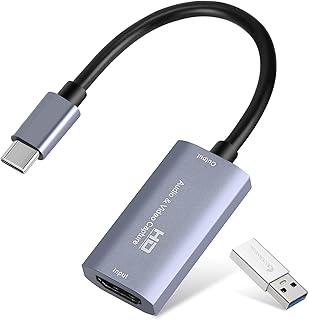
Video Capture Card
Why We Love It

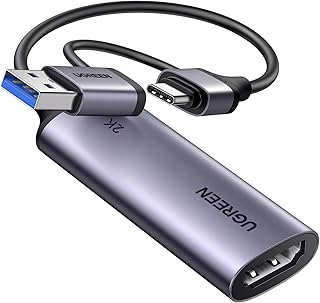
UGREEN Video Capture Card HDMI to USB C 2K@30Hz 1080P@60fps
Why We Love It

UGREEN Video Capture Card HDMI to USB C 1080P 60FPS Capture
Why We Love It

UGREEN Video Capture Card HDMI to USB C 2K@30Hz 1080P@60fps
Why We Love It

KASTWAVE 4K HDMI to USB-C Video Capture Card
Why We Love It

KASTWAVE 4K HDMI Capture Card for Streaming and Recording
Why We Love It

Video/Audio Capture Card, USB3.0 HDMI to USB C
Why We Love It

Elgato 4K S External Capture Card for PS5
Why We Love It

Capture Card Nintendo Switch
Why We Love It

Video Capture Card
Why We Love It
Quick Pick
10 Best Usb-c Capture Cards For Streaming Of 2026
Quick Pick
Video Capture Card, USB3.0 HDMI to USB C Audio Capture Card, 4K 1080P 60FPS Capture with Type-C Adapter Devices for Gaming Live Streaming Video Recorder, Compatible with Windows Mac OS System OBS Zoom
UGREEN Video Capture Card HDMI to USB C 2K@30Hz 1080P@60fps | Capturadora Video Streaming Game Recording and Live Streaming Compatible with Quest 3 Switch 2 PS5 PS4
UGREEN Video Capture Card HDMI to USB C 1080P 60FPS Capture | 4K Input Audio Game Recording Streaming Device Compatible with Switch PS5 Xbox DSLR iPad PC Laptop Phone Quest 3 TV Box
UGREEN Video Capture Card HDMI to USB C 2K@30Hz 1080P@60fps Game Record | 4K Passthrough Loop-out Streaming Device Compatible with Quest 3/3s PS5 PS4 Xbox Switch iPad DSLR Camera Mac Laptop PC
KASTWAVE 4K HDMI to USB-C Video Capture Card - USB 3.0 Streaming Adapter, 1080P 60FPS, Compatible with OBS, Zoom for Gaming, Live Streaming on Windows and Mac OS
KASTWAVE 4K HDMI Capture Card for Streaming and Recording, USB 3.0 to Type C, 1080P 60FPS, Ideal for Gaming, Live Broadcasts, Video Conferences, and Online Teaching
Video/Audio Capture Card, USB3.0 HDMI to USB C, 4K 1080p60fps Video/Audio Capture with Type-C Adapter Devices for Gaming Live Streaming Video Recorder, for Windows Mac OS System OBS Zoom
elgato 4K S External Capture Card for PS5, Xbox Series X/S, Switch 2, PC, Mac, iPad, 4K60, 1440p120, 1080p240 Passthrough, HDR10, USB-C, Windows 11, Black
Capture Card Nintendo Switch, Video Capture Card, Game Capture Card 4K 1080P 60FPS, HDMI to USB 3.0 Capture Card for Streaming Work with PS4/PC/OBS/Camera
Video Capture Card, 4K HDMI to 1080P USB-A/USB-C Video Recording Card for Gaming, Streaming, Conferences, and TV Recording, Compatible with Windows, Linux, Android (Black)
Buying Guide: Usb-c Capture Cards For Streaming
📋 Table of Contents
1What resolution and frame rate should I look for in a USB-C capture card?
For smooth streaming, aim for at least 1080p at 60fps. If you're capturing gameplay or high-motion content, 4K at 30fps is ideal but requires a stronger system. Check your source device's output capabilities to match.
2Does the capture card support hardware or software encoding, and why does it matter?
Hardware encoding (like via an external chip) reduces CPU load and is better for multitasking, while software encoding relies on your computer's performance. For low-latency streaming, hardware encoding is usually the better choice.
3What are the key differences between USB-C and HDMI capture cards?
USB-C capture cards are more compact and often include power delivery, making them great for laptops. HDMI models are typically more versatile for desktops and support higher resolutions, but they require a separate power source and more space.
4Can I use a USB-C capture card with both Mac and Windows systems?
Most USB-C capture cards are cross-platform, but always check for OS compatibility and driver support. Some models may require additional software for full functionality on Mac, especially for streaming apps like OBS or Streamlabs.
5What accessories or additional hardware might I need for a complete setup?
You may need a USB-C to USB-A adapter, a high-speed USB-C cable, and a capture-ready monitor or TV. A capture card with a built-in loop-through output can also help you view your source while streaming without needing a second display.
How we choose
Our editors are people who genuinely love testing and writing about products. We compare each product's real-world usability and strengths, then distill what matters most into our own "Why We Love It" points — so you get an honest, at-a-glance sense of what counts before you buy.