10 Best Usb C Bluetooth Bluetooth Network Adapters Of 2026
Usb C Bluetooth Bluetooth Network Adapters — Reviews, Recommendations & Updated Buying Guide November 2026


UGREEN Bluetooth 5.3 Adapter
Why We Love It


TP-Link USB Bluetooth Adapter for PC
Why We Love It

UGREEN 2-in-1 USB Bluetooth WiFi Adapter
Why We Love It

TP-Link UB500 Bluetooth USB Adapter
Why We Love It

USB-C Bluetooth 5.2 aptX-Adaptive Transmitter for PS5 PC MAC
Why We Love It
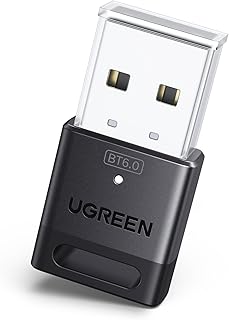
UGREEN Bluetooth 6.0 Adapter
Why We Love It

UGREEN Bluetooth 5.4 Adapter
Why We Love It

UGREEN USB Bluetooth 5.3 Adapter for PC
Why We Love It

TP-Link UB600 Bluetooth 6.0 Adapter Dongle for PC
Why We Love It

Bluetooth 5.3 Audio Adapter for PS5 and PS4
Why We Love It
Quick Pick
10 Best Usb C Bluetooth Bluetooth Network Adapters Of 2026
Quick Pick
UGREEN Bluetooth 5.3 Adapter, USB-C for PS5/PS5 Pro/Switch1 2(Audio Only) | Bluetooth Adapter with aptX/aptX HD/aptX Adaptive, Plug & Play, Supports Windows/macOS, PC, Laptop
TP-Link USB Bluetooth Adapter for PC, Bluetooth 5.3 Long Range Receiver, Plug and Play, Adjustable Antenna, Supports Windows 11/10/8.1/7 for Desktop, Laptop, PS5/PS4/Xbox Controller (UB500 Plus) | Plug and Play, Adjustable Antenna, Supports Windows 11/10/8.1/7 for Desktop, Laptop, Keyboard, Mouse, etc (UB500 Plus)
UGREEN 2-in-1 USB Bluetooth WiFi Adapter, AX900 + BT 5.4 WiFi 6 Adapter | 6dBi High Gain Antenna, 5GHz/2.4GHz Dual Band, Built-in Driver for Windows 10/11, for Desktop PC Laptop
TP-Link UB500 Bluetooth USB Adapter, Bluetooth 5.4, Windows, WPA3
USB-C Bluetooth 5.2 aptX-Adaptive Transmitter for PS5 PC MAC with Low Latency & aptX-Adaptive, Dual Connection Wireless Audio Dongle with 3.5 mm Analog Mic Transmitter for Headphones & Earbuds,
UGREEN Bluetooth 6.0 Adapter, USB Bluetooth Dongle for PC, Plug & Play | Nano Bluetooth Adapter for Windows 11/10/8.1, Mini-Sized, Long Range, EDR/BLE, Connect Controller, Headphone, Keyboard, Mouse
UGREEN Bluetooth 5.4 Adapter, USB Bluetooth Dongle for PC, Plug & Play | Nano Bluetooth Adapter for Windows 11/10/8.1, Mini Sized, Long Range, EDR/BLE, Connect PS5/PS4/Xbox Controller, Keyboard etc
UGREEN USB Bluetooth 5.3 Adapter for PC
TP-Link UB600 Bluetooth 6.0 Adapter Dongle for PC, USB Bluetooth Stick for Mouse/Keyboard/Headphone/Cellphone/Controller, Plug & Play, Only for Windows 11/10/8.1/7 | USB WiFi adapter for PC. Plug & play installation. Stable connection. Compatible with Windows and macOS.
Bluetooth 5.3 Audio Adapter for PS5 and PS4, USB Wireless Dongle Compatible with AirPods, Headphones, and Speakers, Low Latency Gaming Transmitter for Switch Dock, for PC, and for Mac
Buying Guide: Usb C Bluetooth Bluetooth Network Adapters
📋 Table of Contents
1What USB-C port speed should I look for in a Bluetooth network adapter?
Opt for adapters with USB 3.1 or USB-C 2.0 support for faster data transfer rates, typically up to 10 Gbps. This ensures smoother performance for high-bandwidth tasks like streaming or file transfers, especially when paired with a Bluetooth 5.0 or higher wireless connection.
2Does Bluetooth version matter for a network adapter, and why?
Yes — Bluetooth 5.0 or higher offers better range, faster speeds, and lower power consumption compared to older versions. This is crucial for stable connectivity with devices like smartphones, headphones, or IoT gadgets without signal dropouts or lag.
3What’s the difference between a USB-C Bluetooth adapter and a dongle with a USB-A port?
USB-C adapters are more compact and future-proof, especially for newer laptops and devices with USB-C ports. They also often support higher data transfer rates and power delivery, making them more versatile for multi-function use than traditional USB-A dongles.
4Can a USB-C Bluetooth network adapter support multiple Bluetooth devices at once?
Most adapters support Bluetooth 5.0 or higher, which allows for simultaneous connections to multiple devices, such as a smartphone, wireless headphones, and a smartwatch. However, performance may vary depending on the adapter’s chipset and the number of active devices.
5What should I check to ensure compatibility with my device’s operating system?
Look for adapters that explicitly list support for your OS, such as Windows 10/11, macOS, or Linux. Some adapters may require drivers, so check if they come with pre-installed software or downloadable drivers for your specific system version.
How we choose
Our editors are people who genuinely love testing and writing about products. We compare each product's real-world usability and strengths, then distill what matters most into our own "Why We Love It" points — so you get an honest, at-a-glance sense of what counts before you buy.