10 Best Usb Audio Interfaces For Pc Of 2026
Usb Audio Interfaces For Pc — Reviews, Recommendations & Updated Buying Guide November 2026


Nalacal Recording Music Usb Audio Interface For Pc
Why We Love It


Creative Sound Blaster Play!3 High Resolution USB DAC Amp
Why We Love It

MOSWAG USB to 3.5mm Jack Audio Adapter
Why We Love It

IK Multimedia iRig USB Guitar USB-C Audio Interface for Mac
Why We Love It

External Sound Card USB Audio Adapter for Windows PC Mac and
Why We Love It

USB Audio Interface for Smartphones & PC
Why We Love It
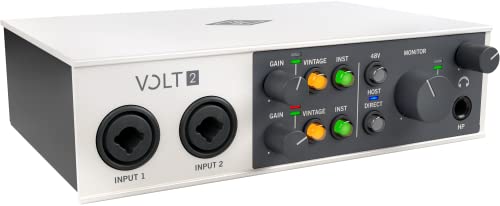
Universal Audio Volt 2 USB Audio Interface
Why We Love It
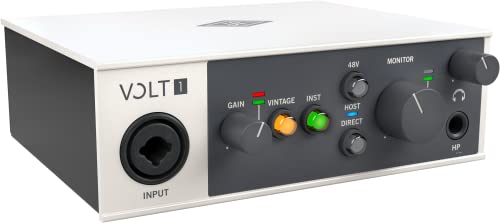
Universal Audio Volt 1 USB Audio Interface
Why We Love It

Behringer U-Phoria UMC22 USB Audio Interface
Why We Love It

Universal Audio Volt 176 USB Audio Interface
Why We Love It
Quick Pick
10 Best Usb Audio Interfaces For Pc Of 2026
Quick Pick
Nalacal Recording Music Usb Audio Interface For Pc, Sound Card Studio, Computer With 3.5Mm Microphone Jack, Plug And Play
Creative Sound Blaster Play!3 High Resolution USB DAC Amp and External Sound Card
MOSWAG USB to 3.5mm Jack Audio Adapter, DAC USB External Sound Card | TRRS Nylon Braided Headphone Jack to USB Adapter, Aluminum USB to Aux Adapter for PC Laptop PS5 PS4 Switch MacBook Linux etc
IK Multimedia iRig USB Guitar USB-C Audio Interface for Mac and PC - High Resolution Audio Transmission, AMP Output with Two FX/Thru Modes, Input Gain Controller, Includes IK App and Software Package
External Sound Card USB Audio Adapter for Windows PC Mac and Linux Laptops, 6-in-1 Stereo Hub with 3.5mm Jack and USB Interface, Integrated Volume Control and Mic Mute, Plug and Play Design (Black)
USB Audio Interface for Smartphones & PC, Plug-and-Play Live Sound Card with DJ Mixer & Voice Effects, Customizable RGB Streaming Kit for Podcast/Recording/Game Streaming
Universal Audio Volt 2 USB Audio Interface
Universal Audio Volt 1 USB Audio Interface
Behringer U-Phoria UMC22 USB Audio Interface
Universal Audio Volt 176 USB Audio Interface
Buying Guide: Usb Audio Interfaces For Pc
📋 Table of Contents
1How many inputs do I actually need for my setup?
For solo recording, one XLR or 1/4" input is enough. If you plan to record multiple instruments or microphones at once, look for at least two to four inputs. More inputs can future-proof your interface for expanded projects.
2What sample rate and bit depth should I look for?
A minimum of 24-bit depth and 44.1kHz to 192kHz sample rate is standard for professional audio. Higher rates (96kHz or 192kHz) offer more detail for critical recordings, but ensure your DAW and monitors can handle them effectively.
3Is built-in monitoring or a headphone amp necessary?
Yes — a dedicated headphone output with volume control lets you monitor your recordings in real time without latency. Some interfaces also offer separate monitor outputs for studio speakers, which is helpful for mixing and mastering.
4What’s the difference between USB 2.0 and USB 3.0 interfaces?
USB 3.0 offers faster data transfer and lower latency, which is ideal for high-track-count sessions or high-sample-rate recordings. However, USB 2.0 is still widely compatible and sufficient for most home studio setups.
5Are phantom power and preamps worth paying extra for?
Phantom power (48V) is essential for condenser microphones, so ensure your interface has it if you plan to use one. High-quality preamps improve sound clarity and reduce noise, making them worth the investment for serious recording projects.
How we choose
Our editors are people who genuinely love testing and writing about products. We compare each product's real-world usability and strengths, then distill what matters most into our own "Why We Love It" points — so you get an honest, at-a-glance sense of what counts before you buy.