10 Best Usb Audio Interfaces Of 2026
Usb Audio Interfaces — Reviews, Recommendations & Updated Buying Guide November 2026


Focusrite Scarlett Solo 4th Gen USB-C Audio Interface
Why We Love It


Behringer U-Control Uca202 Usb Audio Interface
Why We Love It

Universal Audio Volt 2 Gen 2 2-in / 4-out USB Audio
Why We Love It

Focusrite Scarlett 3rd Gen Audio Interface
Why We Love It

MOSWAG USB to 3.5mm Jack Audio Adapter
Why We Love It

Behringer UMC202HD Audiophile 2x2
Why We Love It
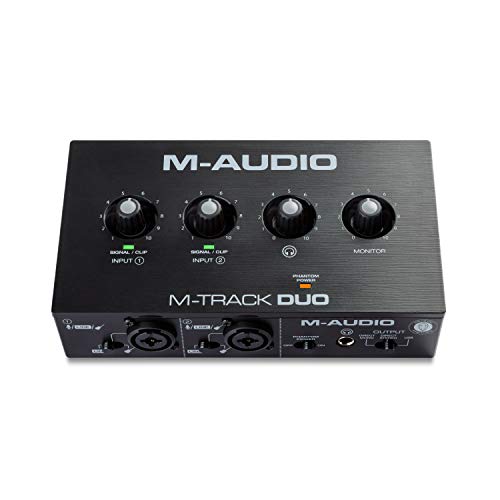
M-AUDIO M-Track Duo USB Audio Interface
Why We Love It

M-AUDIO M-Track Solo USB Audio Interface | XLR
Why We Love It

External Sound Card USB Audio Adapter for Windows PC Mac and
Why We Love It

USB MIDI Cable 6FT
Why We Love It
Quick Pick
10 Best Usb Audio Interfaces Of 2026
Quick Pick
Focusrite Scarlett Solo 4th Gen USB-C Audio Interface
Behringer U-Control Uca202 Usb Audio Interface
Universal Audio Volt 2 Gen 2 2-in / 4-out USB Audio Interface with Onboard Tone Shaping
Focusrite Scarlett 3rd Gen Audio Interface
MOSWAG USB to 3.5mm Jack Audio Adapter, DAC USB External Sound Card | TRRS Nylon Braided Headphone Jack to USB Adapter, Aluminum USB to Aux Adapter for PC Laptop PS5 PS4 Switch MacBook Linux etc
Behringer UMC202HD Audiophile 2x2, 24-Bit/192 kHz USB Audio Interface with Midas Mic Preamplifiers | For Recording Microphones and Instruments
M-AUDIO M-Track Duo USB Audio Interface
M-AUDIO M-Track Solo USB Audio Interface | XLR, Line and DI Inputs, Professional Software Suite for Recording, Streaming, and Podcasting
External Sound Card USB Audio Adapter for Windows PC Mac and Linux Laptops, 6-in-1 Stereo Hub with 3.5mm Jack and USB Interface, Integrated Volume Control and Mic Mute, Plug and Play Design (Black)
USB MIDI Cable 6FT, USB 2.1 Type A to Type B Cord Compatible with MIDI Keyboards, Controllers, Audio Interfaces, Recording Equipment, USB Microphones & Printers, 2-Pack
Buying Guide: Usb Audio Interfaces
📋 Table of Contents
1How many inputs do I actually need for my setup?
For solo recording, a single XLR/1/4" combo input is usually enough. If you plan to record multiple instruments or vocals at once, look for at least 2-4 inputs to avoid needing multiple passes or extra gear.
2What sample rate and bit depth should I prioritize?
A minimum of 24-bit depth and 44.1kHz/48kHz sample rate is standard for most music and podcasting. Higher rates like 96kHz are useful for professional audio but require more storage and processing power, so match it to your workflow.
3Is phantom power necessary for my microphone?
Yes, if you're using a condenser mic — it requires 48V phantom power to operate. Dynamic mics don’t need it, so check your mic’s specs before buying. Some interfaces let you toggle phantom power per input for flexibility.
4Should I choose a bus-powered or external power interface?
Bus-powered models are convenient for portable setups and work well with laptops. For studio use or when using multiple inputs, an externally powered interface offers better stability and lower noise, especially with high-end mics or preamps.
5What preamp quality should I look for in a USB audio interface?
Look for interfaces with clean, low-noise preamps to avoid muddying your recordings. Higher-end models often use discrete preamps for better clarity and headroom, while budget models may use chip-based preamps that can introduce hiss or distortion at high gain.
How we choose
Our editors are people who genuinely love testing and writing about products. We compare each product's real-world usability and strengths, then distill what matters most into our own "Why We Love It" points — so you get an honest, at-a-glance sense of what counts before you buy.