10 Best Usb 2.0 External Memory Card Reader Of 2026
Usb 2.0 External Memory Card Reader — Reviews, Recommendations & Updated Buying Guide November 2026


Card Reader
Why We Love It


TERRIFI Micro SD Card Reader USB 2.0
Why We Love It

Acer SD Card Reader
Why We Love It

NALACAL Dual Connector SD Card Reader
Why We Love It
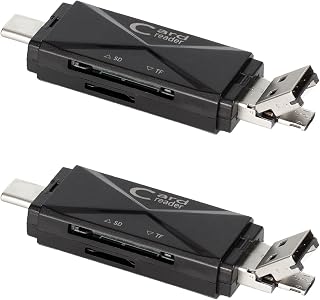
5 in 1 SD Card Reader for Android
Why We Love It

3 in 1 SD Card Reader for iPhone
Why We Love It

Sabrent USB 3.0 and USB Type-C OTG Card Reader Supports SD
Why We Love It

SPiTZE USB-C SD/TF MicroSD + USB 2.0 Card Reader
Why We Love It

T Tersely 3-in-1 USB-C SD/TF MicroSD + USB 2.0 Card Reader
Why We Love It

2-in-1 USB Card Reader
Why We Love It
Quick Pick
10 Best Usb 2.0 External Memory Card Reader Of 2026
Quick Pick
Card Reader, Multi-Port 4 in1 Universal SD TF Card Reader, USB C SD TF Memory Card Reader, USB 2.0 External Memory Card Readers, 4-in-1 Type C Camera Adapter Compatible Plug and Play
TERRIFI Micro SD Card Reader USB 2.0, 4 Slot 4-in-1 USB Adapter for MS Duo/Pro, M2, SDXC, SDHC, MMC, RS-MMC, Micro SDXC, Micro SDHC and TF Card, 480Mbps, Compatible WIN XP 7 8 10 11, Mac, Linux, Vista
Acer SD Card Reader, USB C & USB 3.0 Memory Card Reader Adapter | Supports SD/Micro SD/SDHC/SDXC/MMC, Compatible with iPhone 17 16 Series, MacBook Pro/Air, iPad Pro, Galaxy S26, XPS 13, etc.
NALACAL Dual Connector SD Card Reader - USB 2.0 & USB-C Memory Card Adapter, High-Speed Data Transfer, Compatible with MacBook, Galaxy, Laptop, Android Devices, Supports SD/SDXC/MicroSD/UHS-I
5 in 1 SD Card Reader for Android, USB C and USB 2.0, Micro SD Card to USB Adapter, Portable Memory Card Reader for PC Phone Pads (Black 2 Pack)
3 in 1 SD Card Reader for iPhone, for iPad, Micro SD Memory USB C Card Reader with Magnetic Cover, USB 3.0 External Memory Card Readers, SD Card Reader for Mac, PC, Macbook
Sabrent USB 3.0 and USB Type-C OTG Card Reader Supports SD, SDHC, SDXC, MMC/MicroSD, T-Flash (CR-BCA2) | Dual-slot SD & microSD; USB 3.0; USB-C and USB-A connectors; laptop, PC, Android
SPiTZE USB-C SD/TF MicroSD + USB 2.0 Card Reader, 3-in-1 Type C Memory Card Adapter for iPhone 16 Pro Max, 2022-2016 MacBook Pro 15/16, M1 M2 Mac Air/iPad Pro, for Samsung Galaxy
T Tersely 3-in-1 USB-C SD/TF MicroSD + USB 2.0 Card Reader | Type C Memory Card Adapter for iPhone 17 Pro Max, 2022-2016 MacBook Pro 15/16, M1 M2 Mac Air/iPad Pro, for Samsung Galaxy
2-in-1 USB Card Reader, Micro SD and TF Memory Card Reader for PC and Laptop, Black or White
Buying Guide: Usb 2.0 External Memory Card Reader
📋 Table of Contents
1What data transfer speed should I expect from a USB 2.0 external memory card reader?
USB 2.0 supports transfer speeds up to 480 Mbps, but real-world speeds depend on the memory card's class and file type. For SD cards, Class 10 or UHS-I offers the best performance, while older cards may cap at 20-30 MB/s. This is slower than USB 3.0, so choose this reader only if you need compatibility with older systems.
2Which memory card formats are typically supported by USB 2.0 external readers?
Most USB 2.0 card readers support SD, SDHC, SDXC, microSD, and sometimes CF (CompactFlash) cards. Look for a reader that lists at least SDXC support for larger storage needs. Some models also include slots for multiple formats, which is useful if you use different card types regularly.
3Is a USB 2.0 card reader worth buying if I already have a USB 3.0 port on my computer?
It depends on your needs. USB 2.0 readers are generally slower than USB 3.0, but they are more affordable and compatible with older devices. If you only need occasional access to memory cards and don’t require fast transfers, a USB 2.0 reader is a cost-effective choice. For frequent or large file transfers, consider a USB 3.0 or higher model.
4What should I look for in terms of build quality and durability?
Opt for a reader with a metal or reinforced plastic housing to resist wear and tear. Look for models with gold-plated connectors for better signal integrity and longer lifespan. A compact, lightweight design is ideal for portability, but ensure it feels sturdy and not overly flimsy when handling it frequently.
5Are there any common mistakes to avoid when purchasing a USB 2.0 card reader?
Avoid models that only support outdated card formats like SD or MMC without SDHC/SDXC. Also, be wary of cheap, no-name brands that may have unreliable connections or poor build quality. Always check for compatibility with your operating system and ensure the reader is recognized by your device before purchasing.
How we choose
Our editors are people who genuinely love testing and writing about products. We compare each product's real-world usability and strengths, then distill what matters most into our own "Why We Love It" points — so you get an honest, at-a-glance sense of what counts before you buy.